



Exit
  • Global community
    • Language:
      • Deutsch
      • English
      • Español
      • Français
      • Português
  • 日本語コミュニティ
  • 한국 커뮤니티
2

Preview screen changes output after every restart (Apple Mac Studio M2 Ultra)

Community Beginner ,
Feb 26, 2024 Feb 26, 2024

Hi all,

This is a problem that I have from day one. I have 3 displays conected directly in to 3 separate USB Type C connectors on a back side of my Mac Studio. Display properties shows always right order of screens, starting from left to right (1 left, 2 center (main display), 3 right).
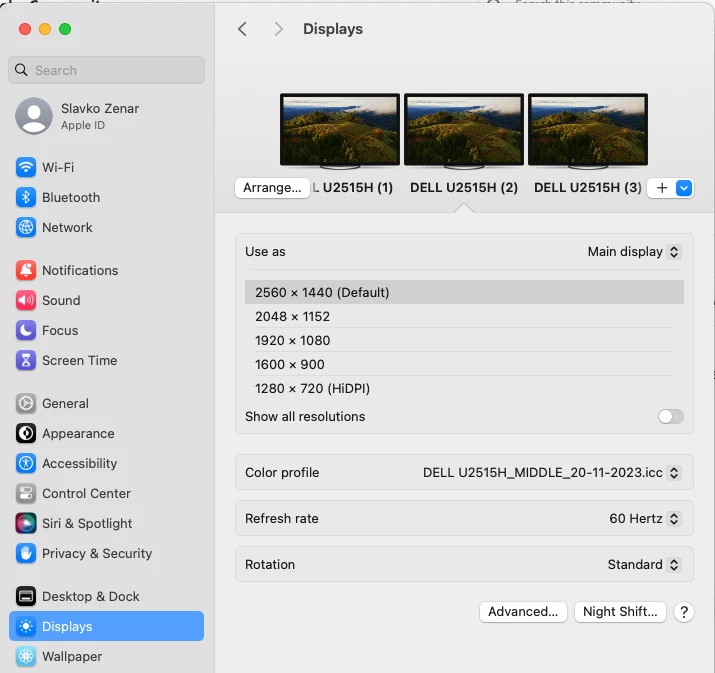
 

Screenshot 2024-02-26 at 09.43.35.png


But problem is that every time I restart my Mac output screen of Premiere or After Effects is placed on  left or right screen. If I open Video preview settings in AE or PP check box is on the same place that I have checked before but softvare changes monitor markings. Monitor that iss Adobe Monitor 2 now is showing preview on monitor 3. So every time I must start Preferences/Video preview and change monitor selection to get output on the same screen as before the restart.
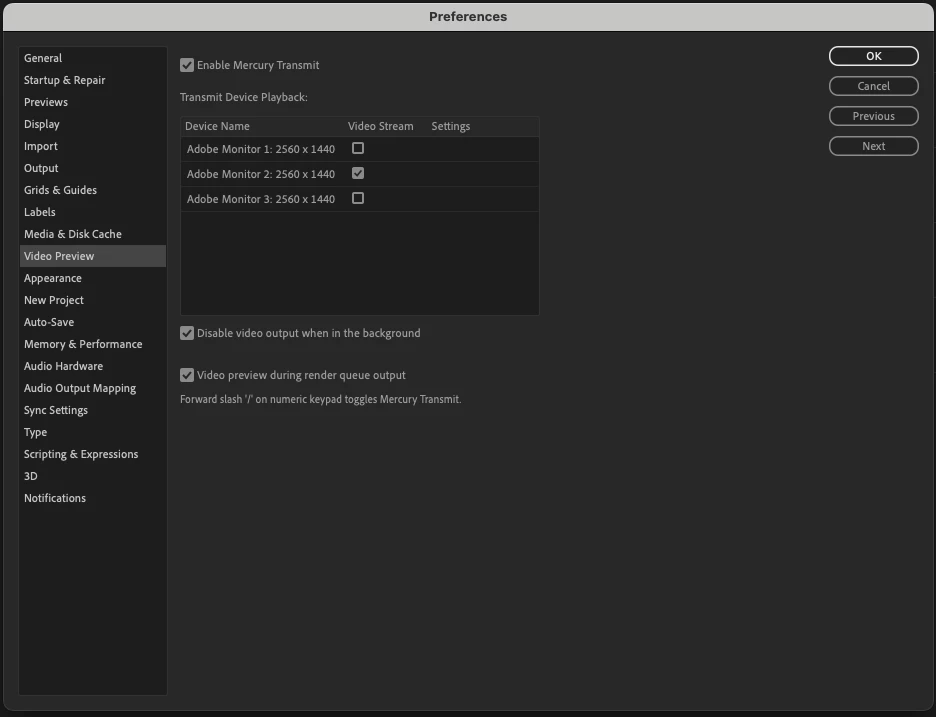
 

Screenshot 2024-02-26 at 09.44.20.png

I have tried to deactivate "separate spaces" on other screens but that didnt help. Right now my settings looks like this:
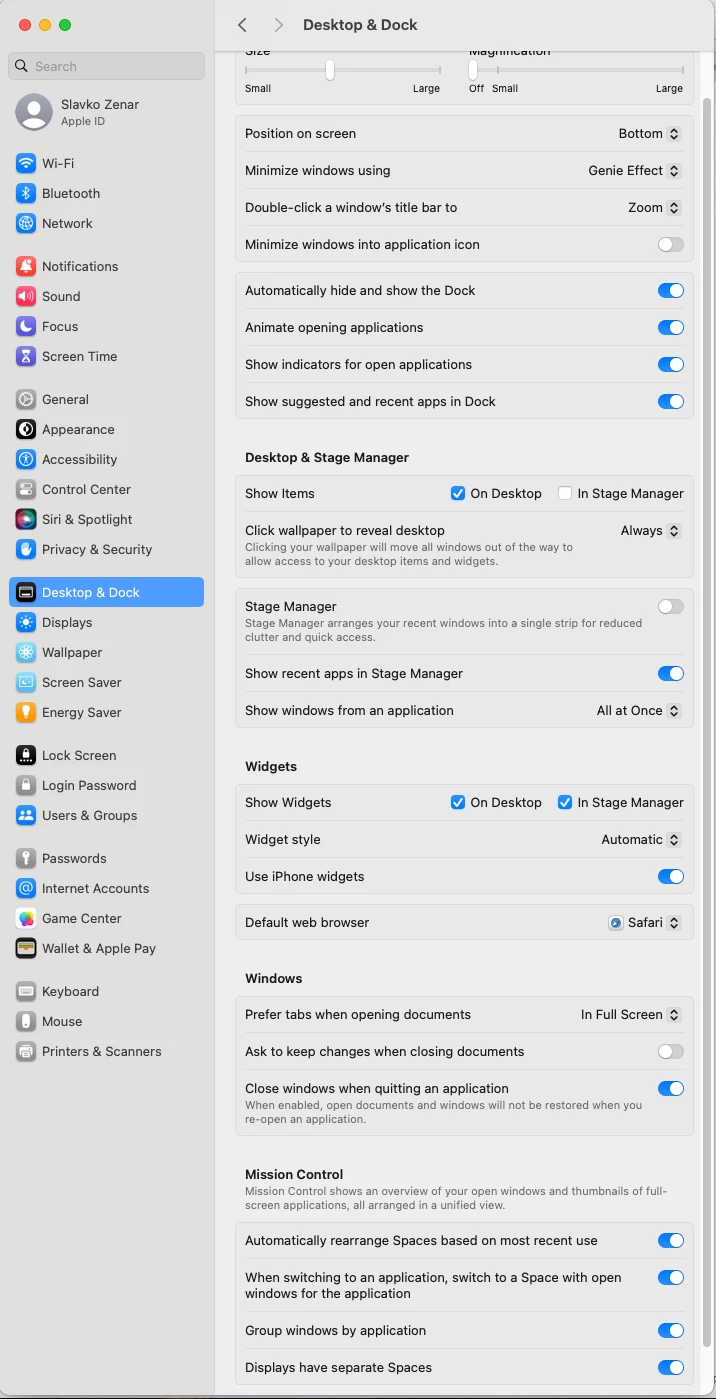
 

Screenshot 2024-02-26 at 09.56.14.png

Can someone please help me out!?

Thank's in advance

Bug Needs More Info
721
Translate
Report
Community guidelines
Be kind and respectful, give credit to the original source of content, and search for duplicates before posting. Learn more
community guidelines

correct answers 1 Pinned Reply

Adobe Employee , Apr 02, 2024 Apr 02, 2024

Hi @Zenar III,

I moved your post to the Bugs forum. I hope that is OK. Thanks for the info. Please note the info and format required by the product team here: How do I write a bug report?


Thank you, @Remote Index, for pointing me to this thread. I appreciate the community in helping me out with guiding others needing my attention. My staff is not very large, unfortunately.


Looking forward to hearing back from you, sir.


Thanks,
Kevin

Status Needs More Info
Translate
6 Comments
Community Beginner ,
Mar 11, 2024 Mar 11, 2024

No one!? Even administrators!?

Translate
Report
Enthusiast ,
Mar 28, 2024 Mar 28, 2024

Hi Zenar III,


Note that the "Discussions" forum is for "user to user interactions".


I've noted the problem of the ambiguity around forums previously.


R.


@Kevin-Monahan 

(possibly move this to "Bugs"?)

(... also: no response re: ambiguity of the forum purposes?)

Translate
Report
Community Beginner ,
Apr 01, 2024 Apr 01, 2024

Hi,

I tried searching for similar problems that people have posted here but I couldn't find anything similar.


Thanks anyway!

Translate
Report
Adobe Employee ,
Apr 02, 2024 Apr 02, 2024

Hi @Zenar III,

I moved your post to the Bugs forum. I hope that is OK. Thanks for the info. Please note the info and format required by the product team here: How do I write a bug report?


Thank you, @Remote Index, for pointing me to this thread. I appreciate the community in helping me out with guiding others needing my attention. My staff is not very large, unfortunately.


Looking forward to hearing back from you, sir.


Thanks,
Kevin

Kevin Monahan - Sr. Community & Engagement Strategist – Pro Video and Audio
Status Needs More Info
Translate
Report
Community Beginner ,
Apr 03, 2024 Apr 03, 2024

Its all good Kevin,

Thanks for expressing your interest, and I hope this benefits us both.

Have a great day!

Translate
Report
Community Beginner ,
Sep 17, 2024 Sep 17, 2024
LATEST

@Kevin-Monahan @Remote Index I have one update, unfortunately not a problem solving one. I have a same issue with PP and AE on my PC with 4 screens! So, it is a definitive Adobe problem. 

Translate
Report