
Participating Frequently
March 11, 2020
Question

PSD import issues in After Effects 2019: text elements behaving oddly.

  • March 11, 2020
  • 6 replies
  • 2001 views

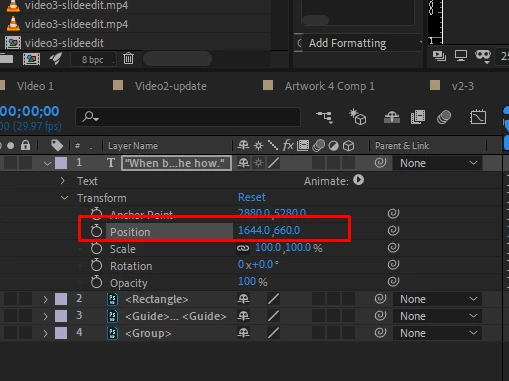
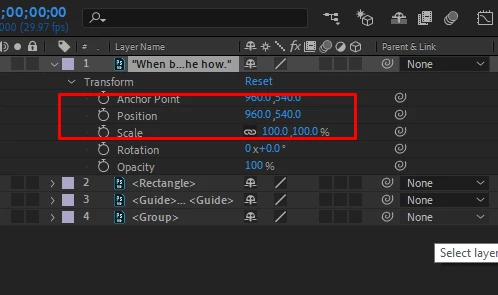
When I import PSD files into After Effects 2019, when I covert text layers to editable text layers the Position seems to be way off. When I try to reset the position the text fly off-screen. How can I correct?


This topic has been closed for replies.

6 replies

Inspiring
March 11, 2020

You would only be able to copy and paste the animation anyway if the coordinates were the same to begin with. Is that the case? If so, just use the Pan Behind (Anchor Point) Tool (KB Shortcut "Y") to reposition the Anchor Point to the center of the layer. Another way of preserving animations so you can copy from one layer to another is to parent a layer to a null, then animate the null. 

Inspiring
March 11, 2020

Gotcha. The post title says 2019, but that's good to know that you're on 2020. I see that the anchor point on the text layer inside Photoshop is in the center, but check out this screenshot for where your anchor point goes when you convert the text. Have you tried reimporting this PSD? The anchor point issue might be a bug, but as I said, when I converted the text it stayed in the proper position for me, which meant that AE corrected the position to account for the drastic anchor point reposition. 

Participating Frequently
March 11, 2020

The only problem with that positioning is that I am unable to copy and paste animating propertoes from other compositions. The layers don't animate correctly because the values are wrong. Definitely a bug and quite frustrating because I have to recreate tonnes of files. I have tried importing again and other troubleshooting methods and nothing seems to work. 

Inspiring
March 11, 2020

Thanks for posting the file. I just tried in AE 2020 and the text converted properly. I did notice that the anchor point was WAAAAAAYYYY outside of the comp, though, but the position was altered to account for that, so there was no visual change when I converted the text.


Is there a reason you're still using AE 2019? There were a lot of great improvements, especially in performance, in 2020. If you've been waiting for patch updates for 2020, 17.0.4 just came out, so there have been a few dot releases since the main release in October. 

Participating Frequently
March 11, 2020

I am using 2020. However, I don't understand what you mean that "the anchor was way outside the comp, but the position was altered to account for that". I am not sure what you mean, as I didn't change the anchor point. I am a little confused.

Participating Frequently
March 11, 2020
Participating Frequently
March 11, 2020

@davidarbor I tried both import options and get the same results. 

Inspiring
March 11, 2020

Are you ok with uploading the Photoshop file for me to take a look at?

Participating Frequently
March 11, 2020
Inspiring
March 11, 2020

It looks like you imported the PSD using the "Composition" option, rather than the "Composition - Retain Layer Sizes" option. Even so, this shouldn't be happening, but what does happen if you re-import that PSD while retaining layer sizes, then try to convert your text?

The way you first imported your PSD means that every layer will be the same size of the comp, and the anchor point will be in the center of your comp, regardless of how large the actual layer content is. So if you have a small piece of text at the top-left corner of your comp, the layer will still be 1920x1080 with your anchor point in the center. This makes it very difficult to animate or even select layers underneath the top one. There are plenty of reasons you would want this workflow, but I just want to make sure you're aware of the differences between the two import options. 

Participating Frequently
March 11, 2020

@davidarbor I tried both import options and get the same results.