


Known Participant
December 18, 2021
질문

"Target" check box to right of Mirror "Reflection Center" is not showing

  • December 18, 2021
  • 1 답변
  • 1486 조회

AFTER EFFECTS 2022

I am trying to learn After Effects using the tutorial. In "Learn." It tells me to select a layer, which has a video. Then I am to add Effect > Distort > Mirror. No problem.

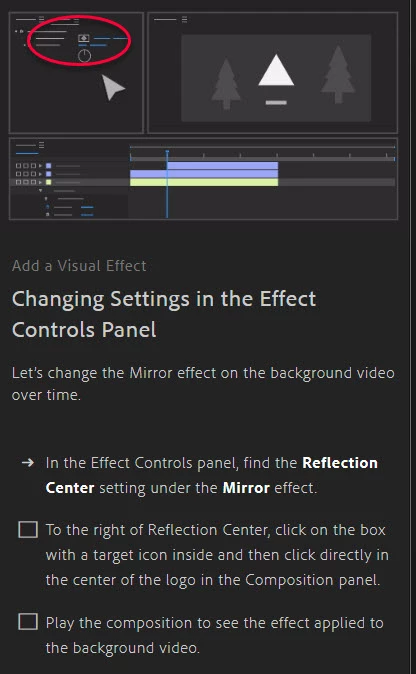
Then I am told, "To the right of Reflection Center, click on the box with a target icon inside and then click directly in the center of the logo in the Composition panel."

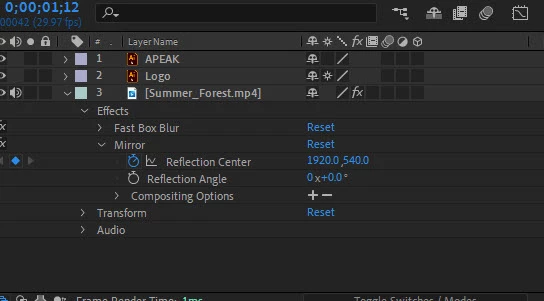
I have toggled switches/modes on and off, there is no box with a target icon to the right of Reflection. The first image is my timeline panel. The second is the tutorial. You can see in the red circle, there is a box with a dot in it. You can see on the timeline panel that there is no such option "to the right of 'Reflection Center.'"

Help, please.


Center.
이 주제는 답변이 닫혔습니다.

1 답변

Jqke
Legend
December 20, 2021

You are viewing your effects threw the layer in the timeline. To be able to see this, go to your Effect Controls panel (if you don't have this, go to Window > Effect Controls: Summer_Forest in your case) 

This is where you can click the little target icon and then click in the center of your composition.


Hope this helps 🙂

- Jake


~Jake
Participant
March 10, 2022

My target icon is miising.
How do I get it to appear?


nishu_kush
Community Manager
Community Manager
March 10, 2022

Hi the right Type,


As the expert suggested, instead of looking into the layers panel, select the layer and go to the Effect Controls panel to be able to see the target icon.

Hope it helps.


Thanks,

Nishu