Participant
January 10, 2016
Answered

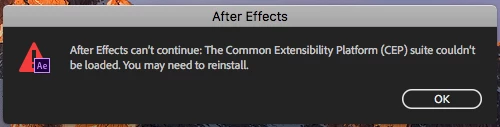
The Common Extensibility Platform (CEP) suite couldn't be loaded.

  • January 10, 2016
  • 21 replies
  • 84016 views

Does anyone know how to resolve this? I uninstalled and reinstalled and getting the same error. After Effects can’t continue: The Common Extensibility Platform (CEP) suite couldn't be loaded. You may need to reinstall. After Effects can’t continue: unexpected failure during application startup. I'm running (Mac) Yosemite 10.10.5, using After Effects CC 2015 v.13.6.1. Any help is appreciated!

    Correct answer Doc Shop Inc

    I had the same problem on a mac running After Effects CC 15.0.1.

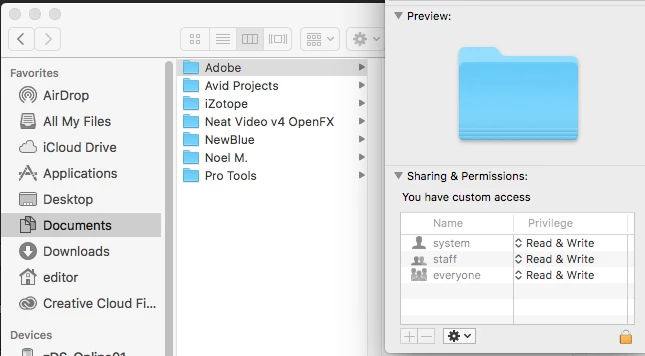
    The issue turned out to be faulty permissions on the "Adobe" folder inside the user "Documents" folder.  I changed the folder permissions to be "Read & Write" for all (be sure to "apply to enclosed items") and the problem was fixed.  Permissions should be as follows:

    21 replies

    Participant
    October 8, 2025

    Hi Everyone,


    i have the same issue. in my case the MS Defender apps controlled folder access feature blocked my documents folder access to adobe apps. so i just disable CONTROLL FOLDER ACCRESS feature from DEFENDER Settings. and thats resolved my problem.

    Participant
    August 1, 2025

    Agrega la aplicacion en la seccion "apliaciones permitidas contra ramsomware" y listo

    Izmael
    Participating Frequently
    June 7, 2025

    At this day and age, why wouldn't the error message just say "You don't have sufficient permissions, please check user permissions, etc..."- Shame on the developers for making us go on wild goose hunts, giving us crazy error messages and offering no advice.

    Participating Frequently
    April 4, 2025

    Oh boy, TY TY TY 1M upvotes for @Doc Shop Inc 

    Participant
    May 2, 2024

    I have the same issue with AE 2024 on Mac M1, and all those fixes don't work

    Participant
    April 27, 2024

    Hello, I have the same issue, I tried to give After effect full permission on my mac, but the issue still occurs. Any other suggestion on how to fix the problem?

    Participant
    June 30, 2023

    This is very easy to solve.

    Simply delete the shortcut of "Document" folder in C\users\"Name of User"\


    open the adobe product then it will work automatically 

    Participant
    June 10, 2024

    This worked after trying every other solution and finding no fix, thanks!

    Participant
    December 30, 2022

    I am having the same issue with getting the CEP message running the latest version of After Effects on Mac.  Multiple re-installs and changing permissions. None of this has worked for me. Please help!

    Participant
    February 2, 2023

    [For MAC users] If you have your After Effects downloaded on your iCloud, this may solve the problem.

    1. Go to your iCloud

    2. Find Creative Cloud folder

    3. Locate After Effects folder (will have the AE purple colour)


    * if there is a download icon next to your folder, then certain files within the AE folder have been stored on your iCloud and you might not have access to them offline.


    4. Within the AE folder, there is another folder called Plug-ins. Open this folder and there is another folder called extensions. This is where you will find the CEPManager.plugin file. If there is a download icon next to it, hit the download icon. That will make the extension available offline. 


    * If you have enough storage space on your device, you can download the whole After Effects folder. IT may take a while because it's a large folder. I hope this helps, as it worked for me. 

    In the event that the issue happens again, follow the same steps and re-download the plugin.


    note: Only downside is having to re-download the necessary plug-ins for AE to run from the iCloud storage.

    Participating Frequently
    February 5, 2023

    I know for sure it isn't stored in my cloud, I have the plugin installed already for offline use and unfortunately I still get the error.

    Participating Frequently
    December 17, 2022

    I've tried everything in these replies, can someone please help me out?

    Participant
    October 18, 2022

    For those Mac M1 users in my case the problem was that the Media Encoder installation was damaged. I was trying to fix After effects but it was until I reinstalled everything that I realized that if you install After Effects from scratch it installs 4 things automatically: Acrobat, Media Encoder, After Effects and Camera Raw which means those programas are dependencies of After Effects.
    TL;DR Try reinstalling the following Acrobat, Media Encoder, After Effects and Camera Raw. If that doesn't work uninstall all adobe apps and reinstall After Effects and all remaining apps.