
Participating Frequently
November 24, 2016
Question

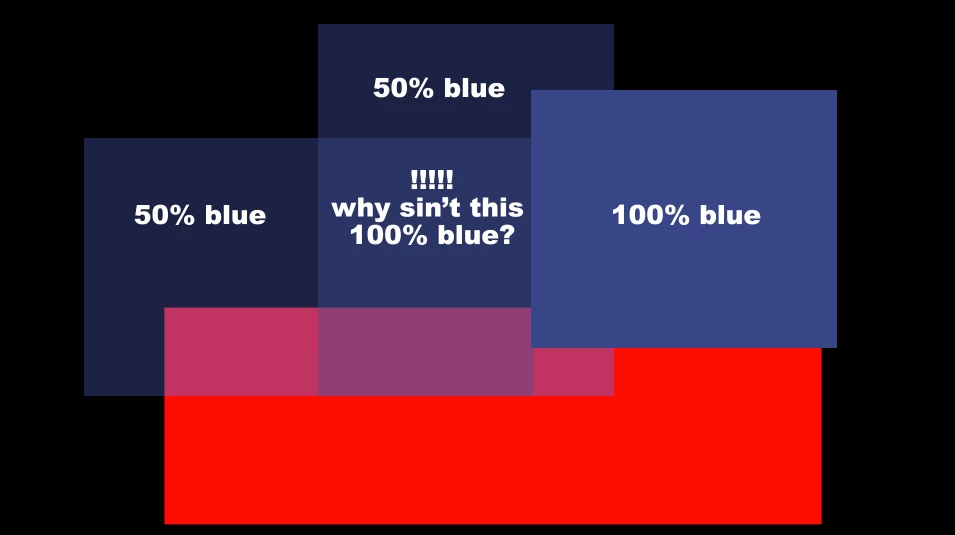
Two 50% tints overlaying do not make 100%. WHY?

  • November 24, 2016
  • 2 replies
  • 3751 views

This one has bugged me for years. It makes cross fades/dissolves unusable imho. If you overlay tints, their combined values are way off what they should be. Example: overlay (on normal transparency) two 50% blue boxes and the overlap will not give you 100% Why is this?? And is there a way to fix?
This topic has been closed for replies.

2 replies

jroguexAuthor
Participating Frequently
November 24, 2016

Mylenium , if you used blend modes that doesn't help with a cross dissolve either. Here's an example of the problem:

I have 3 layers:

Base layer is a figure on a background with no head.

Layer one has the head looking left.

Layer 2 has the head looking right.

BUT - a cross fade between layers 1 and 2 would would become transparent to 75% during the fade and reveal the base layer below - which would look plain wrong.  How would that be helpful?!

Now, I could just do that in PP or FCP but that becomes a lengthy workaround (plus I want to use other AE effects like puppet, etc)

A cross dissolve doesn't do this in PP, it adds the value. Why not in AE or at least the option to check it on? Alphas Add worked until you put another tint or sold beneath and then you lose it. Unhelpful.

jroguexAuthor
Participating Frequently
November 24, 2016

I'd be interested to hear how either of you would solve this without having to do a workaround...

Mylenium
Legend
November 24, 2016

Channel effects? I mean I see nothing in your description that would necissitate anything else but a few instances of e.g. a Blend effect on the same layer, referencing multiple layers and some of them linked with the most basic pickwhip expressions to provide extra "coverage" where necessary. There's really no issue here. You simply need to keep transparency and color/ channel operations separate, which IMO is the real crooked thing about your approach and why you run into those issues.

Mylenium

Roei Tzoref
Legend
November 24, 2016

two 50% blue boxes and the overlap will not give you 100% Why is this?

Opacity does not add up but multiplies. that actually imitates how world physics works when light passes trough a translucent object. say you are making a slideshow with a projector and putting a slide that is about 50% transparent and then you place another 50% slide on top of the first slide - would you expect them to add up to 100%?

when it comes to opacity, 50%+50% is not 100%. it is 75%.

here's how:

1st layer has opacity of 50%

2nd layer has opacity of 50%. this opacity percentage is of the remaining 50% so it's really 25%

so 50+25%= 75%

It makes cross fades/dissolves unusable imho.

that's why you don't cross dissolve in Ae but only fade the top layer. if these are 2 or more layers that are overlapping and you want them to dissolve together - you can precomp them and dissolve that precomp.

jroguexAuthor
Participating Frequently
November 24, 2016

Unfortunately, if you only fade the top layer you will see a hard end of the layer below.

I think this is something that is very commonly used/needed and needs to be addressed. Also, as an animator when I put 2 50% tints overlapping, I want to see 100%. Just makes sense. Making 75% is not useful at all because no matter how many tints you put on top, you'll never reach 100.

I've used AE since 1997 and have always had to do my dissolves in another program and bring back in. Pretty poor work-around really. The only (major) bugbear I have for an otherwise brilliant piece of software.

Roei Tzoref
Legend
November 24, 2016
Making 75% is not useful at all because no matter how many tints you put on top, you'll never reach 100.

that's right this is how opacity works in the software and in physics.

I think this is something that is very commonly used/needed and needs to be addressed.

this is the way every software works with opacity: photoshop, illustrator, probably every software there is. this is how light works in the real world. I don't expect it to change.

Also, as an animator when I put 2 50% tints overlapping, I want to see 100%. Just makes sense.

instead using the opacity, why not actually tint your layers accordingly. if you want light blue, don't reduce the transparency but use a light blue color.

Unfortunately, if you only fade the top layer you will see a hard end of the layer below.

in this case, have you tried using the blend effect in Ae? https://helpx.adobe.com/after-effects/using/channel-effects.html#blend_effect - it simulates a cross-fade and won't have that annoying transparent-in-the-middle-of-the-transition. and the layer below will dissolve like you are used to in your NLE.