
kermith85209306
Participating Frequently
March 15, 2021
해결됨

Updated to AE v18.0 Build 39.... Now All My Mp4 Video Footage Imports Are Green?

  • March 15, 2021
  • 9 답변들
  • 42420 조회

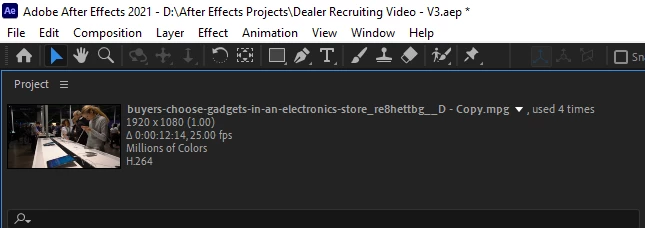
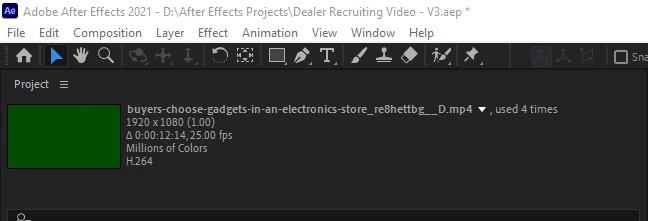
Since updating to AE v18 all my mp4 files now import as soild green footage?   They also export as green footage in Media Encoder.  These files all worked and previewed fine before updating.   If I rename the .mp4 file extension .mpg, the green goes away and the footage works fine and views  normally?  Having to change the file extension on all Mp4 footage is very inconvient, to say the least.

I have tried completely removeing  and reinstalling AE along with all  adobe products on the machine mulitple times.  Tried going back to previous AE versions with the same result.  All .mp4 files remain unusable without changing the file extension to .mpg?  You can see below the .mp4 file is green in the preview and the same file, with extension changed to .mpg becomes viewable?  Anyone see this issue before or have and idea how to fix? Any help will be appreciated.


최고의 답변: Rameez_Khan

Can you please try these steps?

- Go to Preferences > Import

- Deselect "Enable hardware accelerated decoding" under Video Footage

- Then go to Preferences > Media & Disk Cache

- Click "Empty Disk Cache" and "Clean Database & Cache"

- Relaunch After Effects and import the files again


Thanks,

Rameez

9 답변

Rameez_Khan
Legend
November 17, 2022

This green preview glitch in After Effects 18.0 was related to a bad driver that got fixed.


If you're experiencing this issue in After Effects 23.0, it might also be due to a bad driver configuration. Please see this discussion for more details:

After Effects 2023 green preview with H.264 files

Neal5C46
Participant
April 25, 2022

I've been having this issue, as well. Rameez's answer did the trick.  Thank you!

Participant
April 22, 2021

Thank you so much, I've been struggling for 3 weeks and this is the only one that worked. Thank you 🙂

Participating Frequently
April 15, 2021

When i render out my project as a mp4 file on media encoder from after effects it flickers green on some places so much im almost getting a seizure from it. Im not using any green screen content in my project and it's random, ive tried rendering it out twice and the problem hits different spot of the video in both renders.

Im using after effects version 18.1 and media encoder version 15.1

nishu_kush
Community Manager
Community Manager
April 15, 2021

Hi Argoliz,


This is a known issue. Sorry about that. The product team is working on a fix. In the meantime, please try the following workaround:

  1. Go to Media Encoder Preferences > Media.
  2. Uncheck "H264/HEVC hardware accelerated decoding (required restart)".
  3. Restart Media Encoder and export.

If it doesn't help, try exporting directly from After Effects.

Let us know the results.


Thanks,

Nishu

Participating Frequently
April 21, 2021

Hey, sorry for the late reply


Your solution worked, much appreciated

timok71554424
Participating Frequently
March 16, 2021

today, I opened an AE Project im working on, recently. And all of my imported mp4 (H.264) Footgae wont show anything than a green frame:

(the orange part is a solid layer with an ramp effect. The green rectangles are the mentioned footage)


Last time I opened it up (like last week), everything worked fine. I´ve already updated my graphics drivers but it wont fix the problem. The only thing that changed since I last opened the project is, that I made an Windows update yesterday. 

Does anybody know how to fix this?

Community Manager
March 16, 2021

Hi there,

Thanks for writing in and keeping us updated. Preview issues are usually related to the GPU. I appreciate that you have updated the GPU drivers first.

Could you share a sample file with us to test? We'll see if the issue is file specific.

Regards,

Shivangi

Rameez_Khan
Legend
March 16, 2021

Hi, thanks for your reply.

Attached you'll find a mp4 file that I used and a screenshot of my preview in AE


Thanks for attaching the file here. Can you please try these steps for your MP4 files?

- Go to Preferences > Import in After Effects

- Deselect "Enable hardware accelerated decoding" under Video Footage

- Then go to Preferences > Media & Disk Cache

- Click "Empty Disk Cache" and "Clean Database & Cache"

- Relaunch After Effects and import the files again


Best,

Rameez

Rameez_Khan
Legend
March 15, 2021

Can you please try these steps?

- Go to Preferences > Import

- Deselect "Enable hardware accelerated decoding" under Video Footage

- Then go to Preferences > Media & Disk Cache

- Click "Empty Disk Cache" and "Clean Database & Cache"

- Relaunch After Effects and import the files again


Thanks,

Rameez

kermith85209306
Participating Frequently
March 16, 2021

After trying these steps, and opening a new project and importing .mp4 footage the footage previews perfect with no green flashing at all.  But when exporting that project to Media Encoder, the rendered output preview shows green, and if the file rendering actually completes, the rendered mp4 file is completely green..

Opening existing projects resulted in the footage also previewing perfect in some cases but some other older projects some file footage still showed up green.. 


All projects either render all the footage as Green or in most cases errored out on encoding. (see below error)


- Encoding Time: 00:03:56
03/16/2021 06:56:48 AM : Encoding Failed
------------------------------------------------------------
Export Error
Error compiling movie.

Render Error

Render returned error.

Writing with exporter: H.264
Writing to file: \\?\D:\Rendered Video\testing.mp4
Writing file type: H264
Around timecode: 00;00;32;25 - 00;00;33;20
Rendering at offset: 32.933 seconds
Component: H.264 of type Exporter
Selector: 9
Error code: -1609629695

Rameez_Khan
Legend
March 16, 2021

Thanks for sharing more info - this is very helpful.

Have you tried rendering directly from the After Effects Render Queue to a different codec/format?

Would it be possible for you to share a sample MP4 file that's causing this on your machine?

Hope to hear back.

Rameez


Orange Barnacle
Participant
March 15, 2021

I am getting the same issue with my .mov quicktime files, which previewed fine until the latest V18.0 update and now everything is green.

Rameez_Khan
Legend
March 15, 2021

Hey aaronl32138465,


What are your system specs?
Do you have an Nvidia GPU too? If so, which one, and what's your driver version?


Let me know.

Rameez

Orange Barnacle
Participant
March 15, 2021

I'm actually working on a MacBook Pro.


MacBook Pro (15-inch, 2018)

Processor: 2.9 GHz 6-Core Intel Core i9

Memory: 32 GB 2400 MHz DDR4

Graphics: Intel UHD Graphics 630 1536 MB


Not sure if this is relevant to your issue since you're dealing with a different video format. I talked to Adobe customer service for a while. In my case, it looks like the uncompressed Quicktime .mov files I was using for Ae and Pr are no longer supported since Adobe dropped support for the quicktime animation codec in the latest update. I have to go back to the older version of the software or I have to transcode all of my footage.


I did notice that when I changed the render engine from "Hardware Accelorated" to "Software only", some of my green clips began to appear again, but not all.


kermith85209306
Participating Frequently
March 15, 2021

Changing from Cuda to Software Only made no difference, initally.  I went ahead and tried rolling back my Nvidia display driver to an earlier version, and that also made no difference. I then updated back to the lastest Nvidia driver and now the mp4 files playback and show every other frame as solid green.  So,currently it's flashing green frames on and off over the footage, where it used to be just a consatant green for the entire time.  This happens no matter if Cuda or Software only is selected.  

Rameez_Khan
Legend
March 15, 2021

Thanks for providing more info.

Which Nvidia GPU and driver version are you on exactly?

kermith85209306
Participating Frequently
March 15, 2021

Quadra K2000 - driver 461.72 - quadra rtx-desktop-notebook-win 10-64bit-international-dch-whale.exe.

Rameez_Khan
Legend
March 15, 2021

Hi kermith85209306,


We've had one more user report this in our community.

What happens if you go to File > Project Settings > Video Rendering and Effects and switch the rendering engine? Does it bring any change?


Let us know.

Rameez