



Exit
  • Global community
    • Language:
      • Deutsch
      • English
      • Español
      • Français
      • Português
  • 日本語コミュニティ
  • 한국 커뮤니티
1

Interpret Footage Script Support

Contributor ,
Sep 19, 2024 Sep 19, 2024

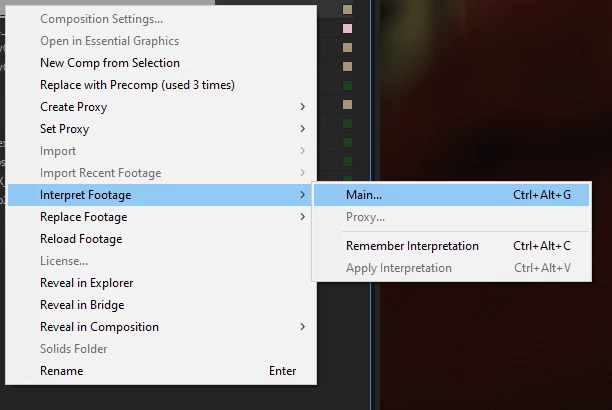
Something that happens EVERY time we use EXR sequences in After Effects, we have to right-click on the footage (there is no File menu equivalent)
InterpretFootage.png

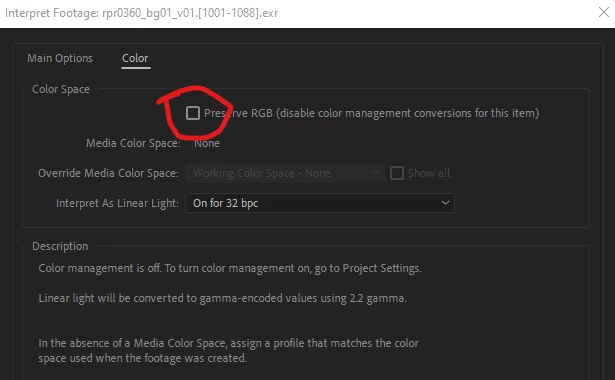
Interpret Footage->Main and then select the color tab and "Preserve RGB".
PreserveRGB.png


It would be super helpful to be able to set these values in these sub tabs with a script event that can be accessed with the scripting language or Automation Blocks system.

Idea No status
TOPICS
Compositing and VFX , Scripting , Workflow
411
Translate
Report
Community guidelines
Be kind and respectful, give credit to the original source of content, and search for duplicates before posting. Learn more
community guidelines
3 Comments
Community Expert ,
Sep 20, 2024 Sep 20, 2024

Good point.

I'd also like to see AE never convert EXR files when no color management is selected. None of the other file formats do this so it's an implicit conversion nobody really asks for. And in modern day compositing barely anyone uses in my experience. Even a preference setting to always Preserve RGB for EXR for the whole software would be welcome.

Translate
Report
Contributor ,
Sep 20, 2024 Sep 20, 2024

Shebbe: Your proposed, never converting an EXR, or "setting" an EXR color space via preference, is a good "simple" fix, but doesn't help with accessing this dialog's functions via script (both are important pieces).


I've been working with "None" as my Working Color Space for the past 10 years and using the old OpenColorIO plugin has been clutch for my EXR film visual effects workflow.


The new Adobe implementation of OCIO is problematic since it doesn't have the roll outs for camera manufacturers the same way the old one does (and it's REALLY slow to scroll) thru. This was brought up during the beta phase when the new OCIO workflow functionality was being implemented.


This is the old OCIO plug in.

OldOCIOPlug.png

This is the new Adobe implementation.

NewOCIOPlug.png

I don't wish upon my worst enemy that they ever have to deal with trying out various Input AND Output values cause it's an incredibly long scroll. This list also has no ability to be called by script.


Another reason that this is problematic is when we setup a render Ouptut module for EXR sequences they "need" to be rendered with "Preserve RGB" explicitly checked on or they are improperly formatted for the client.

OutputColor.png

Worse still is that when rendering EXRs and using them as proxies mean that we have to set the "Preserve RGB" again on the Proxy. This again has to be done manually because the Interpret Footage->Main is not a command that can be called by script.

PreserveRGBProxy.png


If I didn't have to do this I could render out my main EXR (4k), immediately replace the comp with the rendered proxy, and then render slated quicktimes for editorial (HD and 2k) unattended. Currently, I have to render the 4k, wait for completion, then kick off the slated HD and 2k (bypassing the point of the Post-Render Action: Set Proxy).

Translate
Report
Community Expert ,
Sep 20, 2024 Sep 20, 2024
LATEST

For sure both would help.

Regarding user friendliness I've also requested that OCIO configs would read in proper category base to fix the flat list. I will say though that with ACES 1.3 there are a lot less color spaces making it much easier. 1.3 would also be preferrential in general since that version is not LUT based anymore and functions in OCIOv2.x.


The Preserve RGB is not necessary if you're using project based OCIO management because you decide what to output with the color space choice.


But the other hurdles you mention are indeed very sub optimal. When OCIO support was announced I also asked for direct access to the IDT rather than CTRL+ALT+G->go to color tab-> do something, but since they really desired to keep it in line with how you access the color space interpretation of the Adobe color management they weren't planning on improving this which is a shame...


Translate
Report