
Participant
February 2, 2021
Question

After Effects black screen then white work space

  • February 2, 2021
  • 6 replies
  • 3355 views

Hello, I have been having this problem with after effects it will not let me do anything. First, it will make both my computer screens go black then turn on and the after-effects screen looks like this.
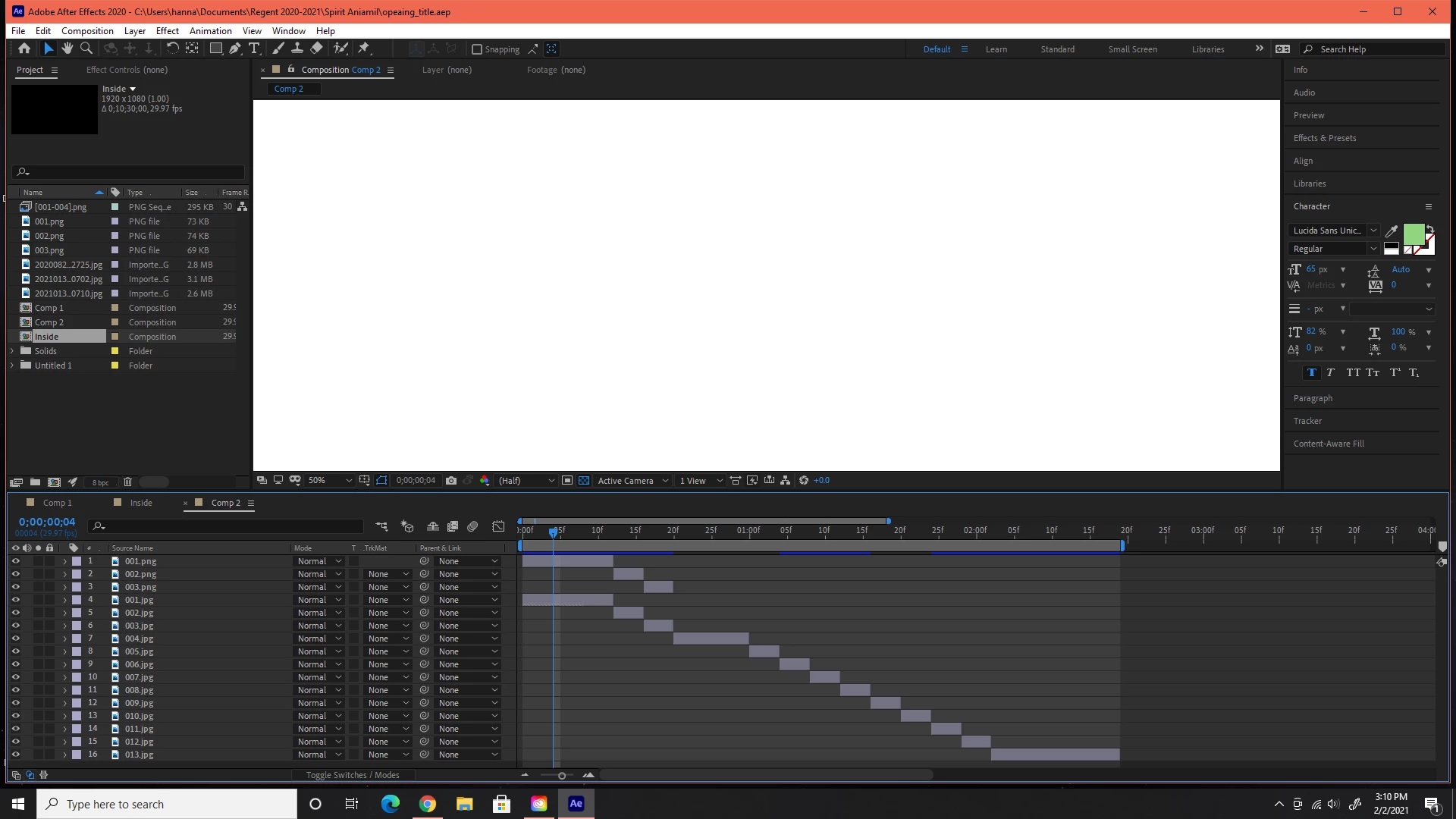
Sometimes it will do this right when it starts up or it will open then as soon as I click anything it will do it. after it will not let me do anything. I have uninstalled it and reinstalled and restarting my computer but nothing seems to help. any advice would be greatly appreciated. 

This topic has been closed for replies.

6 replies

nishu_kush
Community Manager
Community Manager
February 21, 2024

A lot of time, it happens because of the outdated GPU driver. Please share your GPU make and model and the version of the driver installed on your computer.


Thanks,

Nishu

Participating Frequently
February 21, 2024

Sorry! It's all in brazilian portuguese.

------------------------------------------------

Relatório de informações do Sistema NVIDIA criado em: 02/21/2024 16:54:20
Nome do sistema: MAU-PC

[Monitor]
Versão do DirectX: 12.0
Processador da GPU: NVIDIA GeForce RTX 2060
Versão do driver: 551.52
Tipo de driver: DCH
Nível de recursos do Direct3D: 12_1
Cores CUDA: 2176
Clock do núcleo: 1680 MHz
Taxa de dados da memória: 14.00 Gbps
Interface da memória: 192bits
Largura de banda da memória: 336.05 GB/s
Memória total de gráficos disponível: 28639 MB
Memória de vídeo dedicada: 12288 MB GDDR6
Memória de vídeo dedicada: 0 MB
Memória compartilhada do sistema: 16351 MB
Versão BIOS do vídeo: 90.06.6A.00.6D
IRQ: Not used
Barramento: PCI Express x16 Gen3
ID do dispositivo: 10DE 1F03 40991458
Número da peça: G161 0064

[Componentes]

nvui.dll 8.17.15.5152 NVIDIA User Experience Driver Component
nvxdplcy.dll 8.17.15.5152 NVIDIA User Experience Driver Component
nvxdbat.dll 8.17.15.5152 NVIDIA User Experience Driver Component
nvxdapix.dll 8.17.15.5152 NVIDIA User Experience Driver Component
NVCPL.DLL 8.17.15.5152 NVIDIA User Experience Driver Component
nvCplUIR.dll 8.1.940.0 NVIDIA Control Panel
nvCplUI.exe 8.1.940.0 NVIDIA Control Panel
nvViTvSR.dll 31.0.15.5152 NVIDIA Video Server
nvViTvS.dll 31.0.15.5152 NVIDIA Video Server
nvDispSR.dll 31.0.15.5152 NVIDIA Display Server
nvDispS.dll 31.0.15.5152 NVIDIA Display Server
nvLicensingS.dll 6.14.15.5152 NVIDIA Licensing Server
nvWSSR.dll 31.0.15.5152 NVIDIA Workstation Server
nvWSS.dll 31.0.15.5152 NVIDIA Workstation Server
nvDevToolSR.dll 31.0.15.5152 NVIDIA Licensing Server
nvDevToolS.dll 31.0.15.5152 NVIDIA 3D Settings Server
PhysX 09.21.0713 NVIDIA PhysX
NVCUDA64.DLL 31.0.15.5152 NVIDIA CUDA 12.4.74 driver
nvGameSR.dll 31.0.15.5152 NVIDIA 3D Settings Server
nvGameS.dll 31.0.15.5152 NVIDIA 3D Settings Server

nishu_kush
Community Manager
Community Manager
February 22, 2024

Thanks for the details. Looks like you're using the Game Ready driver. Can you install the Studio driver and see if that brings any change? Here's the link to download: https://www.nvidia.com/Download/driverResults.aspx/218115/en-us/

If that doesn't work, Go to After Effects Preferences > Display > disable Hardware Accelerated Composition, Layer, and Footage Panels.

Let us know the outcome.


Thanks,

Nishu

Participating Frequently
February 21, 2024

SAME problema with me! All is up to date. I'ver even unistalled Office thinking it would be it, 'cause everytime it happend I had this almost transparent line on my screen and when I closed Word it was gone. I dont know what is happening.

Participant
February 21, 2024

I have the same issue. The after effects 2024 (24.1.0) freezes for a few seconds, then the entire screen turns black, then after effects turns into a white screen (image attached).
After this happens, the Windows 11 interface also becomes partially unresponsive.


It's annoying because it can happen 5-10 times a day depending on how I use After Effects. To fix it, I restart Windows or log out and on. This is how after effects can work.

here is my PC specs:

the PC specs is in attachments.

Geforce driver version is 551.52 (its latest auto update. I tried an old version but the same issue)

thanks @nishu_kush @Rick Gerard 

nishu_kush
Community Manager
Community Manager
November 16, 2023

Hi @hannaha58007009 and @Phil24377809iqw9 


As the expert suggested, please share the following details so that we can diagnose the issue better:

  • What are your system specifications (CPU, GPU, RAM, OS version)?
  • Is your GPU driver updated? 
  • Does it happen with all the projects or a particular one?

We're here to help, just need more info.


Thanks,

Nishu

Participant
November 15, 2023

I have the same issue on 2 different Windows machines. 

Community Expert
February 3, 2021

What are your comp panel Preview settings. They could be Final Quality or Adaptive Resolution because the Comp Pantl Preview icon is white. You could try changing the setting to Fast Draft.


What are the comp settings? Is the comp background black (the default and what you should always use)? The Inside comp is selected in the timeline and it's 10 minutes long, which is a potentially insane length for an AE comp, Standard HD NTSC. What about the comp you are having problems with?


What version of AE? Are your GPU drivers up-to-date? Have you tried Edit/Purge/All memory and disk cache?