



?...
Inspiring
February 11, 2021
해결됨

how to put your own character over an animators character so you dont have to do your own rig
  • February 11, 2021
  • 2 답변들
  • 771 조회

Disclamier this is completely for just fan remake purpose not to sell or plagiarize!


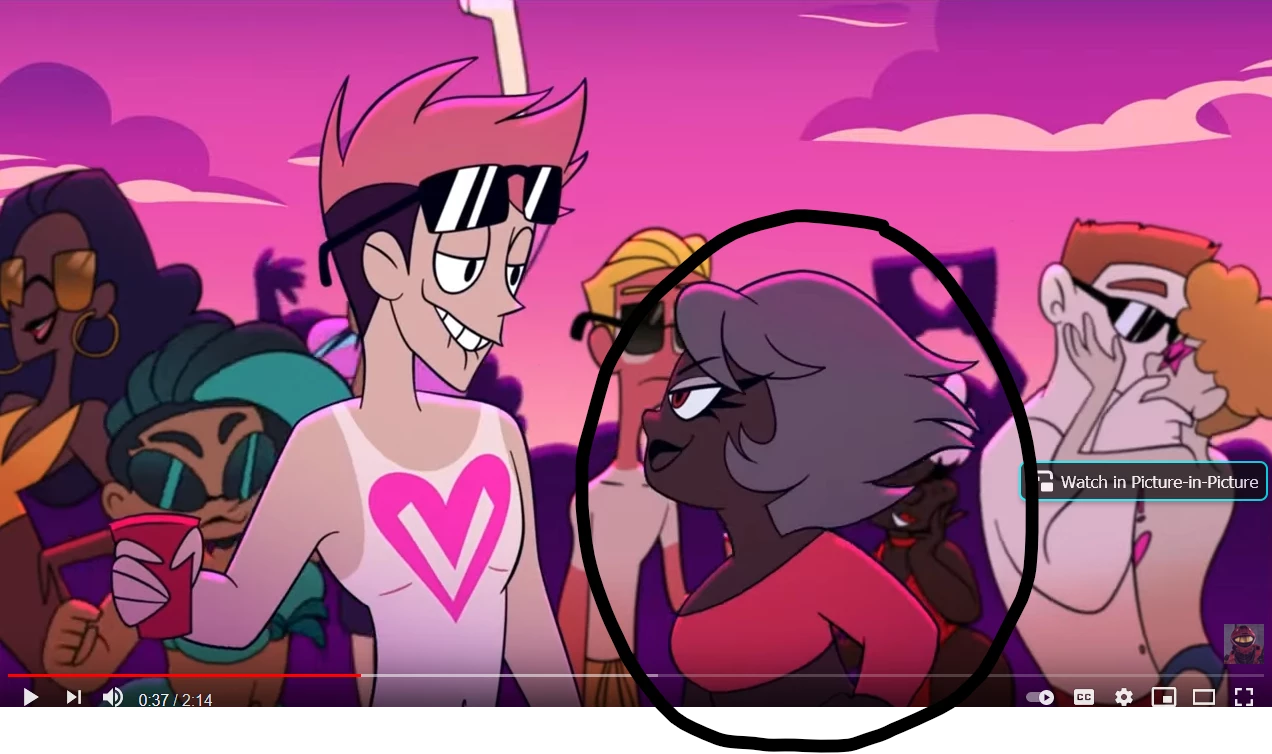
This is a screen shot from an animated series im kind of interested in. But i want to edit the scene. I dont want to have to do my own rigging for such a short scene. Id rather keep the rigging that was done in this animation but mask over the girl with a different character but one that moves accordingy when she moves. Kind of like when you can use a mask to hide something in a video and make it continue to hide at the right moments depending on where it moves during slides, or is there no way to keep the rigging that was already created by a different animator and just mask their character with your own?


Will I have to just re rig that scene with my own character instead of relying on their rig?

이 주제는 답변이 닫혔습니다.
최고의 답변: David Arbor

No, you can't motion track a character and have it translate those movements to your own. And yeah, motion tracking the head will allow you to capture that movement of position and rotation which you can apply to another layer. That layer can be a circle, a photo, or sure, another head. 


If you've never done motion tracking or character animation it's hard to explain, but I suspect this isn't going to look as good as you hope it will. I do think that the motion tracking of the head to attach a new layer on top is more plausible than anything else, though. But think about this, if you mask out the character's head, it's gone, there's a hole in your image that would need to be filled, so there's no need to mask anything out. If you tracked another head on top of the character, it's going to have to be big enough to cover the current head because the hair sticks out pretty far. I suspect this is why you're mentioning masking the head, but again, that will just leave a hole in your original clip.

2 답변

Mylenium
Legend
February 12, 2021

Not possible. AE has no motion transfer tools based on vector fields and even if it did, retargeting such stuff is its own exercise. It still requires extra set up work to pin edges and features from the source to the target. Just like your many other questions you have to put in the work using distortion tools and such if all you have is AE and otherwise it would take a whole lot of cash to buy Nuke and learn it...


Mylenium

?...
?...작성자
Inspiring
February 14, 2021

So in otherwords my best bet is just to do the rigging my self?


Inspiring
February 12, 2021

Think of what you're looking at as a flattened video with no connection to the project file or software that made it. This could have been hand drawn, animated in After Effects, Toon Boom, a 3D app but designed to look 2D (I'm sure it wasn't the first or last suggestion), but my point is that you're looking at a flat image. 


The only way to connect anything you do to what you see on screen is with motion tracking or match moving. This would allow you to track something in the scene like the character's head or eye, then attach something else to it. If you want to make a new character or recreate that character with new movements, you need to make your own character as well as completely cover up the existing one which will likely look a little odd.

?...
?...작성자
Inspiring
February 14, 2021

so in the other words there is no way to motion track the character in the video clip i downloaded? and incoperate into my own characte?


You said i could however change the characters face and just make sure when you replace to motion track, could i do that put a male looking face on top of hers track the face replacement


and mask over her breast?

Inspiring
February 15, 2021

No, you can't motion track a character and have it translate those movements to your own. And yeah, motion tracking the head will allow you to capture that movement of position and rotation which you can apply to another layer. That layer can be a circle, a photo, or sure, another head. 


If you've never done motion tracking or character animation it's hard to explain, but I suspect this isn't going to look as good as you hope it will. I do think that the motion tracking of the head to attach a new layer on top is more plausible than anything else, though. But think about this, if you mask out the character's head, it's gone, there's a hole in your image that would need to be filled, so there's no need to mask anything out. If you tracked another head on top of the character, it's going to have to be big enough to cover the current head because the hair sticks out pretty far. I suspect this is why you're mentioning masking the head, but again, that will just leave a hole in your original clip.