

Inspiring
March 31, 2017
Answered

Getting "unable to load a certificate in this file" when trying to publish APK

  • March 31, 2017
  • 24 replies
  • 18813 views

I wanted to update one of my apps, but when I try to publish it, I receive the following message:
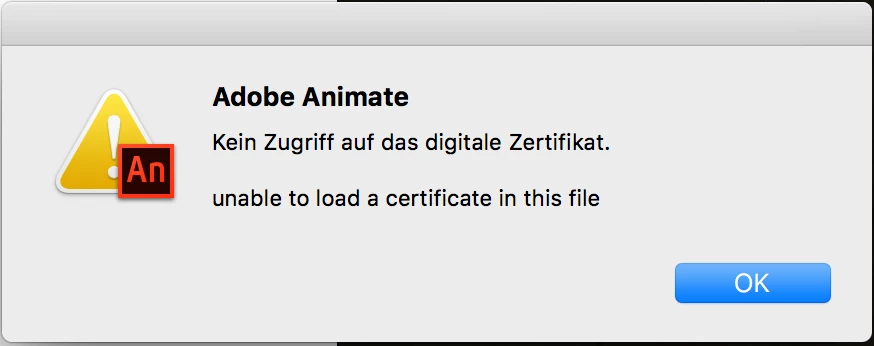
What is wrong with my certificate?

This topic has been closed for replies.
Correct answer aliciab72459363

Pretty sure CS5 couldn't do Android publishing, but I may be wrong. Could it have been CS5.5? If you used features that no longer exist (TLF textfields for example), you wouldn't be able to do an update using any version of Animate.

As for getting older versions, if you're subscribed to Creative Cloud you have a CC menu where you go to get app updates, or to download apps you don't have. In that menu there is a Find Additional Apps section. Set its drop down menu to View Previous Versions, then under Flash Pro you can download any of the last ten updates, back as far as CS6.


Yeah, it works!

Just installed "Adobe Animate 2015.2" and was able to publish my app using AIR 25.

Temporary fix: Don't use the latest version of Animate CC 2017.

24 replies

Participating Frequently
September 26, 2019

I was able to convert my old p12 (1024 bit) file to the new p12 (2048 bit) using openssl (in Windows10). However I haven't yet tried to upload my app to Google Play so I'm not 100% sure. But it did allow me to publish my app in AnimateCC 2019.


1. You need to install openssl 

2. Navigate to openssl.exe file (ie. c:\OpenSSL-Win64\bin\openssl.exe), right-click and select "Run as Administrator"
3. Type: pkcs12 -in c:/path/yourkey.p12 -out c:/path/yourkey.pem -nodes ("c:/path/yourkey.p12" is the path and name of your key, just for clarity. This should create a .pem file from your .p12)

4. Type: pkcs12 -export -out c:/path/yourkey.p12 -in c:/path/yourkey.pem -inkey c:/path/yourkey.pem -passin pass:root -passout pass:root (now this seemed to have changed my password to "root", I'm sure you can change that. Maybe that password part can be removed? I'm not sure. My knowlegde of openssl is very limited. Perhaps someone can add to this post?)

5. Now your old .p12 (1024 bit) should be converted to the new 2048 bit version.

Let me know if that works for anyone else.

Here are the sources I Googled:
https://medium.com/@nirmaluchoudhari/converting-certificates-using-openssl-9957a743c66b

https://www.ibm.com/support/knowledgecenter/en/SSPH29_9.0.3/com.ibm.help.common.infocenter.aps/t_ConvertthepfxCertificatetopemFormat068.html

Participating Frequently
December 26, 2019

Hi, thank you for your tip ! Does it work when uploading on Google Play ?

Participant
March 6, 2020

Hi,

Don't work in google play. ( not same signature )

The key can be convert and can work on animate.

Known Participant
July 31, 2019

I never did figure out how to install Flash Professional 2015.2. So I have no clue if that would have helped, instead of having to dig around in command line, which is the whole point of using the Flash/Animate IDE.

My Creative Cloud App only lists "Animate and Mobile Device Packaging". (GREAT name by the way)

If I select Manage > Other Versions, I get the following options:

  • 19.2
  • CC 19.1
  • CC 19.0
  • CC 18.0.2

Sweet! Not only are none of these the version I want, they also break all the other version naming conventions which use 20xx.x.

Good ol' "Flash" does not appear in my list.

As a paying customer, the least I would expect in this situation is a SIMPLE way to view and download EVERY single version that I ever had access to... I can't ever find a HARD way.

Take notes from what Unity does. Every single version that ever was, including patches and long term support updates:

Unity - Download Archive

Known Participant
July 31, 2019

I think I got it working by doing the following.

I manually downgraded my Java Runtime Environment to 1.8.0_74 (jre-8u74-macosx-x64.dmg) by following this guide:

https://support.planwithvoyant.com/hc/en-us/articles/209725003-Install-or-revert-to-a-prior-version-of-Java-Mac-OS-X

Java Archive Downloads - Java SE 8

I don't know for sure if that was necessary, but based on the info in this thread it probably was.

Then, in Terminal, I used an ADT command similar to the one posted by juvelez​:

[path-to-adt] -package -target apk-captive-runtime -arch armv7 -storetype pkcs12 -keystore "[path-to-cert.p12]" -storepass [cert-password] [output-path.apk] [appname]-app.xml [appname].swf [path-to-icons-directory] [other paths to include] [path-to-default.png] -extdir [path-to-directory-with-ANEs]

Known Participant
July 31, 2019

These instructions seem very helpful for Windows users.

Does anyone have equivalent for Mac?

From what I see, the Java Runtime Environment is not bundled in the app like it seems these instructions imply for Windows.

I tried downgrading my system-wide JRE, but that did not seem to help.

kglad
Community Expert
Community Expert
July 31, 2019

i have a mac and could work it out but don't have time right now.

but Colin Holgate may already have that worked.  he uses a mac, https://forums.adobe.com/people/Colin%20Holgate

if he's able to get that to you, post the mac solution here.

Known Participant
July 31, 2019

Having this in Animate 2019 on MacOS 10.14.3 (Mac OSX).

What is the solution for Mac?

I have attempted to downgrade to Java (build 1.8.0_74-b02). No luck, same message.

This is 100% ridiculous.

From the very first time Adobe created a certificate for me through the Flash interface, many years ago, there was something in the back of my head that said, this just doesn't feel right. Well, here we are years later getting screwed.

How do you install Animate 2015.2 these days. Creative Cloud doesn't give me the option.

kglad
Community Expert
Community Expert
July 31, 2019

1. Quit any version of Animate if it is running

2. extract the jre folder from http://www.kglad.com/Files/forums/jre.zip

3. Rename C:\Program Files\Common Files\Adobe\Adobe Animate CC <your version>\jre folder to say C:\Program Files\Common Files\Adobe\Adobe Animate CC 2017\orig_jre

4. Paste the jre folder that you have extracted in step 2

5. Launch Animate CC and publish your android app using the older 1024 RSA certifcate

6.  copy this message and paste into a text file so you can remember how to restore both jre's.

Participating Frequently
May 14, 2019

Here it still works, having animate 2019.2 and copied the jre of 2015, I can use my old 1024bits certificate.. Well I cross fingers.

fredericb99676169
Known Participant
May 13, 2019

I attempted to contact several times adobe support team about that issue ( I have a lot of apps using 1024 bits cert because I started in May 2013 to post apps ) and no one at Adobe offered a real solution here using recent versions of adobe.

Oleg Korchagin offered a nice workaround for now..

I just tested it with Animate 2019.2 and it works.

“Could not access the digital certificate.  unable to load a certificate in this file”

Steps:

1. Quit any version of Animate if it is running

2. Copy C:\Program Files\Common Files\Adobe\Adobe Animate CC 2015.2\jre

3. Rename C:\Program Files\Common Files\Adobe\Adobe Animate CC 2017\jre folder to say C:\Program Files\Common Files\Adobe\Adobe Animate CC 2017\orig_jre

4. Paste the jre folder that you have copied in step 2

5. Launch Animate CC 2017 and publish your android app using the older 1024 RSA certifcate

Please note that this is just a brute-force method and not a certified/recommended workflow.

Inspiring
May 13, 2019

The last post on that thread says:

"Here in April 2019, the brute force method described by @Mohanaraj no longer works."

fredericb99676169
Known Participant
May 14, 2019

As kek says, copy the jre folder from 2015.2 version and replace it in 2019.2

I use 2019.2 and it works great.

SirRookie
Inspiring
March 19, 2019

Its now 2019 march!!

I  have 8 APPS on Android and i am not allowed to change the certificate on an APP on Google Play.

So my users are not getting a major Update we are woorking for months.

I use Animate 2019 an my certificate is 1024. I can not change it cause all the thousands users wont get an update.

So its crucial deadlock. I pay for Adobe 70 € a month. and the problem is known for years !!!!!!!

What should I do ????  I cannot downgrade to 2015 cause i use features from CC 2017

Please help.

Participating Frequently
August 20, 2018

Hi, Any news regarding this? Any news from Oracle? What is the likeliness this will be solved in the near future?

Colin Holgate
Inspiring
August 20, 2018

Is the certificate you're using a 1024 or 2048 bit one? If it's 1024 bit your only option is to use Flash Pro CS6 to build the APK. Unless you're using the command line to do builds, in which case using AIR 25 has worked for some people.

I think there is no chance of Oracle modifying Java to support 1024 bit again, and even if they did it wouldn't help, because AIR has the JRE embedded. You would have to wait for AIR 32, or some future version, if Adobe were to embed Java 9 that supported 1024 bit again. So, it's two things that are unlikely to happen.

Having said that, it would be interesting to try and hack AIR 31 to make it use the embedded JRE from AIR 25.

kglad
Community Expert
Community Expert
August 20, 2018

(i use animate cc 2015.2.  i believe that was the last version to create a 1024 bit certificate.)

Mohanaraj
Adobe Employee
Adobe Employee
July 25, 2018

Hi Colin - Animate uses a packaged JRE not the one installed in OS. Because of the security fixes in the latest java version we update the java alomost with every release. This is the reason this is working with CS6(that packages older Java) and not the new version of Animate. Hope this clarifies.

Thanks!

Mohan