


Participant
March 13, 2024
Question

How to fix "Unable to multiply transform. GDI Status: 1" error

  • March 13, 2024
  • 3 replies
  • 5852 views

Dear Sir/Madam,

When i open adobe animate software i got this below attached popup massage. How to fix this issue.

The massage like "Unable to multiply transform. GDI Status: 1".
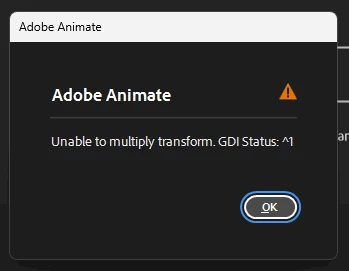
Thanks and regards

Eswarkumar

3 replies

Inspiring
December 20, 2024

I followed the steps I learned from Reddit, and it worked for me.
https://www.reddit.com/r/adobeanimate/comments/1e4ua2i/unable_to_multiply_transform_gdi_status_1_adobe/
Turn on the "An" software

ctrl + Alt + del ---- on keyboard

click on task Manager

go to menu === Details

choice the "An" software (Of course, the software must be running)

right - click on "Name" top of the column and choice "select Column" option

select the "GDI Objects" option and tick it

turn off the "An" and turn on that again

kglad
Community Expert
Community Expert
December 20, 2024
kglad
Community Expert
Community Expert
March 13, 2024

do you have a teams, enterprise or education subscription?

Participant
March 15, 2024

I'm using Adobe Animate on my office laptop provided by my employer;

kglad
Community Expert
Community Expert
March 15, 2024

does that mean you do have a teams or enterprise subscription?

kglad
Community Expert
Community Expert
March 13, 2024

in the future, to find the best place to post your message, use the list here, https://community.adobe.com/

p.s. i don't think the adobe website, and forums in particular, are easy to navigate, so don't spend a lot of time searching that forum list. do your best and we'll move the post (like this one has already been moved) if it helps you get responses.


<"moved from cc desktop">
Participant
March 15, 2024

How should I proceed to resolve the 'Unable to multiply transform. GDI Status: 1' error?

Phorgador
Participant
June 13, 2024

If you have this issue still:
https://community.adobe.com/t5/animate-discussions/unable-to-multiply-transform-gdi-status-1/td-p/14265936/page/2

Here some of us found an answer that fixed this.