


danielc21043637
Participant
June 27, 2018
Answered

ACX audiobook submission requirements 60dbRMS, -3db & -23db -18db RMS

  • June 27, 2018
  • 4 replies
  • 15473 views

Question Adobe Audition CC

ACX Audiobook Submission Requirements:

I’m looking to begin recording an Audiobook using Adobe Audition CC. Before I purchase the rights to use the software I need to find how to set (60dB RMS,

-3dB & between -23dB and -18dB RMS.)

I’ve searched the Web and have seen these questions but no answers for Adobe Audition CC.

Can you help? Here is what I have so far.

  1. 1.    Each file must have a noise floor no higher than -60dB RMS.

I found this -60db noise level option under the levels panelunderneath and to the left of the Spectral Display.

Is this correct?

  1. 2.    Each file must have peak values no higher than -3dB.

I found this under Effects Menu-> Amplitude and Compression->

Normalize Compression-> Normalize screen with normalize option to: -3.00 %db.

Is this correct?

  1. 3.    Each file must measure between -23dB and -18dB RMS.

This one I cannot find the answer to in Adobe Audition CC.

How and where do I set this RMS level to -18db RMS?

Thanks
    This topic has been closed for replies.
    Correct answer SteveG_AudioMasters_

    This is all fairly straightforward; Audition can manage this easily, but your first requirement isn't actually an Audition issue at all - this is determined by your recording environment, and to get a -60dB noise floor, you're going to have to have to create or use a quiet environment to record in, or you have to resort to a bit of trickery with Noise Reduction, which quite frankly is best avoided.

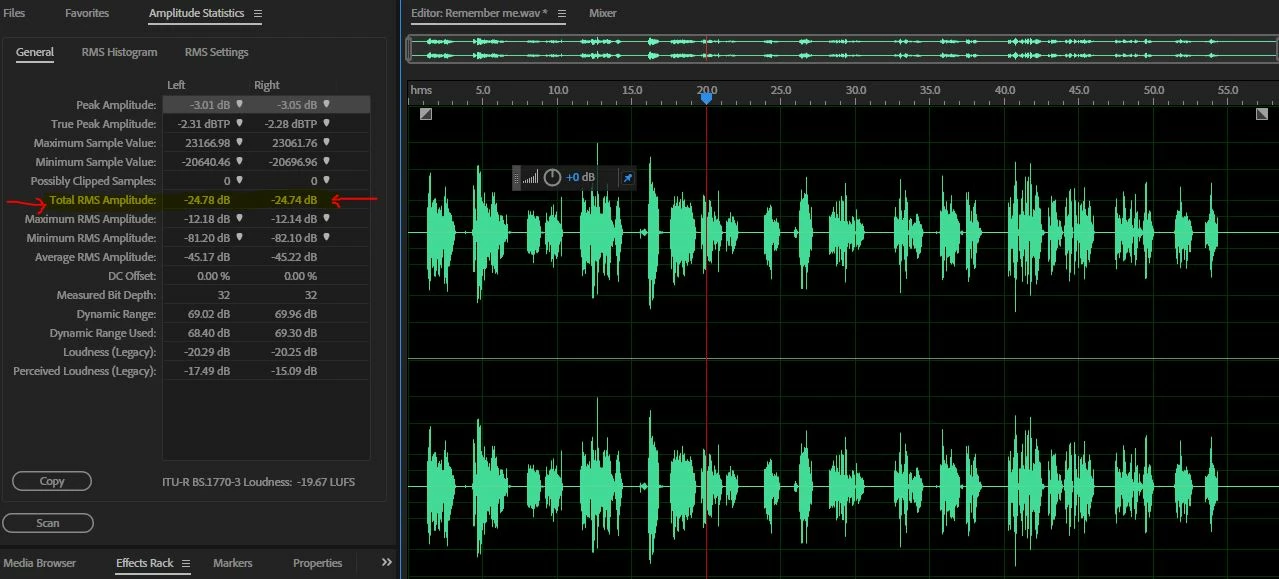
    Once you've got your recording, with its nice low noise floor, in the can the rest is pretty straightforward, except that there are several possible ways to get at it. The easy bit, as you've figured out, is getting the peak level correct - you normalize to -3dB. At this point, you need to look at the Amplitude Statistics, and scan your file. You'll end up with something like this:

    I've highlighted and pointed out the line you need to look at. You'll see that for this file (which is a speech file) it's almost where you'd want yours to be. The trick for getting it right is to note that you can't increase the amplitude of the file without going over -3dB, and that you have to achieve your goal by altering something about the peak to RMS value. The easiest way is to limit the peaks. Don't do this until you've made an initial measurement; when you have, you'll have a reasonable idea of how much peak compression to apply. In the case of my file, I'd have to squash the peaks by about 4-5dB using either the Dynamics Processor, or one of the other compressors available (there are two more) to get to your desired figure. Once you've done this, then you re-normalize to -3dB, and the level of the entire file will be raised, as will your RMS figure when you re-measure it.

    I should point out that this is the sort of job that Audition is ideal for - you won't find any better software for it, wherever you look. (okay, plug over!)

    4 replies

    unauthorizedrob
    Inspiring
    December 16, 2019

        To add a bit of experience from learning the hard way:  I went through an awful learning curve trying to do an audiobook last year and found that my problems all started with that recording environment.  We THOUGHT we had a very quiet home booth built, but it was not -- and I compounded the problems by trying noise reduction and other processors that I really did not understand.  Visualize a kindergartner driving a Mac Truck.

    This year we recorded in a professional booth, and that has made a lot of difference.  I strongly advise against the home booth.  The pro recordings are excellent.  I run each of these initial recordings immediately through Match Loudness, with three steps: 

    First, with the ITU-R BS.1770-3 Loudness setting, with Target Loudness at -20, tolerance 0 LU, and Max True Peak Level at -3 dBTP, and check True Peak Limiting.   I do NOT check Export;  these are WAV files for editing.

    The peaks usually come out a bit too loud, around -2.3, so I then run Match Loudness again in Peak Amplitude mode set at -5.    Then one last time at the ITU-R settings with Peak set at -3, and it hits the ACX requirements precisely, usually around -20 to -21 Total RMS.  I save and edit that file and save a copy on an external drive.  Don't touch that;  you may need it!

    I do this again after editing and finally set export to .MP3, run through the same procedure as above, until I have my final ACX file.   


    I am currently struggling with the noise floor.  If the initial recording was too quiet, then you have to get your noise floor adjusted to under -60.  Steve is steering me on that.  At the moment I'm manually replacing noise with pre-recorded room tone, which is cumbersome and time-consuming.  Looking for guidance on that.


    Rob . 

    Inspiring
    September 10, 2021

    Hi Rob. Just found this thread. I was just trying to do an ACX file and had to do almost exactly what you just described. I was hoping that 3 years later, AA would have done more to help with this pretty popular (and gaining in demand) thing.


    I'll start a separate thread using "2021" in the title to see what - if anything - has gotten better about this. Thanks for your reply here!

    Participant
    November 19, 2019

    Quite frankly, I run my final audio through Audacity. There is a Nyquist prompt that someone developed that puts your audio in compliance with ACX. It's not quite perfect, I need to limit it. There is also an add-on that then runs an ACX check on your audio and tells you if it's all set to go.

    I don't see that there is anything similar for the Adobe products.

    Participant
    July 10, 2018

    I’m using Adobe Audition cc 2018. I’m truly perplexed about how to reach these levels. I’m new to recording andam looking for step by step instruction but all the tutorials seem to assume i am beginning with a higher level of skills.

    Can anyone point me in the right direction?

    SteveG_AudioMasters_
    Community Expert
    SteveG_AudioMasters_Community ExpertCorrect answer
    Community Expert
    June 27, 2018

    This is all fairly straightforward; Audition can manage this easily, but your first requirement isn't actually an Audition issue at all - this is determined by your recording environment, and to get a -60dB noise floor, you're going to have to have to create or use a quiet environment to record in, or you have to resort to a bit of trickery with Noise Reduction, which quite frankly is best avoided.

    Once you've got your recording, with its nice low noise floor, in the can the rest is pretty straightforward, except that there are several possible ways to get at it. The easy bit, as you've figured out, is getting the peak level correct - you normalize to -3dB. At this point, you need to look at the Amplitude Statistics, and scan your file. You'll end up with something like this:

    I've highlighted and pointed out the line you need to look at. You'll see that for this file (which is a speech file) it's almost where you'd want yours to be. The trick for getting it right is to note that you can't increase the amplitude of the file without going over -3dB, and that you have to achieve your goal by altering something about the peak to RMS value. The easiest way is to limit the peaks. Don't do this until you've made an initial measurement; when you have, you'll have a reasonable idea of how much peak compression to apply. In the case of my file, I'd have to squash the peaks by about 4-5dB using either the Dynamics Processor, or one of the other compressors available (there are two more) to get to your desired figure. Once you've done this, then you re-normalize to -3dB, and the level of the entire file will be raised, as will your RMS figure when you re-measure it.

    I should point out that this is the sort of job that Audition is ideal for - you won't find any better software for it, wherever you look. (okay, plug over!)

    SteveG_AudioMasters_
    Community Expert
    Community Expert
    June 27, 2018

    I do have a question for you, though. What equipment will you be using to make the recording? Some systems will manage this a lot more easily than others will, especially in terms of your noise floor requirement...

    danielc21043637
    Participant
    June 27, 2018

    Steve,

    I will be using the following equipment:

    I-MAC 4 years old

    MAC OS High Sierra Version 10.13.5

    Mic - Share SM7b Dynamic Vocal Mic

    Also using CL1 Cloudlifter (1 channel Mic Activator)

    Interface - Mic to Computer - Apogee Maestro 2 Duet

    Thanks for the help - great information