


Participating Frequently
September 10, 2020
Question

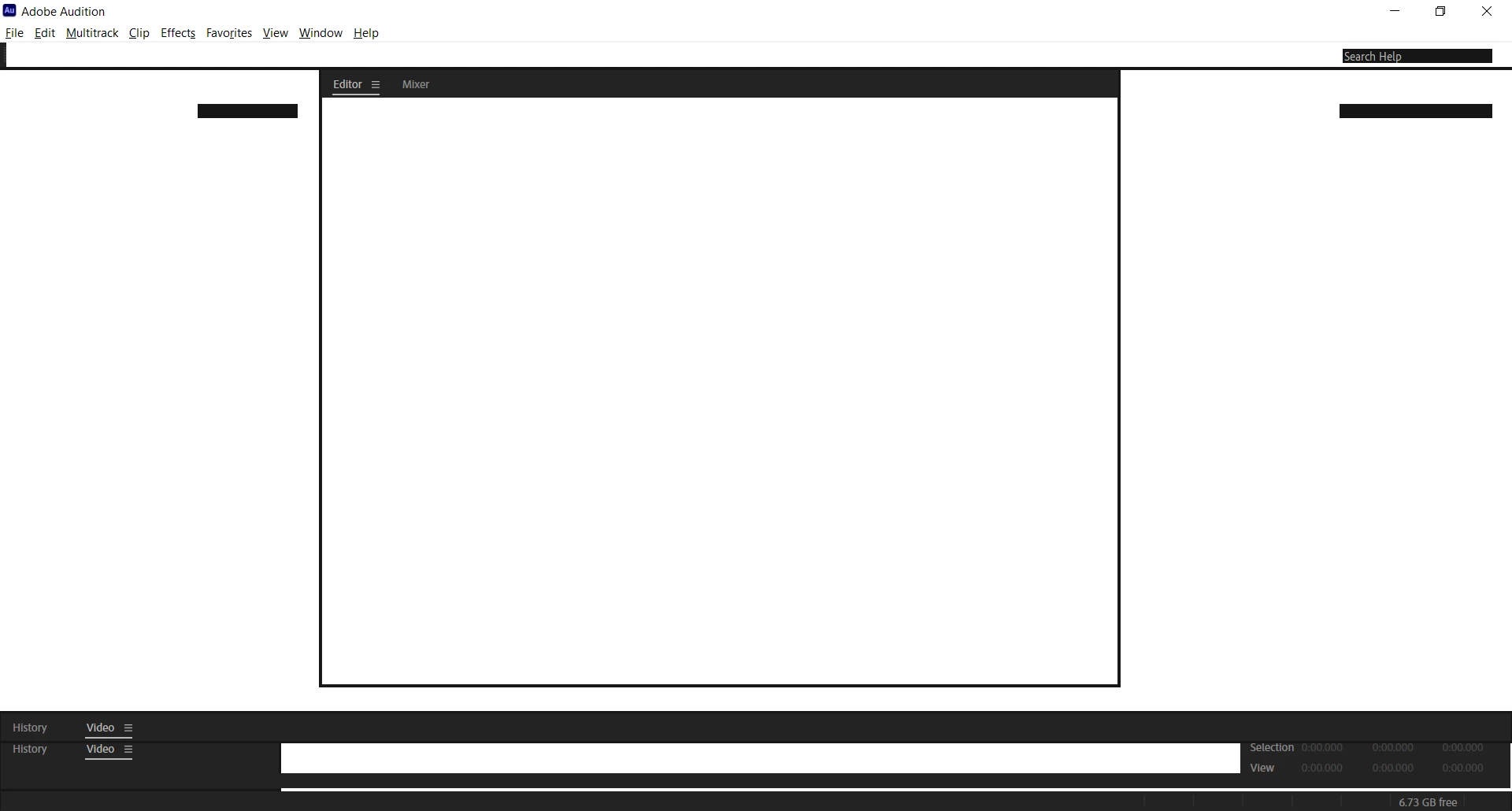
Audition 2020 is a mostly blank screen after install, can't see buttons or menus?

  • September 10, 2020
  • 2 replies
  • 1996 views

I'm still running 2019 because I can't get 2020 to install and run properly. It looks mostly blank, white, and I can't click on anything because it's all invisible. The secondary menus don't appear, nada. I've tried selecting a different workspace, etc. Nothing works. It also seems to have a window inside a window, which you can see best by looking at the very bottom left corner. I can't close off any interior window, and even when I try to open a session created in an earlier version, the screen looks the same. This is becoming super frustrating, especially as I have work to get done. Help!


This topic has been closed for replies.

2 replies

Participant
September 13, 2020

For me trouble was when i run Audition on my Nvidia GTX1050, but when i switched it on internal Intel HD Graphics 630 it starts look fine

Participating Frequently
September 15, 2020

You might be on to something. I'm also running an Nvidia GEForce GTX 970M, which is a few years old. The help line didn't help much, unfortunately, but they did try. I totally understand that this is a weird situation and not typical. While I'm waiting for the escalated help response, I will try messing with the graphics/video card situation and see what happens.

Thank you!

Legend
September 17, 2020

Hi SteveG, The instructions you give to collect system information and log files are not what appear on my screen.

For example, I don't see "Go to the Start Menu > (All) Programs > Accessories > System Tools > System Information?" - there simply is no menu pattern that follows this. I can't see anything comparable. Is it possible that Windows versions have changed the menus since that instruction was written? Or, am I running a different version of Windows 10/2004? I'll send a screen shot of something close that I think contains what you need.

Same with the log file. When I follow the instructions, I get three windows with multiple files. I'll capture the four files that I think are pertinent and send them right now.

Thanks!


Hi.

I think you may be right about Windows Versions having changed the route to access those System Tools!  Try this:

Start Menu>Programs>Windows Administrative Tools>System Information.


HTH

SteveG_AudioMasters_
Community Expert
Community Expert
September 11, 2020

Even if the installation hangs, Audition will have produced a crash log file that will say why. You need to follow the instructions here - Audition Crashed - now what? - specifically my last post, because you won't be able to get at it any other way, and send the result to audbugs@adobe.com


You could also post a copy of the crash log into this thread if you want - it's just possible that the reason may be easy to identify.

Participating Frequently
September 11, 2020

actually, I don't think it's crashing. It's opening fine. What it's not doing is displaying anything after the application opens. 

The program is still technically running, there's just nothing but white where the menus and buttons should be.
No popup messages, no errors happen when the application starts up. It's just white, as per the screen shot in the original message. Install went smoothly. There is no "report this crash" popup or other help device to use to report anything.

In this additional screen shot, you can see what happens when I hover over the indicated (secondary?) menu item, circled in red. It thinks it is the menu item that should be there, but it's repeating the menu above.

Thanks so much for your help!

SteveG_AudioMasters_
Community Expert
Community Expert
September 11, 2020

I've already told you what to do, and it clearly isn't opening fine, otherwise it would be behaving normally. There are no more options, except for ringing the Adobe chatline.