


sab01
New Participant
January 20, 2020
Question

Audition CS6 - Hardware Configuration Unable

  • January 20, 2020
  • 1 reply
  • 483 views

Hello
Excuse me for my English...
I'm using Adobe Audition CS6 V5 build 708 under Win10 pro 64bits, everything was working fine in MME but since I tested the ASIO configuration I can't go back.
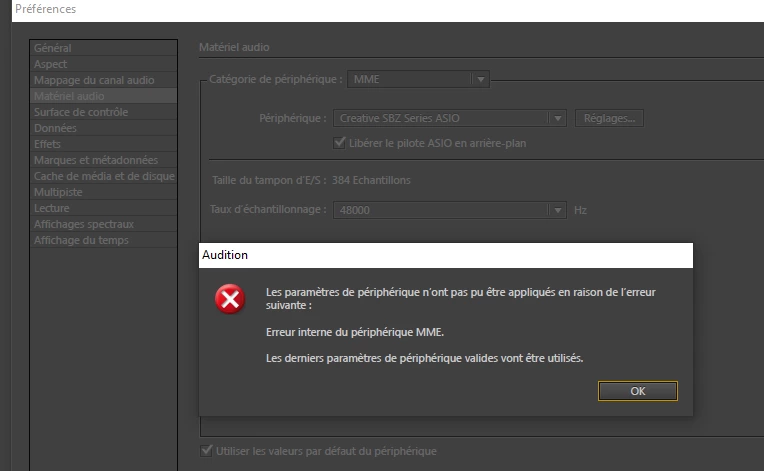
The software tells me "Internal MME device error".

See the screenshots config and error message
config: Audition interface
error: error message
Sound blaster Zx audio card
Everything was working fine before switching to ASIO.

Thank you
This topic has been closed for replies.

1 reply

SteveG_AudioMasters_
Community Expert
January 20, 2020

Oh dear. I thought that all these absolutely awful Creative Labs cards had finally gone away. The ASIO drivers for them were noted for causing many faults and problems for their users, but you should have been able to return to MME without difficulty, I would have thought. But at its root, this isn't an Audition problem - it's to do with the MME driver. You will have to go through all the Windows sound settings to reset it, I suspect - it's likely to have been turned off or made unavailable. And unfortunately it's not a step-by-step thing we can do remotely, although Adobe's help desk might be able to - try giving them a ring?

sab01
sab01Author
New Participant
January 20, 2020

Thank you very much for your answer.
Yes agree with you, I have long chosen Creative labs because they allow the "What U Hear". I don't know if other audio cards do that (...).
I called Adobe in France, I am told that support for Audition CS6 is no longer possible!
I don't know where to look to reinstall the MMe drive in WIN10
thanks again

SteveG_AudioMasters_
Community Expert
January 20, 2020

Probably best to get a local computer engineer to look at it, then.