



demodave
Participating Frequently
May 18, 2017
Question

Auto Save Not Actually Saving

  • May 18, 2017
  • 4 replies
  • 14131 views

I have now been burned twice by the Auto Save function not working in Adobe Audition CC.  After 30 minutes of editing a session in the multitrack, AA crashes.  When I open Audition, a dialog comes up asking if I want to open the backed up files.  I click "Continue", and my session opens to the state it was in 40 minutes ago when I recorded the first bit of audio....unedited.  I checked my Backup folder and sure enough, the last backup was done 40 minutes ago.

I go to Preferences>Audio Save and both check boxes are enabled.  Auto Save recovery data every 10 minutes and Backup multitrack session files automatically every 3 minutes with a max number of backup files set to 10.  The files are saved within the session folder.
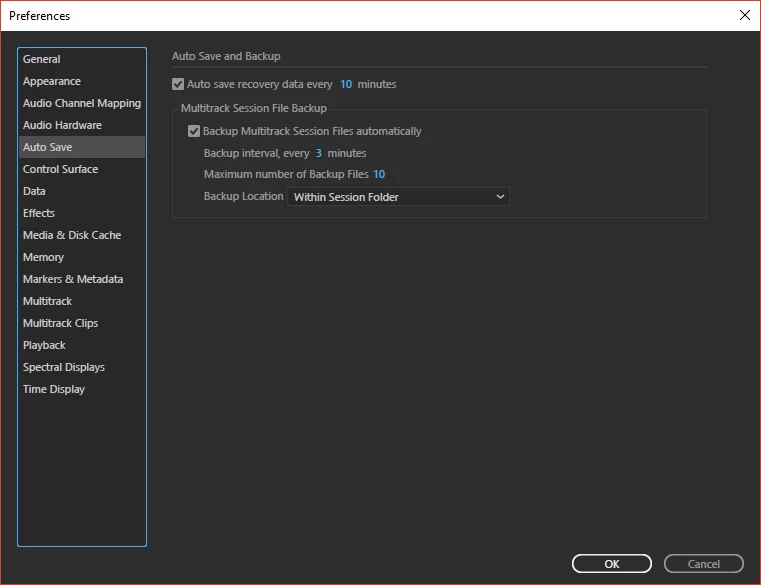
Why is the Auto Save function in AA not saving a new file every three minutes?  What am I missing?  I am beyond frustrated right now.

Dave

This topic has been closed for replies.

4 replies

New Participant
June 22, 2024

auto save fails AGAIN. i followed the suggestions and it was working for months. Even during this session, it was saving every 4-5 minutes and then quit saving for an hour. of course, that hour had a lot of work in it. then the old spinning wheel and the work is lost. Some of the recorded files seem to exist in the tracking folder, for at least 10 minutes of that hour but the rest of the edits are gone. I only resurrected this thread to say, adobe audtion is garbage software and it's time to use reaper, which i don't even like. 

SteveG_AudioMasters_
Braniac
June 23, 2024

I'm afraid I have no idea why Adobe hasn't revisited this, as it's hacked off any number of users now. It would help slightly if they didn't call it 'auto-save', because people generally have a grasp of that fairly simple concept, and it's clearly not what Audition means by it (see details on page one of the thread). At least then people would realise that it was something that they had to manage for themselves - which is what I do. But for whatever reason, this doesn't appear to be a priority to fix - unfortunately.

New Participant
April 30, 2018

Same issue...  I have all sound files saved locally and was working on the multitrack (basic tracklay) with the AutoSave supposedly saving to the cloud.  Only it didn't and I lost 2 hours worth of work.

Disgusting.

Participating Frequently
September 13, 2018

I just lost two days of voice over work because Audition does not auto-save correctly. Recovering from crashes has never worked either. For me this happens when multiple multi-track sessions are open at the same time. Audition seems to be saving only one of the multi-track sessions. Unfortunately for me, not the one I was actually working on.

New Participant
November 15, 2022

I've losted 5 hours of working ! I saved manually often and the autosave is every 3 minutes but all the files are missing. The audio files are well saved and on time but not the file session and its back up.

Participating Frequently
May 23, 2017

I'm having the same issue. I'm saving to my Creative Cloud folder. I can work for 3 hours on a project and although auto-save is set to every three minutes for multi track session files, there will be only 4 or 5 saves generated over that span of time. I hate it and constantly save manually. The auto save function is totally unreliable.

Bob Howes
Inspiring
May 19, 2017

Well, you have session data set to save every three minutes but you're only saving your sound data every ten minutes.

However,  I think a giveaway here might be a combination of Audition crashing  so often (my last crash was several years ago and caused by a lightning strike) and the fact that you're putting your back up into the same folder as your session.  If your HDD is starting to have problems or some other app is grabbing your disk, the same issue that causes the crash could/would also affect the backup.  For reference, I have my backup set to go to an external USB3 hard drive.

As with most crash scenarios, your best bet if fo follow the instructions in Audition Crashed. Now what?   These reports are read by the developers and they can usually provide a pretty quick explanation of what's going wrong.

Participating Frequently
May 23, 2017

I think the explanation of why the app crashed is valuable, but more relevant is why Audition is not auto-saving when it is set to do that.

Bob Howes
Inspiring
May 23, 2017

I'd be willing to guess that analysing the reason for the crash may also solve the Auto Save issue.  I strongly suggest submitting a crash log and getting it analysed by the developers.