


Inspiring
January 15, 2020
Answered

BUG: Sending Media into Audition from Premiere Throws Two Identical Errors (Entry Point Not Found)

  • January 15, 2020
  • 2 replies
  • 2905 views

Sending media into Audition from Premiere Pro 2020 (right clicking on a clip in the sequence and hitting Edit In Adobe Audition) throws two identical error messages:
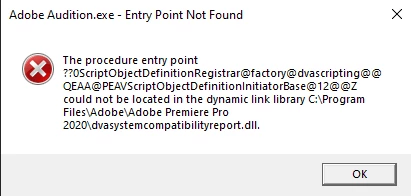


Only started happening once updated to version 13.0.2.35. Windows 10, fully up to date as of 1/15/2020


Please sound off in the comments if you're having the same issue

This topic has been closed for replies.
Correct answer Charles VW

This should be resolved by updating Premiere Pro to 14.0.1 which went live last night.


The reason why this didn't show up in beta testing is that Au 13.0.2 and Pr 14.0.1 are from the same point in time, and Pr shipped later than Au. It did uncover an underlying issue that we'll still fix in Au, likely for Au 13.0.3 so this shouldn't happen if you're on an older version of Pr and a newer version of Au (or vice versa)

2 replies

Charles VW
Inspiring
January 16, 2020

As @_durin_ mentioned, we're looking into this. I haven't tried it yet, but you might try renaming dvasystemcompatibilityreport.dll to something else (it lives in the Premiere Pro folder). However, I don't know if PPRo will launch without it, it shouldn't be required. I'll try a few scenarios on my Windows machine in a bit.

New Participant
January 16, 2020

Thanks for the suggestion. Let us know if it works.


It was a small incremental update (XX.0.2 from .0.1). Can't be that much code for Adobe to check.

I'm surprised this didn't appear in beta testing.

Charles VW
Charles VWCorrect answer
Inspiring
January 17, 2020

This should be resolved by updating Premiere Pro to 14.0.1 which went live last night.


The reason why this didn't show up in beta testing is that Au 13.0.2 and Pr 14.0.1 are from the same point in time, and Pr shipped later than Au. It did uncover an underlying issue that we'll still fix in Au, likely for Au 13.0.3 so this shouldn't happen if you're on an older version of Pr and a newer version of Au (or vice versa)

SteveG_AudioMasters_
Community Expert
January 15, 2020

I've just run the whole round trip without any issues at all on an up-to-date W10 laptop - did exactly the same as you did. The only thing I can suggest, as it appears to be a .dll issue is that you uninstall and reinstall Premiere - it's a Premiere .dll that appears to be malfunctioning.

TeeKayCCAuthor
Inspiring
January 15, 2020

Re-installed both. Tried installing Au before Pr. Cleared preferences too. Same error. Errors twice for every clip I try to import

SteveG_AudioMasters_
Community Expert
January 15, 2020

I'll see if I can point one of the devs at the thread.