


Eric Holtz
Known Participant
January 9, 2017
Question

Frequency Analysis: Sub 20Hz Frequencies Shown Across All Files

  • January 9, 2017
  • 2 replies
  • 4732 views

Hello,

I am running Audition CS6 in Windows 7 Professional 64 bit on an HP dv7-7000 Quad Core Edition laptop. All audio files show a bump below 20Hz in the Frequency Analysis window. This occurs across all files, no matter the source, i.e., personal recordings, ripped Cds, etc.

Here is an image using a CD file:
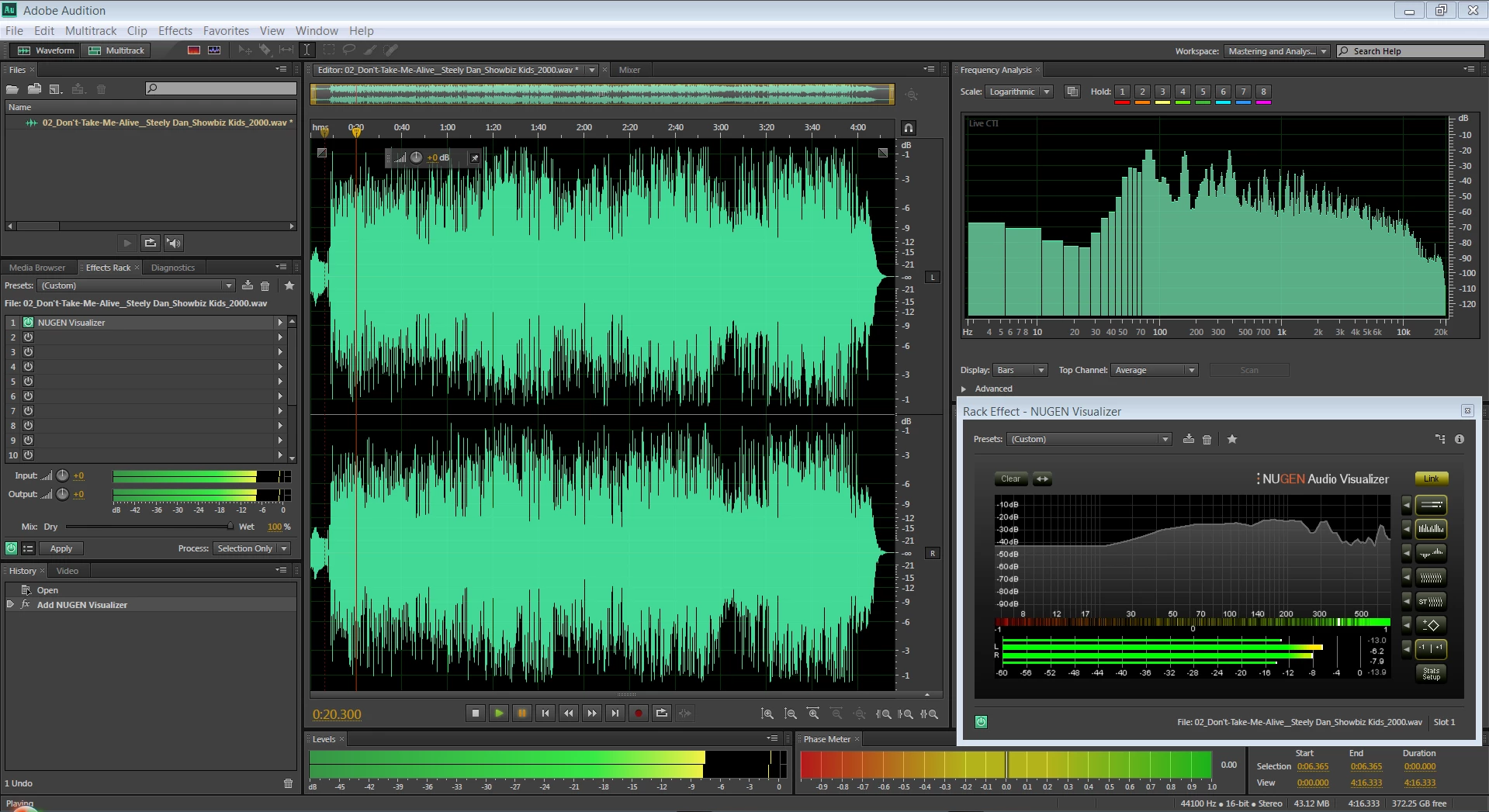
What could be causing the noise below 20Hz? This occurs on any file type, no matter whether I'm using the laptop's sound card or a USB audio interface.

Any comments and suggestions are greatly appreciated.

Thank you,

Eric

This topic has been closed for replies.

2 replies

Charles VW
Inspiring
January 10, 2017

this might be an indication of a DC component to your signal (mathematically the same as 0 Hz) and that it isn't centered around zero.

Eric Holtz
Known Participant
January 10, 2017

Charles VW​ - I was wondering whether there might be something happening "under the hood" in regards to the DC component. How would I alleviate a zero centering issue?

SteveG_AudioMasters_
Community Expert
Community Expert
January 10, 2017

Eric Holtz wrote:

How would I alleviate a zero centering issue?

That's easy. Go to Effects>Amplitude and Compression>Normalize, and you have an option there.

I can see a very small offset on the file with the 0-5Hz signal whereas I can't see one in the other file. Whether that rather small offset would make that much difference to the analysis isn't clear to me, but it might, possibly. There are a couple of other things to note about the whole business though. Firstly that with the best will in the world, an FFT analysis is never going to be perfect across the board - that first F stands for 'Fast' and that invariably means a compromise in the way that the window is analysed. The greater the FFT number, the smaller the sampling 'Window' is, and rather perversely, the less accurate the extreme bass analysis is; indeed any analysis where the window size is smaller than the wavelength of a frequency being analysed is potentially inaccurate, and that's where the problems with having DC in your waveforms comes into play.

On its own, all the DC would do is offset your speaker cone very slightly - assuming that everything in your system up to that point is DC-coupled. But that does lead me onto the other thing, which is in effect a sanity check. If there really is the level of signal between 0 and 5Hz shown, it's going to lead very definitely to bass unit speaker-cone flap - pretty severe cone flap at that. So if you can't see any, then it's almost definitely an analysis anomaly. If you have cone flap, then you should definitely get rid of that part of the signal - it saps power from your amplifier, and restricts the amount of cone movement available for 'real' sounds higher up the frequency range; it's not healthy!

SteveG_AudioMasters_
Community Expert
Community Expert
January 9, 2017

In the Audition Frequency Analysis window, can you show us the advanced settings? Can't comment about your plugin, but response anomalies at the bottom of a FFT window aren't that unusual. Also, if you shift the waveform up so that we can see the Spectral Frequency display with the spectral resolution increased to max, (Ctrl+Shift+Up Arrow) do you get the same result?

ryclark
Participating Frequently
January 9, 2017

As Steve suggests by showing us the Advanced Settings of Audition's Frequency Analyser window we will be able to see what the FFT size settings are. For more accurate LF display you really need to have the highest FFT size available. but even that will be inaccurate for the lowest few bars unless you can have an infinite FFT size.

ryclark
Participating Frequently
January 20, 2017

Eric Holtz wrote:

What does Audition do to the 24bit file upon each subsequent save? Should I simply save (or originally record) the files at 32bit (float), using them until all the editing is finished? I guess what I am truly trying to get at is, what does Audition do when going from the 32bit (float) processing environment to saving at 24bit? Do I need to add dither to an edited file each time I save it, since the editing is done at the 32bit (float) level?

I hope I am not making this harder than it really is.

The 24bit file is an integer file - so if you reduced its amplitude, saved it, and reopened it and amplified it again, you'd lose resolution in your audio. This doesn't happen with 32-bit processing at all; you can scale files up and down with impunity, as the information is is stored in a different form - basically a 23bit mantissa, an 8bit exponent (which scales it) and a sign bit - that's what the 32 bits are for. As for dither - well there's no point at all in dithering anything greater than a 16-bit file - it will have no audible (or even inaudible) effect on the bottom few bits of your sound device, as its analog performance is limited by the Laws of Physics to about 18-19 bit performance. So, you dither at the 16-bit level. Most importantly though, you only do it once on a file! If you dither your dither, all you are doing is adding more noise to the file, and this will soon build up to be audible, and defeat the point of it completely.


So the rule is you keep everything at 32bit float until the very last minute where you only reduce it's bit depth if really necessary for distribution. If you are archiving audio you should really keep it at 32bit float to allow for future processing where possible, otherwise a minimum of 24 bit. Most would also say that there isn't much point in saving at higher sample rates than the basic 44.1/48k ones.