


Participating Frequently
May 4, 2022
Question

How can I add/export audiobook chapters using Audition?

  • May 4, 2022
  • 2 replies
  • 4145 views

I am working on an audiobook and I need to export the audio track as a single file with all the chapters labeled correctly so that it can be used in the table of contents.


Is it possible to mark where each chapter starts and then have that chapter information embedded in the file so that each chapter name and timecode gets added to the audiobook's table of contents?


For example, the below image is a screenshot of an audiobook's table of contents from within Apple's iBooks app. I need a way to be able to mark where each chapter is within a single audio file so that I can have my audiobook's table of contents broken out by the preface, introduction, chapter 1, chapter 2, etc. 
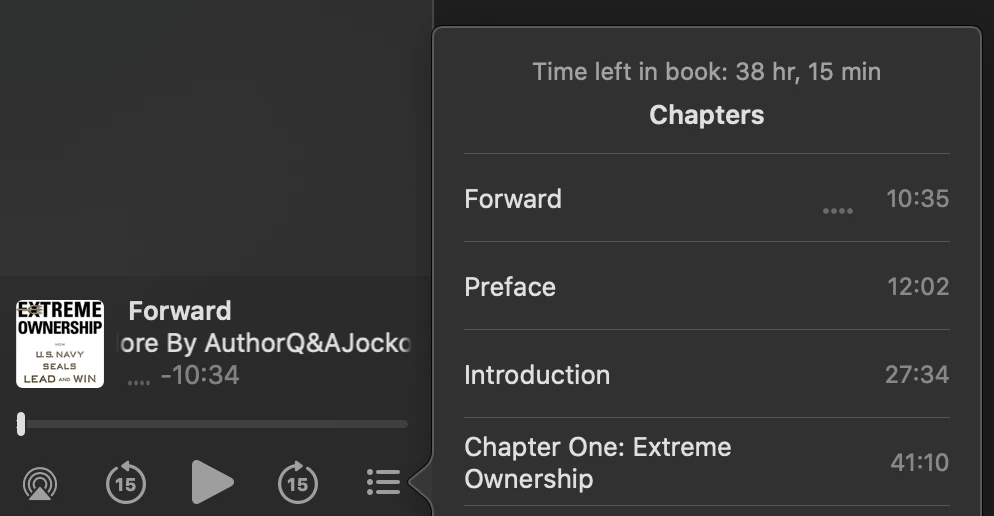
 

Currently, I have to make a cut where each chapter starts and ends and then move it to a separate audio track. Then I export each audio track so that I have a separate .M4B file for each chapter. When that's done, I have to use a special tool to combine all the chapters back together again into one file. It's a pretty difficult process and I'm running into issues with how I'm doing it so I need to look for a better way to do this.


Any ideas?


(*chapter markers work in Premiere Pro for doing this exact task for Quicktime videos but I couldn't get that to work for my purposes with only audio. There's a youtube video that explains this better HERE.)

This topic has been closed for replies.

2 replies

Pariah Burke
Community Expert
March 7, 2024

Hi, @Mic. and @daevf94258102 .


The way you do it is to create markers and then export those markers to separate files. I created a video walkthrough to show you how. Just watch this video.


https://youtu.be/RPgeNGbVHXo

New Participant
March 7, 2024

Hi Pariah,

Thank you for your response and clear video.  I am confused though still about something.  


My understanding is that audiobooks are ONE file. If I go to my library and find the source for an audiobook, it is an M4B file format.   I'm assuming that to upload a book someplace it will need to be a single file, not separated out into other files.  Or at least if I sell/send a book to someone that is self-published, it is more convenient to have one file that they can navigate like a book they get on Audible. 


I can separate out chapters already (actually they are separate files.  The goal is to package this, put the artwork in, and create the one file that someone can download and navigate like a normal audiobook.)


Do you have any thoughts?  I assume you're saying that marking chapters, and then exporting as AAC single file, will not result in the files having readable chapters, but this of course seems confusing to me, because someone can do this with some software someplace.  


thank you,


Dv

Pariah Burke
Community Expert
March 7, 2024

Hi, Dv.


I understand the confusion now.


An M4B audiobook is just a wrapper for the separate per-chapter audio files. You can use MB4 Tool to take your chapters and put them together. Here's the site for MB4 Tool: https://github.com/sandreas/m4b-tool


Audible is one of the stores that requires multiple files (as do most audiobook stores). They mostly use proprietary wrapper tools, but some make use of the MB4 format. Here's the official statement from Audible's ACX:

Each file must contain only one chapter or section.
 

You'll be prompted to upload each file individually. Both the opening credits and closing credits must be separate files. This ensures listeners can easily navigate between sections, and that skipping forwards or backwards moves them forward or back one section. Learn more about chapter names for your audiobook here.
Vaggelis Auvril
New Participant
May 9, 2022

Hello, i'm working on audiobooks full time. 

I think that you can't do what you ask because i search for it alot.

The chapters are different audio tracks.


Mic.Author
Participating Frequently
May 9, 2022

Thanks! I just messaged you directly.