


New Participant
May 9, 2019
Question

How to move a clip with keyframes associated with it

  • May 9, 2019
  • 7 replies
  • 7457 views

Hi everybody,

I am on Adobe Audition CC 2018 and I have a sound clip with keyframes on the 5.1 surround sound and others associated with that sound.
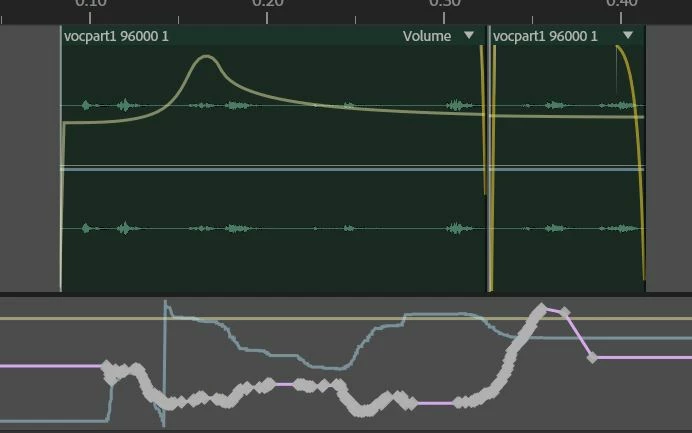
Basically what I want is to move the audio clip with the keyframes (not like this, if I just drag it) :
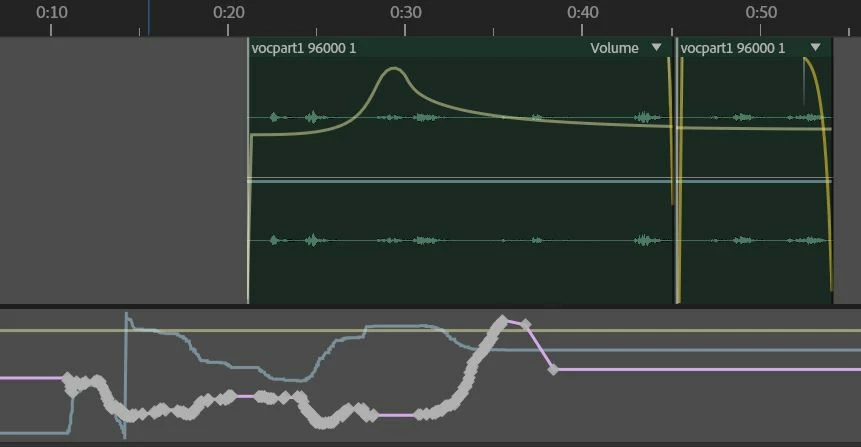
Thanks

7 replies

New Participant
April 14, 2024

@anilberry @jasonlevine @17187739 @ScottBelsky 
ADOBE please please please please fix this

This is what we want. Simplicity.
Please just have it where we can click and drag over the clips and the keyframes and all are highlighted to move. If we don't want to move the key frames we can just click the drop down menu next to "read" to hide key frames.

You are losing loyal customers because of this issue. Even a person in this thread vowed to never come back. 
PLEASE WE ARE BEGGING YOU!!!! Fix this please. 
Thanks for your time and effort!

Known Participant
April 19, 2024

Well, as we're talking about this issue since 5 years I think we can forget it. Just accept Audition as it is or try it with another DAW.

Known Participant
December 10, 2023

This is not possible as the keyframes are associated with the timeline, not with the audio.

November 24, 2023

This is why audition SUCKS. I used it now for the first time and i don't think im gonna use it again for this very reason. I won't pay for a software that's not even able to do something so basic and usefull, that literally EVERY other DAW lets you do EASY.

They didn't fix it for years. I guess they just don't care, so now this sofware is going straight to the bin and im afraid it won't be installed ever again.


[Abuse removed by moderator]

Known Participant
January 8, 2023

Hi!

This threat is already 4 years old. I've still the same problem, purchased Audition hoping that this would have been fixed. Is it fixed?

Thanks!

Known Participant
January 8, 2023

I would really apreciate a soon answer as I'm right know working on a project that should be finished tomorrow. 😉 It also would depend on the answer if I''d go for a one year license or would leave it with my actual trail version.

Known Participant
January 8, 2023

Sorry, can't edit the posts, but I forgot: Windows 10 Pro, Audition CC 23.0.0.54

New Participant
November 25, 2020

Wow! So.. i edited a podcast that's 45 min long. And have to insert some audio clips in the middle and back. Since I already did all the envelopes for volume to edit out some mistakes and click sounds that means i have to do everything from the middle up again because I my only option is to seöec everything and the manually go in and deselect them one by one. Thanks Adobe. This sucks. Really need to add this function. Upvoting....

Known Participant
January 8, 2023

Hi!

This threat is already 4 years old. I've still the same problem, purchased Audition hoping that this would have been fixed. Is it fixed?

Thanks!

Participating Frequently
April 19, 2023

It's not fixed. It's really really really frustrating. 

Participating Frequently
March 31, 2020

Jeez, that's embarring. I'm mixing a project and using send automation. If I move a clip the send automation is out of synce... AND I can't move the automation for just that clip, I have to move all the automation for all the clips.  Come on Adobe.

JeDiBanKai
Inspiring
May 9, 2020

Dats rly very strange...

ryclark
Participating Frequently
May 9, 2019

Unfortunately, as you have discovered, automation keyframes are tied to the Timeline rather than to the clip, except for the on clip volume and pan envelopes. At the moment there is only one slightly awkward work around if you need to move the automation keyframes. Right click on a keyframe and Select All Keyframes from the drop down menu. Then if you hold down the Shift key and select one of the keyframes you can drag all the selected keyframes left or right to match the Clip's new position.


There have been requests previously for better keyframe operability. The ability to Edit keyframes manually has been added recently but still doesn't yet go far enough. So I would suggest that you put in a feature request to try and get Keyframe copying/moving further up the list.


[Mod note: this has been unmarked as the correct answer, simply because it's now out of date - see comments below about clip effects, which have subsequently been added as a feature]

johhnryAuthor
New Participant
May 11, 2019

Thanks for your answer, that was clear!

Have a great day.