


Known Participant
April 13, 2018
Answered

I lost all the files AGAIN!

  • April 13, 2018
  • 8 replies
  • 12700 views

I was working on a session yesterday.  And AGAIN, I closed it, opened it this morning and was greeted by this:
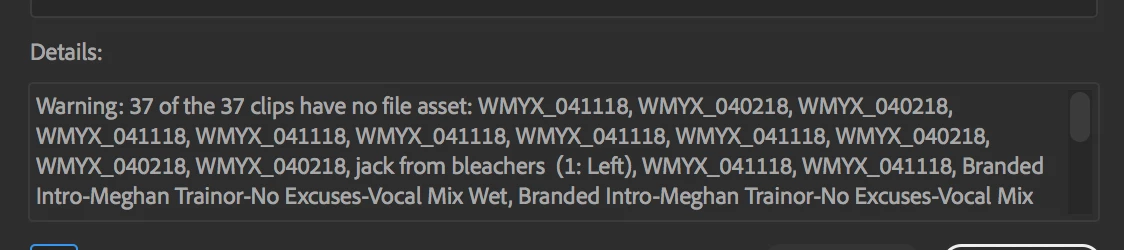
I've lost all the files.  They're there.  Just all closed.  This is happening SO often now.  Sure, I can go back and re-link them one at a time, but I don't have time (OR THE DESIRE) to do that. 

Am I the only one with this problem??  Am I cursed?

I'm on a Mac, 10.13.4, running Audition CC Build 11.1.0.184.

    This topic has been closed for replies.
    Correct answer SuiteSpot

    Here's a dropbox link:

    Dropbox - SpermCastEp2v1rough.sesx

    Found the back ups folder. There is one from today - right after the crash and one from 5 days ago. :-(

    I absolutely saved the file multiple times today.


    Have you tried opening this session?

    The session looks fine - your files are in this location

    /Volumes/TruTV Drive/Spermcast/Eps/SpermEp002/Conformed Files/

    /Volumes/TruTV Drive/Spermcast/Eps/SpermEp002/Imported Files/

    etc

    8 replies

    New Participant
    May 3, 2021

    Hi! I think I might have the same problem... Could somebody help me? I made a seperate post about it here: https://community.adobe.com/t5/audition/changes-and-files-lost-after-crash-audition/m-p/12011833#M28630 


    Thank you so much in advance! 

    SteveG_AudioMasters_
    Community Expert
    May 3, 2021

    Have a look at the other post - this isn't necessarily related at all, because it appears to relate to crash recovery.


    Generally, one post per query is sufficient, otherwise it makes it hard to keep track of replies, and you end up with a load of duplication.

    Participating Frequently
    November 26, 2020

    Blah this just happened to me 4 hours later I paid for a service to get my files they deleted 

    New Participant
    December 15, 2018

    So, I get the same error but I'm exporting my session instead of "saving." I started doing that back when I was upgraded to CS6. Never had a problem. I export the session the same way, saving copies of associated files to the same session directory. I have the imported, bounced, and conformed file folders within the exported session folder. Everything is there. The files the session is looking for are ALL there. But it's not pulling them out and placing them in the session....just giving me the blank rectangles.

    SuiteSpot
    Inspiring
    December 15, 2018

    Not exactly sure what you are saying but how about emailing me the sesx session file so I can have a look at it

    Email: info@aatranslator.com.au

    _durin_
    Community Manager
    Community Manager
    May 14, 2018

    I'm very confused by the completely empty <files /> group, too.  One thing to check: Audition creates periodic backups of the session file while you're editing it.  I'd be curious if these are okay, but the official "saved" session file isn't.  You can find these in the Creative Cloud Files directory if you have that enabled, or in a subdirectory of the session folder.  The filename will include a timestamp of when they were written.  If you have a moment to check some of those to see if they load properly, that may help troubleshoot a bit.

    Otherwise, as Michael Rooney has already noted, there are seemingly random id's for each clip (they just start at 1 and be in numerical order), and no actual files listed to link to.  I've not seen this happen before, so I'm not entirely certain where to begin troubleshooting.

    An audio clip item in the sesx file (it's just an XML file which you can read in a text editor) reads:

    <audioClip clipAutoCrossfade="true" crossFadeHeadClipID="-1" crossFadeTailClipID="-1" endPoint="10075755" fileID="4294967295" hue="-1" id="0" lockedInTime="false" looped="false" name="WMYX_041118" offline="false" select="false" sourceInPoint="9003130" sourceOutPoint="9045604" startPoint="10033281" zOrder="0">

    and the files section should look something like this:

    <files>

        <file absolutePath="/Volumes/Ado_SantaCruz1/DROPS/Audition_NAB2018_Drop_03/Media/Trailer Media/00 TSB Trailer FINAL.mp4" id="0" relativePath="Media/Trailer Media/00 TSB Trailer FINAL.mp4"/>

        <file absolutePath="/Volumes/Ado_SantaCruz1/DROPS/Audition_NAB2018_Drop_03/Adobe Audition Audio Previews/AUD_NAB2018_Drop_03.PRV/Clip_B157R001_18021316.mov_(444972528000_1642160520000_254270016000).wav" id="1" importerPrivateSettings="Compression:0:0;LargeFileSupport:0:0;SampleType:0:1;" mediaHandler="AmioWav" relativePath="Adobe Audition Audio Previews/AUD_NAB2018_Drop_03.PRV/Clip_B157R001_18021316.mov_(444972528000_1642160520000_254270016000).wav"/>

    </files>

    If you open Audition and select Help > Reveal Log Files, can you share the Audition Log.txt and Audition Log Last.txt files in there?  We only store the previous two launch cycles, so if you've opened Audition more than once since this happened, they may not help, but it would be good to see them both immediately if this happened again.  You can send them to audbugs@adobe.com

    mcdeeeAuthor
    Known Participant
    May 14, 2018

    Thank you for chiming in Durin.  I'm having a great deal of trouble with Audition day to day.  I'm losing a lot of time messing with it, trying to be patient with it.

    Using SuiteSpots fixed session file, I relinked everything.  When I opened one of the backups, everything was linked.  So, I'm not sure if it was ok all the while, or if relinking fixed the backup as well.

    Either way, the backup is here:  Dropbox - 041118 Mix Customs_20180412T152756.042346.sesx

    New Participant
    May 7, 2018

    I got Audition CC in February replacing Audition 1.5. I have had the exact same thing happen twice. I get the same warning and am left with a multitrack session full of empty rectangles that used to have waveforms on them and now have nothing...no waveform, no sound.  Thankfully it's only (so far) on the one session and not all of them.  I work in radio production and have a folder I call 'Daily'. It is my daily work session where I do my routine things like adding tags to pre-produced spots...the stuff that doesn't need to be saved. Lots of files are recorded into and then deleted out of this session each day so maybe that has something to do with it.

    After the first time it happened I deleted all the files from the session and then deleted the session folder, shut down, rebooted and started over again from scratch. When it happened last week for the second time...'warning 27 of 27 files have no file asset'...I went into the session folder and, one by one, loaded each file back onto the track just below itself, then deleted each 'empty box'. I lost any edits I had made to the files but had the sound and waveforms back. That was a week ago and so far...knock on wood...the program has been stable since.

    I do everything..open the session, do the work, save and close the session...the exact same way every time. I have started a new way of working--making a new session folder for each thing I do rather than use this 'Daily' folder for multiple projects. That way if/when it happens again it won't be such a pain to put it back together.

    What's strange about this is that obviously the assets are still attached to the files since they are intact in the session folder but somehow the 'asset connection' between the session folder and multitrack screen has been severed. If there was a sort of 'reboot' procedure that would provide a way to re-attach the missing assets to the files in the multitrack production that have lost them then that would fix this problem. (Hope that made sense)

    Yes it's possible that I pushed a wrong key or clicked on the wrong word or icon somewhere along the way but I can't imagine what cuz I do everything the same way every time I use Audition.

    ryclark
    Participating Frequently
    May 7, 2018

    The answer probably lies in your .sesx session file. This is where Audition stores all the details about your audio files, where they are stored and what to do with them when you reopen the session. If it happens again save a copy of the faulty .sesx session file and post a link to somewhere where we can download it from and take a look at it's contents. 

    SuiteSpot
    Inspiring
    May 8, 2018

    I RECOMMEND TO USE 2015 VERSIÓN... THE LATES VERSION DO NOT WORKING PROPERLY. ALSO IS VERY IMPORTANT USE EXTERNAL HARD DRIVE... AND IS TIME FOR LOOKING i7 PC.

    Mario Del Varco

    El lunes, 7 de mayo de 2018 5:42:03 p. m. EDT, SuiteSpot <forums_noreply@adobe.com> escribió:

    I lost all the files AGAIN!

    created by SuiteSpot in Audition CS5.5, CS6 & CC - View the full discussion

    That sesx file contains no reference to any physical file locations and the clip references all point to a single reference but that reference is to what I would consider to be an 'illegal' reference ID

    I could possibly rebuild the file references but that would take a bit of work

    If the reply above answers your question, please take a moment to mark this answer as correct by visiting: https://forums.adobe.com/message/10367655#10367655 and clicking ‘Correct’ below the answer

    Replies to this message go to everyone subscribed to this thread, not directly to the person who posted the message. To post a reply, either reply to this email or visit the message page:

    Please note that the Adobe Forums do not accept email attachments. If you want to embed an image in your message please visit the thread in the forum and click the camera icon: https://forums.adobe.com/message/10367655#10367655

    To unsubscribe from this thread, please visit the message page at , click "Following" at the top right, & "Stop Following"

    Start a new discussion in Audition CS5.5, CS6 & CC by email or at Adobe Community

    For more information about maintaining your forum email notifications please go to https://forums.adobe.com/thread/1516624.

    This email was sent by Adobe Community because you are a registered user.

    You may unsubscribe instantly from Adobe Community, or adjust email frequency in your email preferences


    I have done my best to reconstruct the sesx - without more info this is probably the best I can do
    Let me know how it goes

    Dropbox - 041118 Mix Customs - Fix.sesx

    New Participant
    April 13, 2018

    My recomendation is very simply: Always save several times your job when working with some especial item.

    Another thing: I used External Hard Drive, just in case.

    Very truly yours,

    Mario Del Varco

    ryclark
    Participating Frequently
    April 13, 2018

    Have the external drives got fixed drive letters? Very often if they are not fixed they will be given a different drive letter depending in what order the drives power up when you turn your computer on. Obviously if the external hard drives change their drive letter then Audition won't be able to find the assets when you open the session another day after the computer has been turned off.

    mcdeeeAuthor
    Known Participant
    April 13, 2018

    ryclark - I'm on a Mac.  No drive letters here.

    SteveG_AudioMasters_
    Community Expert
    April 13, 2018

    This will definitely happen if you close the clips in the browser before closing the session; they will be set to offline, and you'll get a warning. Other than that, they'll need relinking if anything about the path to them has changed, or it isn't available, and you haven't saved copies of them in the session folder (usually a good idea).

    I don't know if you're the only person having the problem, or even if it's really a problem at all (I use a PC and don't have any issues with this). As to whether you're cursed - well who knows? I sometimes feel that I am, but usually whatever it was turns out to be self-inflicted - if you see what I mean...

    mcdeeeAuthor
    Known Participant
    April 13, 2018

    But I don't close the clips before closing the session.  Once I've completed my work, I go to File, Close All and it asks me if I want to save any changes I've made to the session, and if I want to save changes I've made to particular files, and finally, if I want to save the mixdowns.  I wonder if I'm somehow doing it differently than you?

    And yes, I'm perfectly willing to admit this may be a PEBKAC.  I am absolutely willing.  I've been editing for radio for twenty five years.  Doesn't mean I know it all.

    SteveG_AudioMasters_
    Community Expert
    April 13, 2018

    Let's see what Charles makes of your .sesx... and where are the files stored? Locally on the machine, or in any sort of remote location?

    Charles VW
    Inspiring
    April 13, 2018

    Can you post your *.sesx file somewhere for analysis?

    mcdeeeAuthor
    Known Participant
    April 13, 2018

    Yes.  Temporarily.  Here:  Dropbox - 041118 Mix Customs.sesx