



Multitrack session crashed on save; now links to resource files are gone
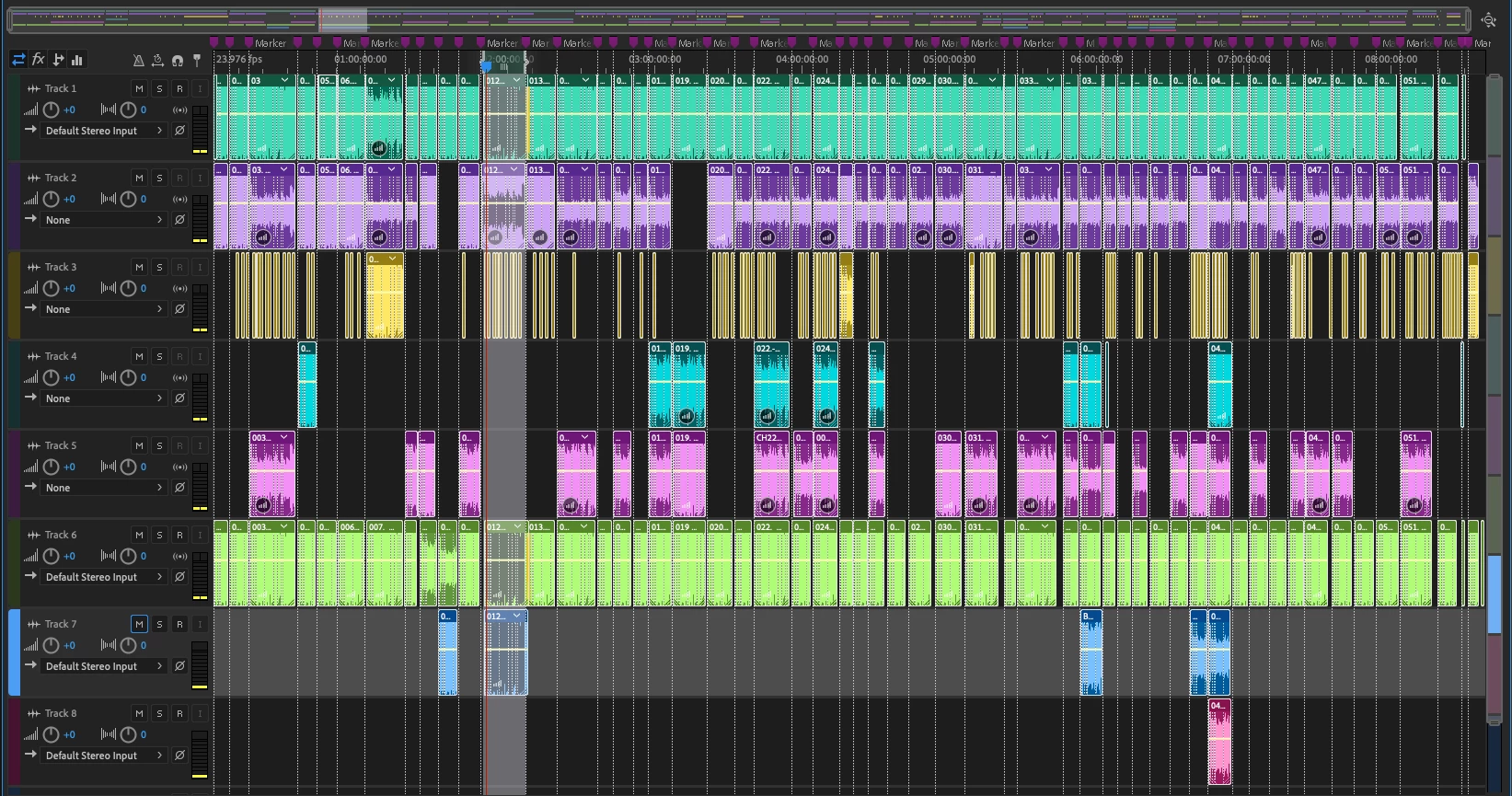
Mastering an audiobook, and have several versions as I climbed the learning curve. I wanted to be able to compare versions, side-by-side, so created a multitrack into which I inserted original, edited, and processed, as well as a track for fixes. This was working beautifully -- choosing the best file, applying some minor Dynamics and evening out the levels -- having re-recorded bits at hand if needed, making great progress. I saved every five minutes and clicked YES to copying media into the session folder. all was well until I left it to save all and copy all files into the session folder. This morning, the computer was frozen -- had to force quit. When I re-opened the project, all the segmented layout is there, and Audition repopulated each clip, but when I went to resume editing, every file -- regardless of its position or label -- plays back the same file, chapter 3.
I have tried different versions of the back-up, all the same problem. I tried relinking all files, but it wants the wrong chapter, which seems very bizarre ("Please locate "03. CH-03 MASTER Working_ML.wav for clip "014. CH14new.") I tried picking the RIGHT clip for "014. CH14new," but then it replaced all clips with THAT file.

I've searched in vain for a solution to this weird issue, no luck. I saw one similar problem where the answer was to highlight all tracks, then right click and choose "offline," then drag each empty sequence to a new project, then relink from there -- but I cannot see how to "offline" the files other than as described above.
Here's a screen grab of the layout, with original sessions on top, and the most recent files at the bottom. It LOOKS pretty, but if you click anywhere, it is all chapter three.
A copy of the session file is available here:
Dropbox - BALEFIRE_ORIGINAL_ASSEMBLY_190327_01.sesx
And a crash log, plus recovery xml?https://www.dropbox.com/sh/emcw2ufxwc5qz0m/AACpzQEC8U3oufdGM5Xcb1Pna?dl=0
Dropbox - 21be9541-cfd4-41ef-8712-5b135efb3fc7 - Simplify your life
Can I restore mu multitrack layout with the CORRECT links??
Thanks!
Rob Wilson
UnAuthorized Films
Audio Editing hardware/Software
Hardware Overview:
Model Name: iMac
Model Identifier: iMac14,4
Processor Name: Intel Core i5
Processor Speed: 1.4 GHz
Number of Processors: 1
Total Number of Cores: 2
L2 Cache (per Core): 256 KB
L3 Cache: 3 MB
Memory: 8 GB
Boot ROM Version: IM144.0189.B00
SMC Version (system): 2.21f92
Serial Number (system): C02PC3LJFY0T
Hardware UUID: C20D7D89-56EB-59A6-B813-49158E1B037C
PreSonus AudioBox USB 96 Audio InterfaceTech Specs
Computer Connectivity: | USB |
Form Factor: | Portable, Desktop |
Simultaneous I/O: | 2 x 2 |
Number of Preamps: | 2 |
Phantom Power: | Yes |
A/D Resolution: | 24-bit/96kHz |
Built In DSP/FX: | 20 Native effect plug-ins |
Analog Inputs: | 2 x XLR-1/4" combo (mic/instrument) |
Analog Outputs: | 2 x 1/4" (main out) |
Headphones: | 1 x 1/4" |
MIDI I/O: | In/Out |
USB: | 1 x Type B |
Software: | Studio One 4 Artist DAW included |
OS Requirements - Mac: | OS X 10.8.5 or later, Intel Core i3 or higher, 4GB RAM or more recommended |
OS Requirements - PC: | Windows 7 SP1 64-bit or later, Intel Core i3 or higher, 8GB RAM or more recommended |
Bus Powered: | Yes |
Depth: | 1.75" |
Width: | 5.5" |
Height: | 5.5" |
Weight: | 5 lbs. |
Manufacturer Part Number: | AUDIOBOX USB 96 |
Installed Audio Software:
Pro Tools First:
Version: 18.7.0.201
Obtained from: Identified Developer
Last Modified: 8/3/18, 6:40 PM
Kind: Intel
64-Bit (Intel): Yes
Signed by: Developer ID Application: Avid Technology Inc (4UYUA773XD), Developer ID Certification Authority, Apple Root CA
Location: /Applications/Pro Tools First.app
Get Info String: 18.7.0.201, Copyright 1991-2018 Avid Technology, Inc.
Creative Cloud Desktop App:
Version: 4.6.0.384
Obtained from: Identified Developer
Last Modified: 8/3/18, 10:04 PM
Kind: Intel
64-Bit (Intel): Yes
Signed by: Developer ID Application: Adobe Systems, Inc. (JQ525L2MZD), Developer ID Certification Authority, Apple Root CA
Location: /Applications/Utilities/Adobe Creative Cloud/Utils/Creative Cloud Desktop App.app
Adobe Creative Suite.
Adobe Audition. Build 11.10.0.184
Punch And RollVersion 1.22.3.
Adobe Acrobat Pro
Architecture: x86_64
Build: 18.11.20055.290043
AGM: 4.30.78
CoolType: 5.14.5
JP2K: 1.2.2.41223
 AdChoices