


New Participant
August 26, 2018
Answered

Normalize effect is truncating my audio?

  • August 26, 2018
  • 1 reply
  • 1007 views

Good afternoon,

For years I've done the exact same routine with every Sunday sermon mp3 from my church:

-copy original from Dropbox

-open in Audition

-check there's no truncation at beginning or end of sermon

-select all waveform, go to EFFECTS, AMPLITUDE AND COMPRESSION, NORMALIZE with the following settings:
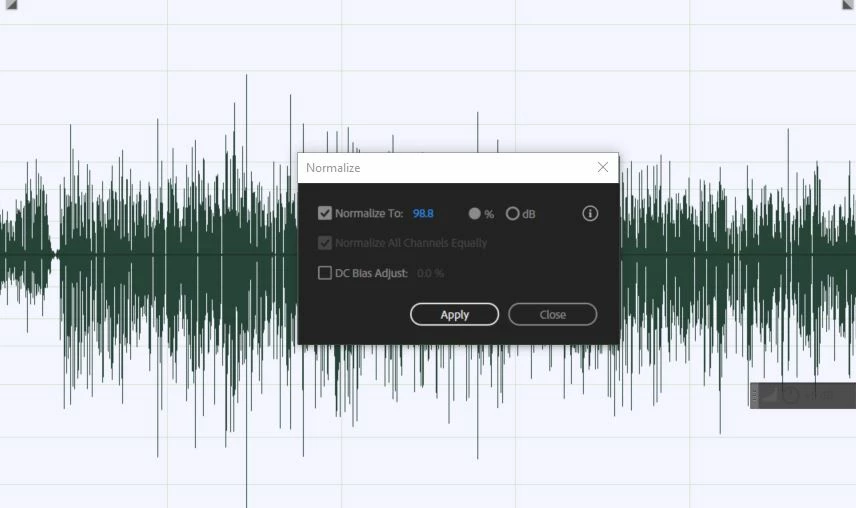
But for one particular file, from two weeks ago, I find that my audio is getting truncated by about 90 seconds, the original 25:01 recording is truncated to 23:37.

If I open the waveform and re-save it (no normalize effect), it does not truncate.

But if I apply the normalize effect, even though the waveform shows me the whole 25:01, the saved audio is 23:37.  This is true whether I simply save (overwrite) or save as. This is my SAVE AS dialog:
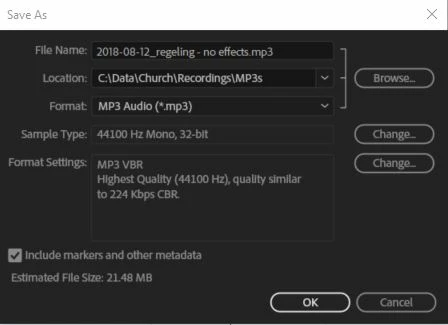
I'm mystified. Is there something corrupt about this original that I can't understand?

Thanks for any help any of you can offer!

Dan

PS I attach the original mp3 here: Dropbox - original.mp3

And the truncated mp3 here: Dropbox - truncated.mp3

This topic has been closed for replies.
Correct answer ryclark

Normalize effect is truncating my audio?

No it isn't. It is not adding the effect that is causing an apparent truncation of the audio files but the re-encoding of the level changed audio back to a VBR .mp3 format. And there is no actual truncation of any of the audio. It is all still there. It just a difference in how various audio software reports the apparent file size/duration from calculating the number of audio samples within a VBR compressed file.

Both posted tracks are identical in length and contain identical audio (except for the level difference from Normalization) ie. 00:25:01:09. So it would appear that the apparent difference in size is partly due to different .mp3 format encoding settings. The Original Audition reports the Properties to be MP3 94 Kbps VBR whilst the Truncated one says MP3 145 Kbps VBR OFL. So although the file size will be different due to the different coding settings the length of the content will be exactly the same, OFL stands for Original File Length.

However I should point out that opening an .mp3 file in Audition causes it to be decoded to Audition's native lossless format of .wav. Making changes to the audio and then re-encoding back to lossy .mp3 will then lose quite a bit more audio quality. Although this may appear to be offset by the level increase Normalisation has made. But whoever made the original recording is doing you a great disservice by recording the audio at such low level thus starting out the lossy audio compression with not much audio to start with. To make efficient use of compressed audio files the level of the audio in the file should generally be a high as is possible to get the best quality out of the resultant file.

Although lossy formats using VBR (Variable Bit Rate) rather than CBR (Constant Bit Rate) make be slightly more efficiently and give smaller output files it makes it difficult for any media Playing software to know the real length of the included audio content. In these days when file size for use of the internet is not so much of a problem using CBR would probably be quicker encoding and will give more consistent duration and bit rate properties.

Going back to the problem of decoding an .mp3 and then recoding it as .mp3 again with the resultant audio quality loss can be overcome for level changes by using special .mp3 level changing apps such as MP3Gain which leave the original audio intact and just add extra metadata to tell the playback software to increase the level during playback.

MP3Gain

1 reply

ryclark
ryclarkCorrect answer
Participating Frequently
August 26, 2018

Normalize effect is truncating my audio?

No it isn't. It is not adding the effect that is causing an apparent truncation of the audio files but the re-encoding of the level changed audio back to a VBR .mp3 format. And there is no actual truncation of any of the audio. It is all still there. It just a difference in how various audio software reports the apparent file size/duration from calculating the number of audio samples within a VBR compressed file.

Both posted tracks are identical in length and contain identical audio (except for the level difference from Normalization) ie. 00:25:01:09. So it would appear that the apparent difference in size is partly due to different .mp3 format encoding settings. The Original Audition reports the Properties to be MP3 94 Kbps VBR whilst the Truncated one says MP3 145 Kbps VBR OFL. So although the file size will be different due to the different coding settings the length of the content will be exactly the same, OFL stands for Original File Length.

However I should point out that opening an .mp3 file in Audition causes it to be decoded to Audition's native lossless format of .wav. Making changes to the audio and then re-encoding back to lossy .mp3 will then lose quite a bit more audio quality. Although this may appear to be offset by the level increase Normalisation has made. But whoever made the original recording is doing you a great disservice by recording the audio at such low level thus starting out the lossy audio compression with not much audio to start with. To make efficient use of compressed audio files the level of the audio in the file should generally be a high as is possible to get the best quality out of the resultant file.

Although lossy formats using VBR (Variable Bit Rate) rather than CBR (Constant Bit Rate) make be slightly more efficiently and give smaller output files it makes it difficult for any media Playing software to know the real length of the included audio content. In these days when file size for use of the internet is not so much of a problem using CBR would probably be quicker encoding and will give more consistent duration and bit rate properties.

Going back to the problem of decoding an .mp3 and then recoding it as .mp3 again with the resultant audio quality loss can be overcome for level changes by using special .mp3 level changing apps such as MP3Gain which leave the original audio intact and just add extra metadata to tell the playback software to increase the level during playback.

MP3Gain

New Participant
August 27, 2018

Thank you VERY much. You've helped me a great deal and solved my problem!