


Known Participant
May 12, 2018
Answered

Problems with convertation mono to stereo and vice versa

  • May 12, 2018
  • 5 replies
  • 6936 views

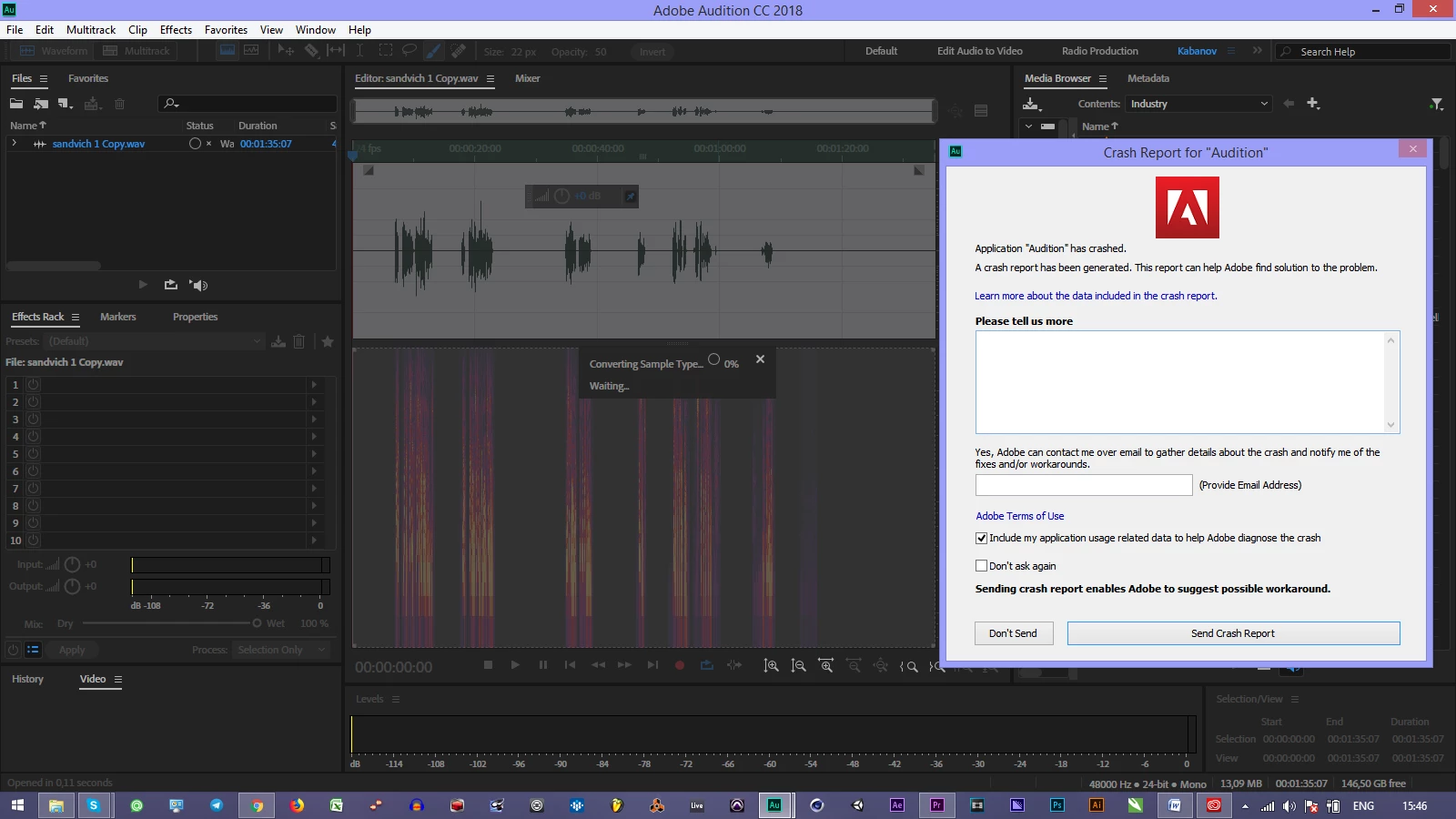
when i try to convert any sound file from mono to stereo "great" Audition CC get crash... It's f*cking unbearable. I can't do simple operations. Program that use my money can't work... Audition 1.5 was better than that sh*t... Sorry for  for the emotions, but it's realy poor performance of developers.
This topic has been closed for replies.
Correct answer mivangen

Thanks for the report.  The workaround for this issue for now is to close the Spectral Display before converting via preset in Convert Sample Type.

5 replies

rickf779
Known Participant
November 19, 2018

For what it's worth, it crashed again upon performing a "Convert Sample Type."  Crash report submitted.  It only crashed one after the update and I had several conversions to make.

rickf779
Known Participant
November 19, 2018

Are you guys going to fix this problem or not?  Build 11.1.1.3 of Audition CC

Symptoms are exactly as above...1) CONVERT SAMPLE TYPE FROM MONO TO STEREO, 2) EXPERIENCE CRASH

This is ridiculous.  You have your "monthly subscription" money now; I'd prefer the one-time buy it in a box concept, but no, you want to to be a financial drain every month.  Therefore, I don't think it's too much to ask for you to actually do some work this month and deliver a reliable product.  I see this issue was brought to your attention six months ago so please, use your hands for something other than an a$$ warmer and get to work.  This resolution delay is unacceptable.

Brainiac
November 19, 2018

rickf779  wrote

Are you guys going to fix this problem or not?  Build 11.1.1.3 of Audition CC

Symptoms are exactly as above...1) CONVERT SAMPLE TYPE FROM MONO TO STEREO, 2) EXPERIENCE CRASH

This is ridiculous.  You have your "monthly subscription" money now; I'd prefer the one-time buy it in a box concept, but no, you want to to be a financial drain every month.  Therefore, I don't think it's too much to ask for you to actually do some work this month and deliver a reliable product.  I see this issue was brought to your attention six months ago so please, use your hands for something other than an a$$ warmer and get to work.  This resolution delay is unacceptable.

The latest version is 12.0.0.24.  Perhaps you should first install the update?

Just to add: I very regularly need to convert stereo wav to mono wav and I've never experienced a crash.  Admittedly, I've never needed to carry out the reverse procedure.

ryclark
Participating Frequently
November 19, 2018

Any way we 'guys' won't be able to do anything about bugs since we are just users like you on a U2U forum. However the Adobe guys have already fixed this AFAIAA in the latest version 12.

So there won't be any fixes to v.11 now v.12 is out. Any fixes will be included in the latest version which, as you have a CC subscription, you should have updated to anyway as Emmrecs suggests.

Participating Frequently
October 25, 2018

We never had the problem with our old PreSonus Audiobox sound card, but with our new RME Fire Face UC it crashes every time. Really strange, deeply disturbing.

ryclark
Participating Frequently
October 25, 2018

Under what circumstances using what operating system? Audition versions have changed since the previous posts.

Participating Frequently
October 26, 2018

Windows 7 service pack 1 and latest update Audition.

Known Participant
August 1, 2018

I've been having the same problem for a month or so - not sure, but it may have been preceded by updating to version 11.1.1.3 - I use the function to balance the left and right channels 1:1. I first convert to Mono (which is successful and it doesn't crash), then converting to stereo. Before, it would manage this without a problem. Then it started crashing -- consistently and predictably.

Fortunately, I have had it (consistently with 100% success) ask if I would like to continue my recovered session, and, choosing "Continue", it reopens the file with the Stereo conversion complete.

It's annoying, and I lose all my steps in history prior - so I do this step either first or after I'm satisfied I won't need to undo anything - but no real negative significance. I don't lose any work, and the process is successful. I don't even have to make sure I manually save prior to initiating the conversion. It still recovers it.

It'd be really nice to see Adobe correct this issue, but at least as long as you have "Autosave recovery data" enabled, you should be able to reopen, continue session, and still have your stereo conversion complete.

Adobe Employee
August 1, 2018

Do you have the Spectral Display open?

Known Participant
August 1, 2018

Yes. And if reopening it causes the crash to just happen later, as this stated:

Quote: bgambrogi Jul 26, 2018 1:00 PM (in response to mivangen)
This works, but then when you reopen Spectral Display, it crashes again anyway

Then it is out of the question. There's literally nothing I do in Auditon without the Spectral Display.

SuiteSpot
Inspiring
May 12, 2018

This is really not normal - my guess is that we need to troubleshoot what is happening on your PC

First off you should check out this thread

Audition Crashed. Now what?

In addition you should give us a details of your hardware OS, audio interface, etc

The more info the more chance someone on the forum can help

Known Participant
May 12, 2018

thanks, i submit all info to audbugs@adobe.com

mivangenCorrect answer
Adobe Employee
May 15, 2018

Thanks for the report.  The workaround for this issue for now is to close the Spectral Display before converting via preset in Convert Sample Type.