


New Participant
April 15, 2020
Answered

Recording in waveform but not in multitrack

  • April 15, 2020
  • 1 reply
  • 3673 views

I'm trying to record a phone conversation with Alesis iO2 audio interface and Adobe Audition. To the left channel I have a mic connected, to the right one - the telephone.


When I record in waveform - it's okayish, but the right channel (from the phone) is too loud and results in overdrive. Hardware gain reduction is not enough.


So I thought I would record in multitrack and use Audition mixer to reduce the right channel. But the multitrack is not recording at all, despite setting input devices on Track 1 and Track 2 and toggling the power on both tracks. What am I doing wrong?


Sorry if my vocabulary is a little rough, I'm new to sound editing and don't have much experience.
Correct answer SteveG_AudioMasters_

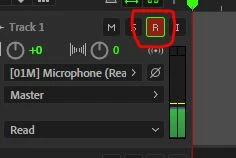
A couple of things: In Multitrack you have to select the 'R' button on any given track before it will record - did you do that?


Secondly, the Auditon mixer doesn't function as any sort of input attenuator - Audition has no control over incoming levels at all - that's entirely down to your sound device. And if you have an overload at the input, physical attenuation is your only answer - whatever you use. Normally you get sufficient attenuation if you select line level as your input - on the Alesis that would be the guitar input you'd use, but there is also a line attenuator device available for this purpose - I don't know where you are, but in the UK, Amazon sell them - Headset buddy 

1 reply

SteveG_AudioMasters_
SteveG_AudioMasters_Correct answer
Community Expert
April 15, 2020

A couple of things: In Multitrack you have to select the 'R' button on any given track before it will record - did you do that?


Secondly, the Auditon mixer doesn't function as any sort of input attenuator - Audition has no control over incoming levels at all - that's entirely down to your sound device. And if you have an overload at the input, physical attenuation is your only answer - whatever you use. Normally you get sufficient attenuation if you select line level as your input - on the Alesis that would be the guitar input you'd use, but there is also a line attenuator device available for this purpose - I don't know where you are, but in the UK, Amazon sell them - Headset buddy 

New Participant
April 15, 2020

Thank you very much. Indeed, I didn't toggle the record button. Now it works!


I'll get the line attenuator as you recommend. Thanks again.