


Reset Multitrack session from mono to stereo
Hello all.
I have searched for the answer but couldn't find it so forgive me if this is documented elsewhere.
I accidentally set up a multitrack session as mono instead of stereo.
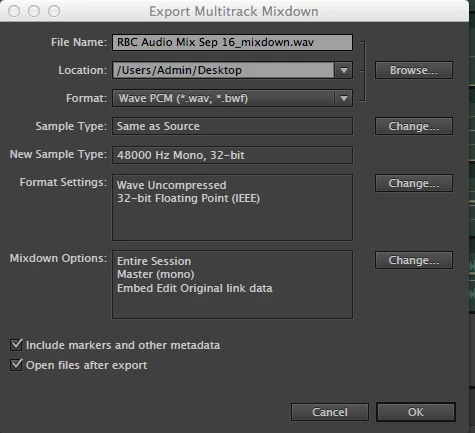
I have finished the mix and want to export it as stereo but the usual pulldown menus won't give me the option to change the export file from mono to stereo.
I can't change sample type from 48000Hz Mono to stereo
Is there a work around?
I read I could edit the .SESX file in a text editor (manually change the text from mono to stereo) file but don't know how I would begin to do that.
Please help.
Many thanks.
Message was edited by: Adrian Smith OK. I figured out a quick fix. I opened the session file .SESX by dragging it onto a text editor app which automatically opened the source code. I used TextMate but any text editor will do it. I just dropped the session file onto the app and it opened/revealed the code. I then changed the word "mono" to "stereo"in the line of code that had to do with session set-up. I saved the file as an exact copy of the session files (so by giving it the same name it replaced the original). Note: Be sure to save it as as a .SESX file and not a default text file. The Audition file will now open as a stereo master session with all the other information intact. I exported the stereo file as originally wanted and got on with life. Hopefully this will be helpful to someone else..
 AdChoices