wshanemuir
Participating Frequently
January 6, 2021
Answered

Selected Area Changes While Running a Script from "Favorites"

  • January 6, 2021
  • 1 reply
  • 943 views

When I'm processing an audio file, I'll pull it into Audition and run a series of effects. I have several effects set up as a script under the "Favorites" menu. But I'm running into a problem.

I'll select the portion of the waveform I want to modify and click the script I want to run. The first few effects will be applied just fine, but then the selected area will change on its own, and the rest of the effects will be applied to the smaller selection only.

I don't know if it matters, but it seems that when it gets to the "denoise" effect, the selected area changes.

I'm currently using version 13.0.12.45, but I had the exact same issue with version 12 as well. Anyone have a clue what's going on?


System info:

Windows 10 Pro

x64-based PC

Intel(R) Xeon(R) CPU E5-2623 v3 @ 3.00GHz (x2)

64 GB RAM


This topic has been closed for replies.
Correct answer SteveG_AudioMasters_

Almost certainly what has happened is that during the creation of your Favorite, the selected area of the waveform has changed. If you want to see what has happened, then you need to open the Favorites for editing. What you probably have is something like this:

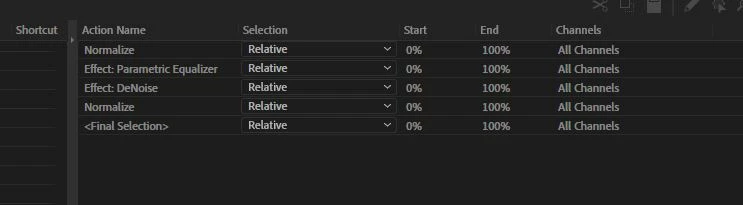
In this list, you can see that the DeNoise has an entirely different selection to everything else. If this happens, and you don't correct the time before adding the next effect, then the time selection will carry on through the rest of the Favorite. In the one above, I reset the time to get it back to the entire file, but it will certainly retain the previous time selection for the next effect if you don't alter it.


If you make sure that it's correct, then you end up with a display like this for your Favorite:

The trick here, before applying each effect, is to have the cursor on the waveform and hit Ctrl+A. That will guarantee that you select everything.


Unfortunately, when it says you can 'edit' the Favorites, it doesn't really mean it. The only column you can edit is the Selection one, and not any of the times. That's a pain, because it means that if you get this wrong, you have to recreate the entire Favorite from scratch.


Creating Favorites does work, but there are snags and gotchas!

1 reply

SteveG_AudioMasters_
SteveG_AudioMasters_Correct answer
Community Expert
January 6, 2021

Almost certainly what has happened is that during the creation of your Favorite, the selected area of the waveform has changed. If you want to see what has happened, then you need to open the Favorites for editing. What you probably have is something like this:

In this list, you can see that the DeNoise has an entirely different selection to everything else. If this happens, and you don't correct the time before adding the next effect, then the time selection will carry on through the rest of the Favorite. In the one above, I reset the time to get it back to the entire file, but it will certainly retain the previous time selection for the next effect if you don't alter it.


If you make sure that it's correct, then you end up with a display like this for your Favorite:

The trick here, before applying each effect, is to have the cursor on the waveform and hit Ctrl+A. That will guarantee that you select everything.


Unfortunately, when it says you can 'edit' the Favorites, it doesn't really mean it. The only column you can edit is the Selection one, and not any of the times. That's a pain, because it means that if you get this wrong, you have to recreate the entire Favorite from scratch.


Creating Favorites does work, but there are snags and gotchas!

wshanemuir
Participating Frequently
January 6, 2021

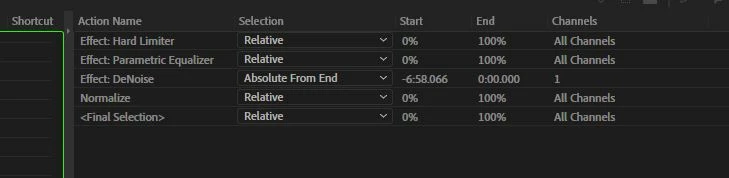
Here's a screen shot of my favorite.


As far as I can tell, the selection shouldn't be changing.


Here is a screen capture of the actual process. At the top you can see the selected area as the favorite runs from Parametric Equalizer through the first instance of Hard Limiter. But once DeNoise comes up, the selection shortens (bottom). I have no idea why it changes...


SteveG_AudioMasters_
Community Expert
January 6, 2021

You haven't shown the whole of the edit - Can't tell what's actually happening to the rest, as it's still possible to have percentages in the other columns, even if they are set to relative. If you have anything other than 0 or 100% in any of the boxes, it's going to make reselections. Personally I wouldn't start from any absolute position at all; I'd start the Favorite recording with Ctrl-A and just to make sure, redoing that before each new effect.