


cheyrn
Inspiring
November 19, 2017
Answered

Still no way to enter keyframe value?

  • November 19, 2017
  • 1 reply
  • 1177 views

I think the answer is no. But, is there a way to type a number and have that be used as the value of a keyframe? I'm giving up after a few hours trying to get key frames to have values that are all within a 3db range and it goes -2, +7.1, +1.1, +9, 0, +5 etc. etc. etc.
    This topic has been closed for replies.
    Correct answer SteveG_AudioMasters_

    Strange - I thought this was all available in 2017, but whatever...

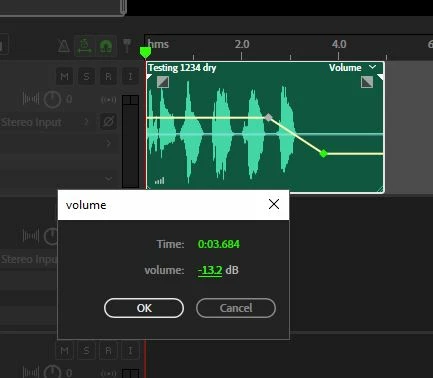
    If you right-click with the mouse on a keyframe, you get an option to edit it. If you take that option you get this:

    No zooming required at all.

    1 reply

    ryclark
    Participating Frequently
    November 19, 2017

    You are correct there isn't any way at present to type in Keyframe values. It has been requested many times.

    However I am not sure what the numbers you are quoting refer to. I can make mouse adjustments of keyframe values on my system that are in 0.2dB steps. Well within the 3dB range that you are quoting. Are the values that you are getting at different keyframe points on one Track or across several different tracks? Not quite sure from your post what you are trying to do.

    Inspiring
    June 26, 2019

    Is this still the case in Audition CC 2019? Do you have any workspace advice to make adjustments easier?

    I can keyframe much faster in Aftereffects, so it seems like something's wrong here.

    I have been zooming into the tracks with 1 finger mouse scroll and even then I have to fight with the keyframe to get it to the number I want. Then of course I have to zoom back out and sometimes the interface gets wonky, lagging a bit etc. Maybe there's a handy way to fullscreen an individual track when multitrack editing? Or is there a way to keep an extra zoomed window open with the volume envelope that functions like a loupe and follows the playhead?

    The obvious fix would be to handle keyframes like aftereffects (double-click for manual data entry) but in the meantime any timesaving UI hacks would be appreciated.

    Thanks

    SteveG_AudioMasters_
    Community Expert
    SteveG_AudioMasters_Community ExpertCorrect answer
    Community Expert
    June 26, 2019

    Strange - I thought this was all available in 2017, but whatever...

    If you right-click with the mouse on a keyframe, you get an option to edit it. If you take that option you get this:

    No zooming required at all.