


4_Valhalla
Participant
September 4, 2022
Question

Tracks not sending to Mix (Master) track - Please Help

  • September 4, 2022
  • 3 replies
  • 1583 views

Okay so I'm using version 22.6 of Audition. My OS is Windows 11 Pro and I have all the latest updates. My audio interface is a Scarlett 2i2, which I have the latest drivers installed.

I tried resetting to factory defaults and my issue is still occurring.

Here's the full details:


In a multitrack session, for my individual audio tracks I have the input set as one of the two inputs on my Scarlett and the output is set as mix.
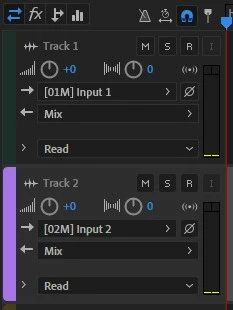


If I arm the track I will get audio signal from my Scarlett, on that particular track. However, if I navigate to my mix (master) track I and look at the levels, I am getting nothing, even though I have the track output to send to mix.


Is there extra steps or settings that I am missing? Is there something broken here? This is a core function of multitrack session and should be simple enough to function.


I really appreciate your help.

This topic has been closed for replies.

3 replies

SteveG_AudioMasters_
Community Expert
Community Expert
September 4, 2022

Smart monitoring was accidentally enabled by default in one Audition release, and it caused no end of problems - see here. It can easily give rise to digital howl-round and strange ringing sounds caused by system latency.


But here I think we need some more information. You shouldn't have to do anything in particular to get tracks fed to the output to show up in the metering, but I have to say that by default, the output channel is called Master, not Mix. So could we see how your mixer screen looks? And are you using one of the standard session templates? Which one?

4_Valhalla
Participant
September 4, 2022

Hello Steve,


I thought that adobe renamed the master track to mix. I don't have an output option called master. I can either output to None, Mix, Bus, Mono then a channel on my audio interface, and Stereo then the channel group on my audio interface.


Here's my mixer screen.

I just started a multitrack session without a template.


Looking forward to your feedback.


Thanks.

SteveG_AudioMasters_
Community Expert
Community Expert
September 4, 2022

It is perfectly possible to change any of the track labels - including renaming Master as Mix. I checked, and the default name for the output on the 'None' template is indeed Mix, although it's Master for the rest. But it shouldn't matter, as long as the track sends go to whatever it's called. On the face of it you should see an output with the way yours is set, by the looks of it. But I am a little suspicious about your session though - a normal 'none' scenario would give you 6 tracks, not 2.


The thing to try at this point is to open a new session using another of the templates and see if the same thing happens. I wouldn't pick Podcast, as that has led to people getting very strange results, and somewhat confused. If you get the same result then the next option is to restore the templates (and indeed everything else) to the 'vanilla' settings. That's easy to do - just close Audition and restart it with the Shift key held down.

Community Expert
September 4, 2022

Try changing this option in preferences:

4_Valhalla
Participant
September 4, 2022

Hello Richard,


I checked and Smart Monitoring is already diabled (or unchecked)


Thanks for the suggestion though.

4_Valhalla
Participant
September 4, 2022

I'd like to also add that I am having the same issue if I send a track to a bus track.