


Inspiring
June 21, 2025
Answered

Waveform displayed by Adobe Audtion CS6 not showing digital artefacts?

  • June 21, 2025
  • 1 reply
  • 183 views

When storing audio files on my PC I always downsample 192/24 audio files to 96/24 files using Adobe Auditon CS6. Yesterday, when playing back one such file, I was surprised to discover a single loud pop/click/skip in one downsampled track when listening to it using JRiver Media Center 34.


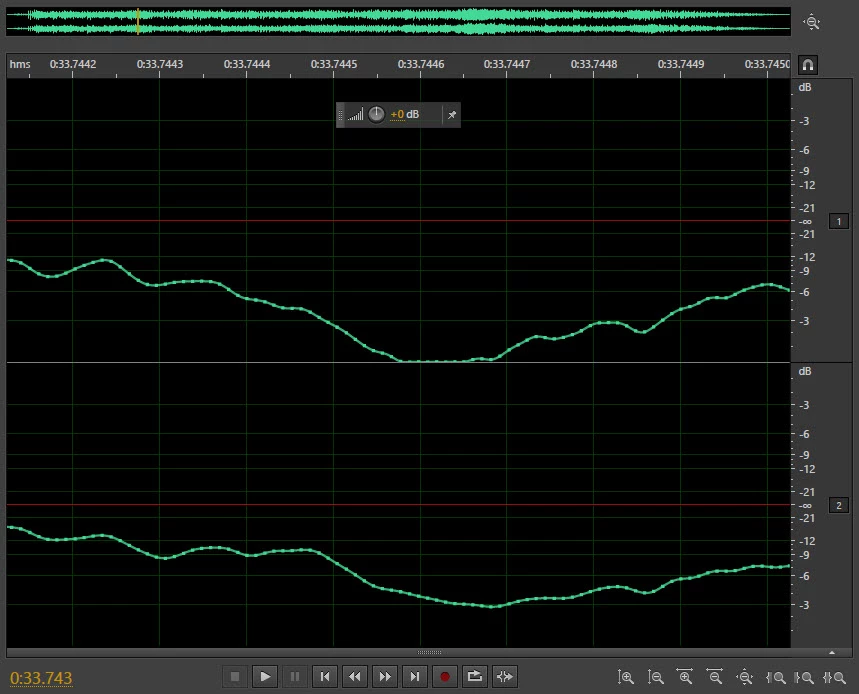
On opening up the offending audio file in Adobe Audition CS6, I was puzzled to find that CS6 played it back without any problem. Visually, there appeared to be nothing much wrong with the waveform where the pop occurred, as can be seen here:


However I then opened the same file at the same point in iZotope RX5 and got a bit of a shock because this is what it showed:
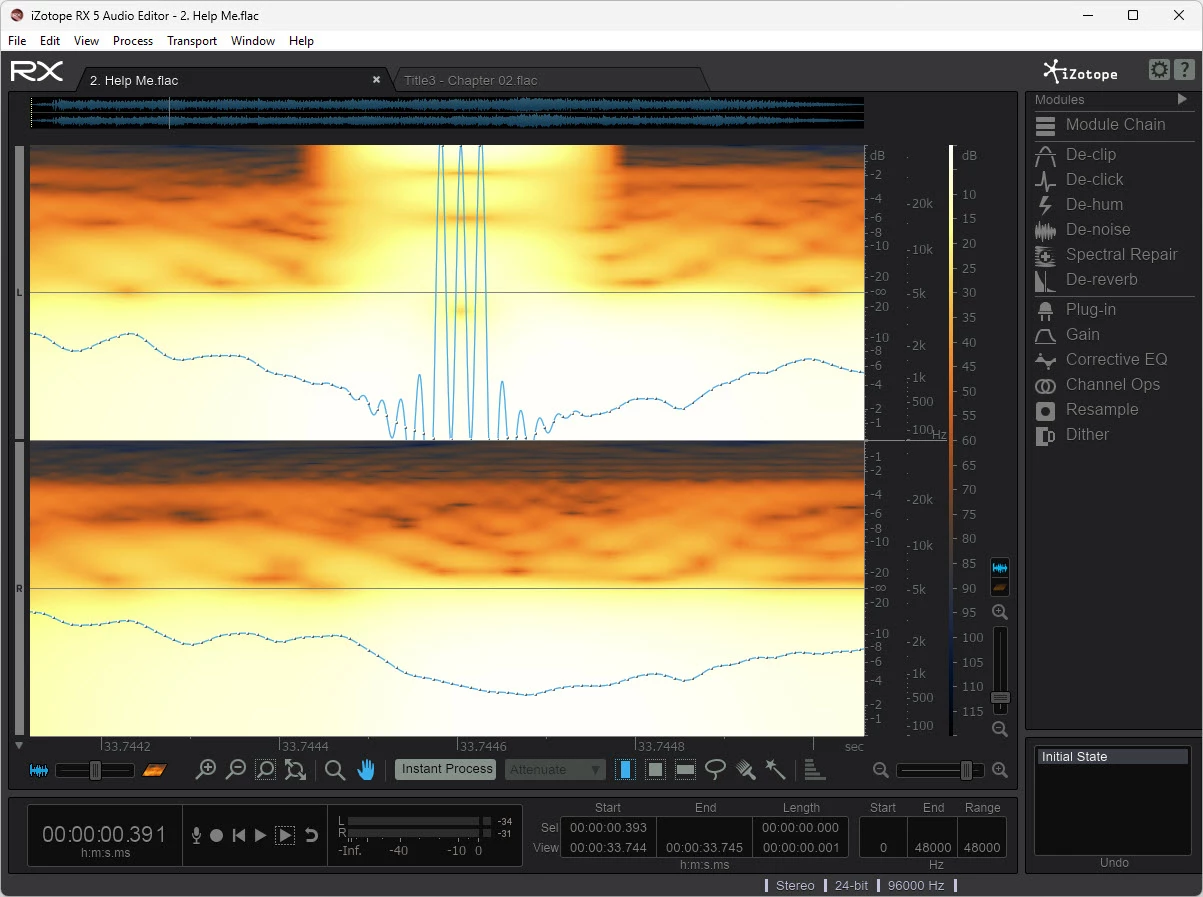
 

So I have two questions. First, how can Adobe Audtion CS6 and iZotope RX5 give such remarkably different renderings of the same part of the same audio file? And second, if the iZotope RX5 rendering is accurate (as suggested by the pop/click/skip), how could a high quaity and trusted piece of software like CS6 introduce such artefacts?  

Correct answer SteveG_AudioMasters_

Not all software or hardware handles out-of-gamut audio the same way. Many years ago I created a .pdf document that demonstrated how just moving a couple of samples could cause all sorts of overshoots, and the way that these were actually outputted as audio depended a lot on the physical characteristics of the hardware you used. You need to get your head around this in order to get used to the idea that everything isn't perfect! Document is available here. For instance, with your example, even if the waveform stays identical at a lower level, the display is going to look different, simply because it hasn't hit 0dB.


But these are all abnormalities - you really shouldn't run anything this hot.

1 reply

SteveG_AudioMasters_
Community Expert
Community Expert
June 21, 2025

You're not really asking the correct questions here... It's pretty obvious from your first screengrab that the upper waveform has hit 0dB in the centre of it, and at that point the waveform makes an abrupt turn that's actually impossible to reproduce correctly - you'd need an infinite bandwidth to reproduce the step change. And you are using an integer-based format to store the sound, so the signal cannot exceed 0dB.


The second thing is that the degree to which this is represented in a spectral display depends entirely on the spectrum settings - just by altering these it will look completely different. That's why the results differ - it has nothing to do with 'accuracy' - this is a Fast Fourier Transfer process used to represent the spectrogram, and the reason that the controls are there is so that you can vary them to better represent what you want to see at any given instant. But I have to say that to get the best out of this, you need to understand how the FFT works, and unfortunately that's not altogether simple.


So from your two screengrabs, it's pretty easy to tell that the Audition one is more 'correct' in terms of what the waveform is doing (and shows the reason why), but the RX5 one is showing a typical composite response to it (which you could vary with the display controls. What you actually need to do is reduce the amplitude of the original file so that when it's converted, it doesn't hit 0dB. If you use Audition's 'Normalize' effect with it set to -1dB before the conversion, you shouldn't experience this happening at all.

Inspiring
June 22, 2025

Thank you so much, SteveG, for the extremely helpful reply.


It's certainly true that I do not have an undertanding of how FFT works but I do follow your simplified explanation and it does make sense to me.


The odd thing is that if I go back to the original 192/24 audio file, that too has the the same waveform shape at that particular point and yet a) it does not make a popping sound when played back through JRiver MC34 and b) when displayed in iZotope RX5, it does not have those alarming spikes. 


A second oddity is that if I downsample the same audio file to 96/24 using software other than Adobe Audition CS6, the resulting audio file does not cause the popping sound when played back through MC34 or the spikes when displayed in iZotope RX5.


Do you think you could help me undertand why this is? I've been experimenting with home audio for a good many years now yet this is the first time I've come across this.     


SteveG_AudioMasters_
Community Expert
SteveG_AudioMasters_Community ExpertCorrect answer
Community Expert
June 22, 2025

Not all software or hardware handles out-of-gamut audio the same way. Many years ago I created a .pdf document that demonstrated how just moving a couple of samples could cause all sorts of overshoots, and the way that these were actually outputted as audio depended a lot on the physical characteristics of the hardware you used. You need to get your head around this in order to get used to the idea that everything isn't perfect! Document is available here. For instance, with your example, even if the waveform stays identical at a lower level, the display is going to look different, simply because it hasn't hit 0dB.


But these are all abnormalities - you really shouldn't run anything this hot.