


Inspiring
April 8, 2018
Answered

Why am I not able to have direct effect when adjusting volume on expanded waveform with version 11.0.2

  • April 8, 2018
  • 1 reply
  • 660 views

Adjust amplitude

Not able to have direct effect when adjusting volume on expanded wave form with version 11.0.2. Replaced mouse batteries. no change. Works normally when changing the volume on the entire file or larger portions of the file.

Uninstalled 11.0.2 and installed 11.0.  Adjust amplitude works normally on expanded waveform on version 11.0.
    This topic has been closed for replies.
    Correct answer SteveG_AudioMasters_

    It works fine at that resolution for me also. expand it and try again.


    Okay, I've done some more experiments and can see what you mean. In fact, you can make a selection and, depending upon the zoom level, the display will either move immediately or not until you release the mouse. No I have no idea why this has changed - I'll report it as at least a cosmetic bug tomorrow, referencing this thread.

    1 reply

    ryclark
    Participating Frequently
    April 8, 2018

    Audition v. 11.0.2 is not the latest version. Update to the latest v.11.1 and see if the same problem exists.

    How are you trying to adjust the amplitude of the audio in Audition? You imply that you are working in the Waveform view to edit this audio. What particular Audition tool are you using for your level adjustments?

    Rick0725Author
    Inspiring
    April 16, 2018

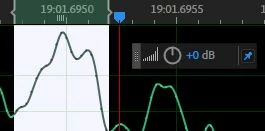
    The volume control function works the way it should till it gets to a certain resolution. past a certain resolution the wave amplitude does not follow the wheel.

    Works - move wheel to the left amplitude goes down appropriate amount following the wheel reading.

    Does not work past a certain resolution. move wheel to the left. wave does not change with the dial. let go at -1.2 db for example and  the display changes -1.2 db. this did not happen in previous versions. used it a lot during  editing

    Mouse and usb drivers update to date

    Replaced mouse batteries.

    Video drivers up to date.

    Reinstalled software removing previous settings.

    Situation is new with latest versions

    Rick

    SteveG_AudioMasters_
    Community Expert
    April 16, 2018

    Goes fine from +15dB to -96dB here in the current release...

    Dropbox - HUD works fine on selection.mov