Thanks Steve
I’m not really sure how to do that. Do I import it into Audition as Raw? I have tried but it just sounds like loud static.
Any other tips in this direction greatly appreciated.
Michelle
Sent from my iPhone
I suspect that this is one of the instances where, unless we have access to the file itself, it's going to be hard to tell what to try. Remote saves have always been slightly risky things to do - generally it's much safer to do the first save (where the file is created) on your local machine, and then transfer the already-complete file to the remote location. This is a much safer process, and you can also check that it's worked successfully before deleting the local version. Yes, even an external drive connected to your machine counts as 'remote' until you've proved absolutely that it works okay for doing this!
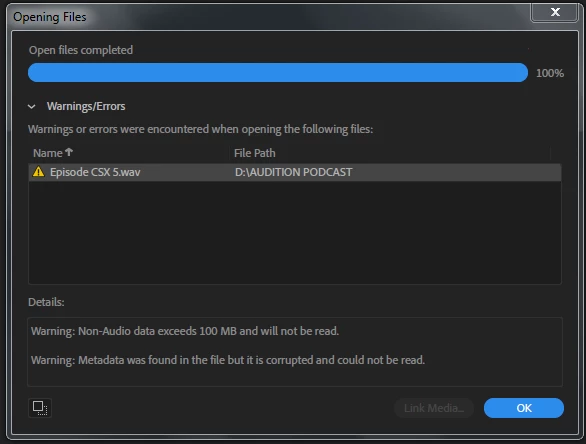
My guess, from the messages you've got, is that somehow the file's headers have got corrupted and now Audition thinks that something that was supposed to be sound data isn't that - and it has wrongly identified it as metadata, even though it isn't. This is why I suggested looking at it as .raw - that should interpret all of the data as audio, although if it really is badly corrupted even that may not work.
Mylenium isn't wrong to suggest trying to open the file in another app - indeed it might be worth trying this, just in case it works. But if it's that corrupted, I suspect that it won't open at all. Just trying to open it with Windows Media Player would reveal whether this was the case or not - you don't need to install any other software.




 AdChoices