


Workflow for splitting sentences into words (1 word per file)
I am trying to create speech test materials for audiology, and need to split recorded 5-word sentences into 5 separate clips and export those 5 clips as 5 WAV files. Those files will later be combined on the fly in other software to create new sentences. Using results from some pilot testing, the RMS amplitude of each file needs to be adjusted according to it's intelligibility. Obviously, for that to work and sound good (no clicks), there need to be ramps at each end of the file. I wish to have 5 ms ramps.
All of this work is easily done in the Magix Sequoia DAW. Unfortunately, the one thing Sequoia doesn't have that I need is a way to get detailed amplitude statistics about a clip. I need to be able to see average RMS amplitude, which Audition can do. I had wanted to do everything in Audition, so if anyone can think of an alternative workflow to accomplish everything else that would be greatly appreciated.
Maybe I'm having trouble because I'm used to working in multitrack mode in a very powerful DAW where almost everything is done non-destructively in multitrack view, but unfortunately, it doesn't seem there is any practical way to do this in Audition because:
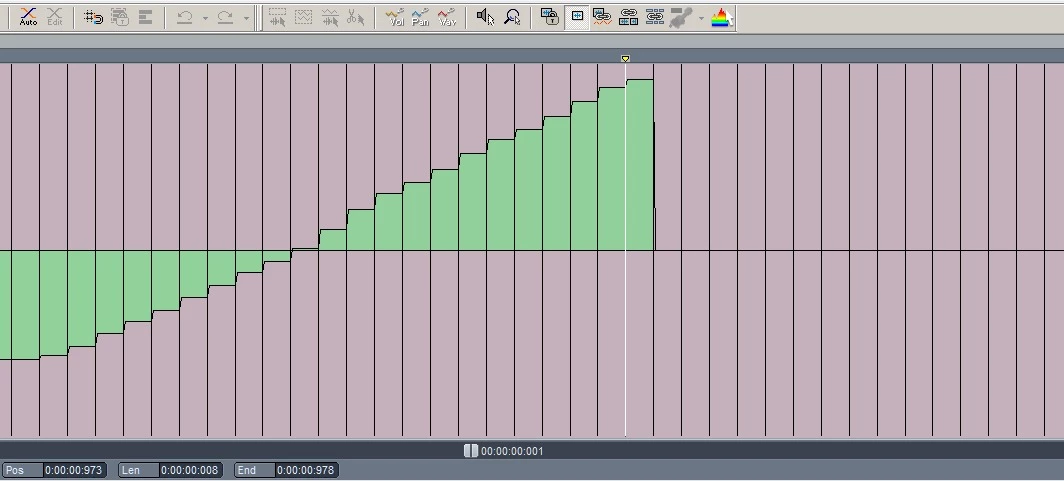
1. It won't create crossfades automatically when I use the split command (even though there is a menu option in the Data section of preferences that explicitly says it will do that, it doesn't work - see below waveform in Sequoia of a clip exported from Audition with this option on and fade time set to 5 ms)
2. No way to quickly apply a fade to each end of a clip after it's been split with a uniform shape and duration of 5 ms.
Even if I could do that, it doesn't look like there is:
3. A command to place markers at the beginning and end of all clips in a selected range.
4. A command to export each segment between two markers as a separate WAV file.
Any ideas of alternatives to these 4 steps?
 AdChoices