 Adobe Community

- Home
- Bridge
- Discussions
- Re: BRIDGE Exports as JPEG not JPG ... WHY? ?? PH...
- Re: BRIDGE Exports as JPEG not JPG ... WHY? ?? PH...

Copy link to clipboard
Copied
It would be great if BRIDGE export presets would have an option to choose the file format extention .jpg NOT .jpeg
In BRIDGE when you go to TOOLS > PHOTOSHOP > IMAGE PROCESSOR it saves as .jpg
but if you use BRIDGE, EXPORT > FILE > EXPORT TO it saves as .jpeg, i need it to be .jpg
so, photoshop doesn't export as .jpeg so why does BRIDGE?
It causes a lot of syncing and confsuion prblems due to the .jpg (photoshop image processor). and .jpeg (bridge export to...)
Grrrrr.... Am i missing something here?


 1 Correct answer


Hi,
The latest Beta build 14.0.0.57 has support for exporting files to .jpg extension along with a few other features.
For a complete list of features available in the Beta build, please refer to the community post:
https://community.adobe.com/t5/bridge-discussions/adobe-bridge-beta-is-now-available-14-0-0-57/td-p/13986216
We would love for you to try it out and share feedback.
Regards,
Bridge Team

 19
Replies
19
19
Replies
19


Copy link to clipboard
Copied
There is no known solution other than to batch rename your "jpeg" files with the new extension "jpg".
https://community.adobe.com/t5/bridge/converting-raw-to-jpeg-from-within-bridge/td-p/11331084?page=1

Copy link to clipboard
Copied
Why isn't this fixed with the latest version of bridge, for the love of all things holy?!?

Copy link to clipboard
Copied
Because its not broken. Both file extensions are valid and equivalent.
Copy link to clipboard
Copied
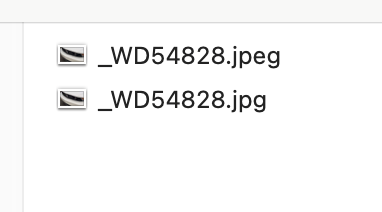
Wrong. When one is overwiting a file via a batch process, the extention matters. If the extension is different, the file isn't overwritten.
Copy link to clipboard
Copied
Yes, they are both valid. You can do a batch rename if its a problem.
Copy link to clipboard
Copied
Incorrect. A batch rename process will not deal with the two duplicate files. Which file will take precidence? This presents a clear problem, which I detailed. Simply being contraian is not helpful to this community.

Copy link to clipboard
Copied
@Wes Duenkel Exactly. Plus it doesn't take a lot of software development horsepower to provide a .jpg option when exporting. Some of the main galleries and repositories where I post my photos don't accept .jpeg, but they have no issue with .jpg.
Do better, Adobe.
Copy link to clipboard
Copied
It's indefensible not offering the choice and in addition it's an inconsistent, lazy implementation not to take this into consideration considering that both are widely used and that adobe has always defaulted to .jpg in the past.
People have systems and processes and these details do matter. Batch rename makes it worse, as it creates a duplicate if file allready exists which makes more and more mess.
Slow. Hand. Clap. for Adobe.
This needs fixing.

Copy link to clipboard
Copied
I have had to install a 3rd party batch file renamer. It is, as has been said, indefensible, that Adobe doesn't offer a .jpg option right off the bat in Bridge. Totally ridiculous, really.
Copy link to clipboard
Copied
It sounds like a small thing. It isn't. It completely nukes our process as we have systems that are setup for the .jpg extension. There is batch renaming in Bridge but if a file allready exists it will create a new one which trashes workflow as now online images are a mess.
Mark1S whcih 3rd party app are you using, does it have the above feature I need i.e. will overwrite what is there?
For those affected by this :
PLEASE UPVOTE ON USER VOICE HERE
It's allready at11 votes.. top items seems to have about 30. Let's get this up there.
Copy link to clipboard
Copied
@jollyroger44 I use one called Bulk Rename Utility. It has a powerful feature set and yes, it does overwrite the jpeg files so you don't need to deal with duplicates. It is also free.


Copy link to clipboard
Copied
are you talking about https://www.bulkrenameutility.co.uk/
it is not a plugin for Bridge, just a question
Copy link to clipboard
Copied
Yes that's the one. It is not a plugin for Bridge

Copy link to clipboard
Copied
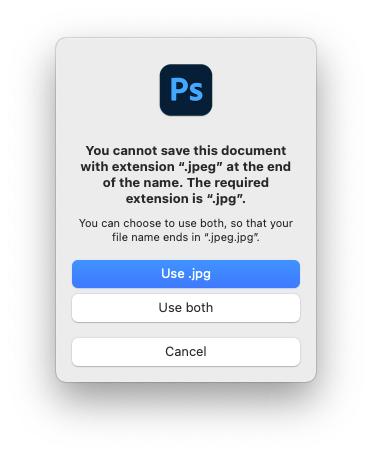
It is absurd that Bridge forces all exports as JPEG for some unbeknownst reason. When we upload JPEG files to our online photo management system, they get corrupt. The tech support tells us their system only supports JPG extensions. Adobe, can you please change Bridge exports to utilize the JPG extension please? It is beyond my understanding why they'd use an extension which is no longer in use. My Mac OSX literally tells me that JPG is the correct extension and warns me when I try to rename any file into JPEG.

Copy link to clipboard
Copied
Yes, it's an inconsistency and major source of irritation and frustration when working with and in Photoshop.
https://community.adobe.com/t5/photoshop-ecosystem-discussions/jpg-jpeg/m-p/12760785


Copy link to clipboard
Copied
This is still stupid. I can't believe that a company like Adobe would allow this in the first place. Either always do one or the other or always do both... Its just silly to find out alter that my extensions are messed up. Yes, the batch tool in Bridge is a work around but it is bad practice that a workaround is required for somthing that Adobe can do... the problem is consistency. Please Adobe, fix these little issues.

Copy link to clipboard
Copied
I have THREE THOUSAND images I'm using Bridge to export to change a file size and append metadata. These images are called up from a number of SQL tables and ASPX pages to render on the website. I'm not changing tables and templates to this JPEG extension.
What a mess!
Come on, Adobe. Please allow JPG extensions.

Copy link to clipboard
Copied
It's been 2 years, it seems Adobe is not seeing this, or is just ignoring. LOL!
Copy link to clipboard
Copied
Hi,
The latest Beta build 14.0.0.57 has support for exporting files to .jpg extension along with a few other features.
For a complete list of features available in the Beta build, please refer to the community post:
https://community.adobe.com/t5/bridge-discussions/adobe-bridge-beta-is-now-available-14-0-0-57/td-p/...
We would love for you to try it out and share feedback.
Regards,
Bridge Team


 AdChoices