
Participating Frequently
October 15, 2018
Answered

Thumbnails in Bridge went crazy after 2019 update

  • October 15, 2018
  • 69 replies
  • 22336 views

Okay, I installed all of the cc2019 updates and Bridge (worked normally on cc2018) started to behave crazy. I mean all works except preview thumbnails. I get some kind of "static interference" pattern instead of previews.

I completely uninstalled and reinstalled Photoshop and Bridge to solve the issue but no luck.

Computer is iMac Pro 27".

On my old iMac 27" (2011) it works normally after the update.
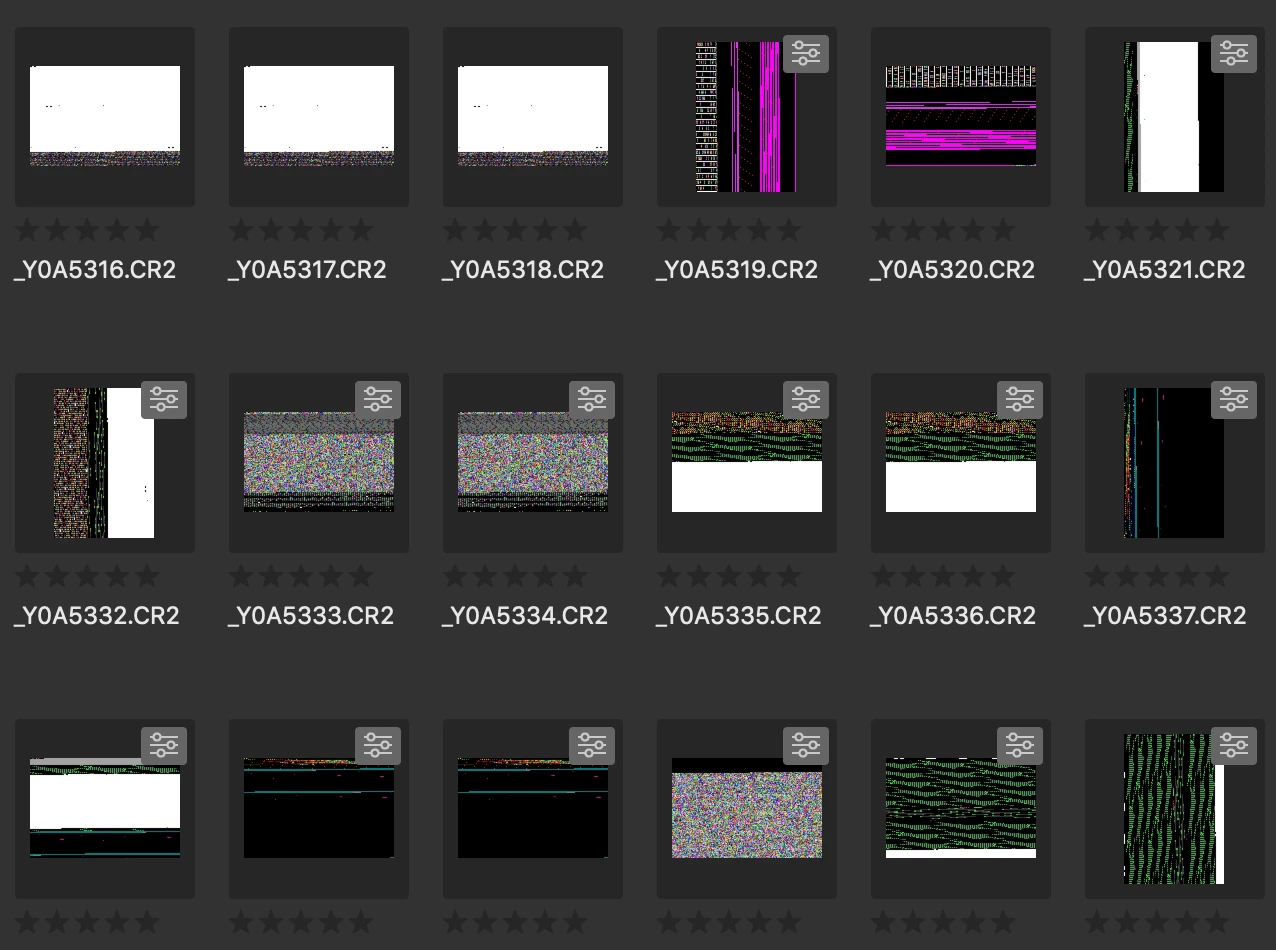
Any idea?

Thanks!

This topic has been closed for replies.
Correct answer siddharthsingh

Dear Users,

We have released a new version of Adobe Bridge (CC 2019) on 2nd November 2018. The new version build number is 9.0.1.216. This version is available to install via Adobe Creative Cloud application.

This Bridge update resolves the thumbnail rendering issue on iMac Pro devices and has few other bug fixes.

Please let us know if you face any issues.

Regards,

Siddharth

69 replies

garlicpeeler
Participant
October 16, 2018

Same problem for me. I have Imac Pro 27" and now I started to use the old version.

Deepak_Gupta1
Participating Frequently
October 16, 2018

Hi,

We are investigating the thumbnail issue with Bridge CC 2019. So far, this issue is reported on iMac Pro 2017, 27".

Thanks,

Deepak Gupta

dSparks
Inspiring
October 17, 2018

Yep. Same here.

iMac Pro 2017

Alliance Images
Participant
October 16, 2018

iMac Pro 27. Same problem

Participating Frequently
October 16, 2018

Exactly the same here, iMacPro 27" as well.

As usual, while the new features are much appreciated, the update itself is frustrating in many small details, fron Indesign-Font-Folder that gets purged (with *every* update), Photoshop-Plugs that don't work, Dock-Items that aren't simply updated to something as simple as this. Nothing helps with this problem, so far - clearing the cache helps for a few moments and glitch-static returns. 

BMGSAuthor
Participating Frequently
October 16, 2018

Agreed!

so it’s safe to say they overlooked this bug which hits only iMac Pros. Obviously something with GPU.

Deepak_Gupta1
Participating Frequently
October 16, 2018

Hi,

Seems like this is an issue with GPU driver. Please use the software rendering option in Bridge.

Launch Bridge -> open Preferences Dialog -> Advanced Tab -> Turn on "Use Software Rendering" -> Restart Bridge -> Now purge cache for above shown files.

Please check and confirm.

Thanks,

Deepak Gupta

BMGSAuthor
Participating Frequently
October 16, 2018

Hi Deepak,

that’s what I did (Abhishek suggestion). As I said, didn’t solve the problem. What puzzles more that it works as it should on my 2011 iMac 27”.

Best,

Mario

lsilipo
Participant
October 16, 2018

Hi All, same problem here on iMac Pro 27. Please do something. Thanks.

Participating Frequently
October 16, 2018

Same problem here.Works on  new macbook pro 15" but not iMac Pro

otrokhim
Known Participant
October 16, 2018

Also it crashes quite often.

Usually I work without "Preview" tab. Last crash was when I tried to open "Preview" tab.

otrokhim
Known Participant
October 16, 2018

I Have absolutely the same issue. iMac Pro, Bridge CC 2019 goes crazy with thumbnails. Restarting, updating to Camera Raw 11, changing to software rendering doesn't help.

It works flawlessly on iMac 27 2011, much better than cc2018.

Please, do something to make it work as good on iMac Pro 2017. Maybe this is GPU drivers issue?

Deepak_Gupta1
Participating Frequently
October 16, 2018

Hi,

Please update to latest CameraRaw (version 11.0), restart Bridge, and purge the cache for these files.

Thanks,

Deepak Gupta

Sheena Kaul
Legend
October 15, 2018

Hi All,

We have released a new version of Adobe Bridge (CC 2019) on 15th October 2018. The new version build number is 9.0.0.204. This version is available to install via Adobe Creative Cloud application.

This Bridge update contains support for managing media cache files (https://helpx.adobe.com/bridge/using/media-cache.html).

Please check following link to know about all new features in Adobe Bridge CC 2019 - https://helpx.adobe.com/bridge/using/whats-new.html

You may need to update the Creative Cloud application and restart your computer to see the updated installer.

Regards,

Sheena

BMGSAuthor
Participating Frequently
October 15, 2018

Hi Sheena,

thanks but your answer doesn't help. I have all the latest. I am talking about latest Bridge update. I have latest Creative Cloud.

So, this obviously has nothing to do with my problem - thumbnails preview error in latest Bridge.

Best,

Mario 

Sheena Kaul
Legend
October 15, 2018

I've reported the same to the product team as well.

I'll update you once I hear more.