
saladdreesing
Participant
August 10, 2023

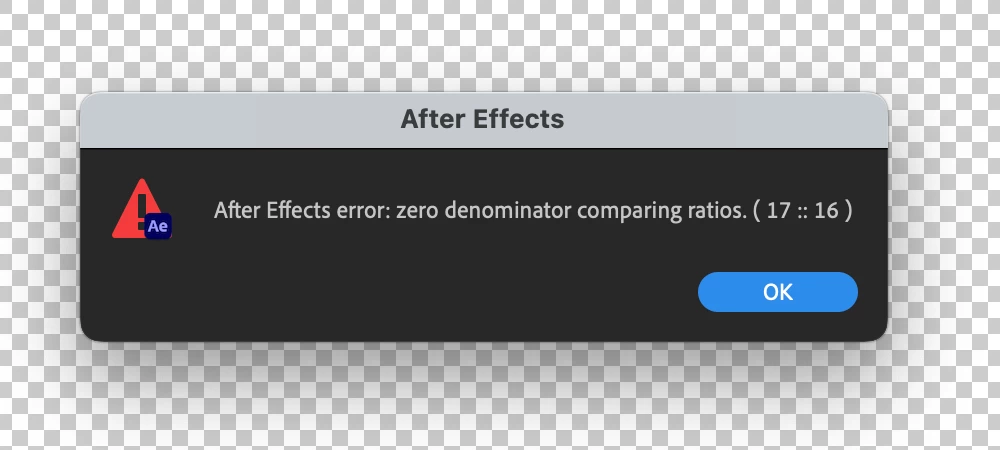
After Effects Error - Zero Denominator comparing ratios (17 :: 16) error in Ae version 23.6

  • August 10, 2023
  • 82 replies
  • 32847 views

Hey y'all, I'm really stuck.


This error keeps popping up for me and I have no idea how to solve it. It'll appear as I'm trying to play a sequence with an image in it. I made other sequences with images in them a few hours ago and rhey're all fine. But now when tryong to add anything new, it gives me this error and doesn't go away at all - no matter how many times I hit 'okay'. Any ideas?


Thanks!


Title edited by Mod.
 

82 replies

Facun AMZL
Participant
August 23, 2023

In case this can help anybody: What I have done for the time being is to install the inmediatly older version of this one that is driving us crazy, that is to say: I've installed the Version 23.5.0 (Build 52). I did this through the Creative Cloud APP that allows you to install older versions of the Adobe Suite. In the older version that I have installed the problem is not present and I can work as usual. So, while we are all waiting for Adobe to release a new version that solves the problem, I'll be using the older version of After Effects that I mentioned before.


Hope this can help.

Participant
August 22, 2023

I don't know if this is at all possible, but when the recommended fixes don't work. It would be nice for the error pop-ups to, you know.....JUST GO AWAY after clicking okay. Just let us keep working!

craigh52675903
Participant
August 22, 2023
While this is being sorted out at Adobe, go and Install the After Effects
Beta version. Opening my files in that version gives no errors. at least I
can carry on working

Craig
Dowding
Known Participant
August 22, 2023

Same problem with latest AE version 23.6.0

20 Layers.

All 2D.

8 bit color.

No motion blur.

All referencing as single, multi-layer Illustrator file.

Rebooting, clearing cache makes no difference. Adobe..... help!


Turn everything into Shapes and problem disappears. Something to do with Illustrator file!

craigh52675903
Participant
August 22, 2023

While this is being sorted out at Adobe, go and Install the After Effects Beta version. Opening my files in that version gives no errors. at least I can carry on working 🙂

Participant
August 22, 2023

Enabling Classic 3D worked for me. Tested by going back to Cinema 4D and it immediately started again. I'm just doing the "Animate a logo" tutorial.

RIN_
Participant
August 21, 2023

I am having the same issue. It is really bad as it only goes away after mashing the ok about 26 times and praying. I am trying to learn after effects for a college class and this error is even happening in the learn section which contains pre-made files and projects. I have no idea how even that is being affected. I hope everyone gets this fixed soon and we can all use after effects happily 🙂

Facun AMZL
Participant
August 21, 2023

I'm having the same issue. I'm only working with vectors and the following error appears every time I try to do a preview of the animation: "After Effects error: zero denominator comparing ratios ( 17 :: 16)".


Working with a MacBook Pro MacOS Monterrey V.12.6.8 and the AE version is the 23.6.0.


Hope this helps.

Participant
August 21, 2023

@nishu_kush sorry to tag but think I worked out how to recreate and what's causing the issue!

I've got a music track that I've split up several times in one comp, and to cause the error message to come up i have to select whichever one is highest in the stack and hit space to play. if any other's are selected then it will be fine, only whichever one is highest in the order. It also happens if there's only one layer of audio too a little workaround that's working is i can duplicate one of the audio layers, mute and hide it and chuck it at the top of the layers and then it won't come up with the error. I also just tried it with a PNG and the same thing happens, move that to the top, have it selected and hit space, error pops up. Must be whatever footage is highest in the order as it ignores comps.


Windows 10
Ryzen 7 2700X

NVIDIA GeForce GTX 1070ti

64GB RAM


Participating Frequently
August 21, 2023

Also dealing with this issue with multiple project files and footage files. No 3D enabled fresh new project with no effects or anything still ocurring on different image/footage.