Exit
  • Global community
    • Language:
      • Deutsch
      • English
      • Español
      • Français
      • Português
  • 日本語コミュニティ
  • 한국 커뮤니티
0

Can't assign color labels in Adobe Camera Raw 2020

Community Beginner ,
Jul 27, 2020 Jul 27, 2020

I've searched for answers and can't find them. When in the new 12.3 version of Adobe Camera Raw batch editing multiple images (or even a single image for that matter), how does one apply a color label? I used to be able to for example hit ctrl+6 to label an image red in ACR. Now in this new version that doesn't seem to be working and even right clicking doesn't give an option for color labels. Thanks in advance for the help. 

1.1K
Translate
Report
Community guidelines
Be kind and respectful, give credit to the original source of content, and search for duplicates before posting. Learn more
community guidelines
LEGEND ,
Jul 27, 2020 Jul 27, 2020

See: https://blogs.adobe.com/jkost/2020/06/acrv12-3.html

• Click and hold the Filmstrip icon to show filenames, ratings and color labels as well as choose the orientation of the filmstrip (or, use the shortcut Command + Shift + F (Mac) | Control + Shift + F (Win) to toggle the orientation).

FILMSTRIP

You can now choose to have the filmstrip in the left panel (recommended for portraits) or the bottom panel (recommended for landscapes). To change the filmstrip orientation, do the following steps:

1. Control-click (macOS)/right-click (Windows) the current filmstrip to access the context menu.

2. Select Filmstrip Orientation.

3. Choose between the options: Horizontal or Vertical.

In the same context menu, select Show Filename and Show Ratings and Color Labels to view the filenames and ratings of photos in the filmstrip. 


Author “Color Management for Photographers" & "Photoshop CC Color Management/pluralsight"
Translate
Report
Community guidelines
Be kind and respectful, give credit to the original source of content, and search for duplicates before posting. Learn more
community guidelines
Community Beginner ,
Aug 20, 2020 Aug 20, 2020

Hi! Thanks. Just use the number without ctrl or command.

Translate
Report
Community guidelines
Be kind and respectful, give credit to the original source of content, and search for duplicates before posting. Learn more
community guidelines
Community Expert ,
Jul 28, 2020 Jul 28, 2020

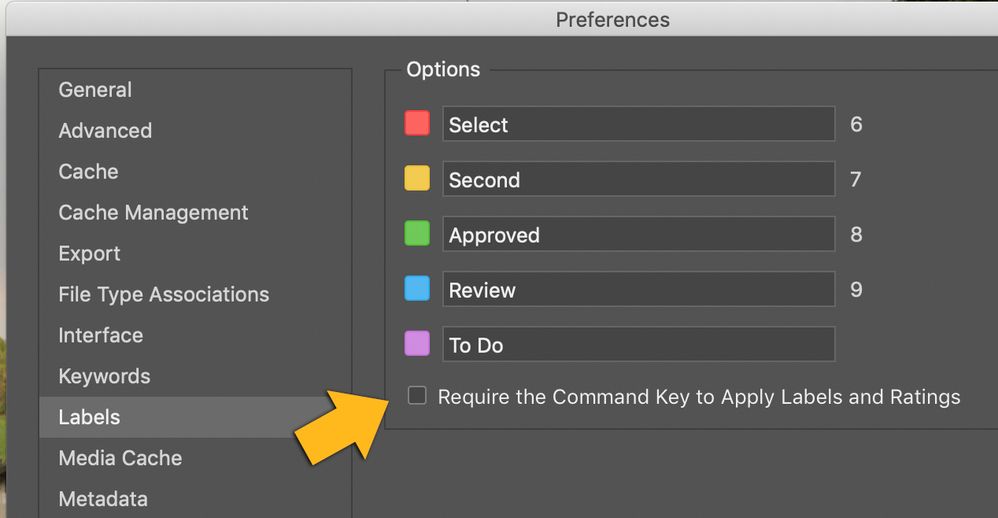
The keyboard shortcuts are now reserved for calling up the panels. There is a little trick. In Adobe Bridge go to Preferences> Labels. Unckeck the option "Require the command key (ctrl-key) to apply labels and ratings" Then you can add ratings and labels with buttons 1–9 in Camera Raw and Bridge.

Adobe Bridge 2020ScreenSnapz001.jpg

Translate
Report
Community guidelines
Be kind and respectful, give credit to the original source of content, and search for duplicates before posting. Learn more
community guidelines
Adobe Employee ,
Aug 20, 2020 Aug 20, 2020

The keyboard shortcut for labels is just the un-modified digits 6, 7, 8, 9.  The purple label is command-shift-0
The preference in Bridge has no affect on Camera Raw.

Translate
Report
Community guidelines
Be kind and respectful, give credit to the original source of content, and search for duplicates before posting. Learn more
community guidelines
Community Expert ,
Aug 24, 2020 Aug 24, 2020
LATEST

Thomas_Knoll, in Bridge version 10.1.0.163 and Camera Raw 12.3.0.493 it only worked like this at the time. I had tested it several times. But I agree with you that it now works without the trick.

Translate
Report
Community guidelines
Be kind and respectful, give credit to the original source of content, and search for duplicates before posting. Learn more
community guidelines