


mikejlkemp
Known Participant
October 10, 2023
Answered

P: Camera Raw Basic tab disappeared

  • October 10, 2023
  • 8 replies
  • 17745 views

Hi there,

I'm just processing some pictures here and wondering where the 'Basic' tab has gone within Camera Raw? (usually situated at the top where the red dot in the attached picture is)
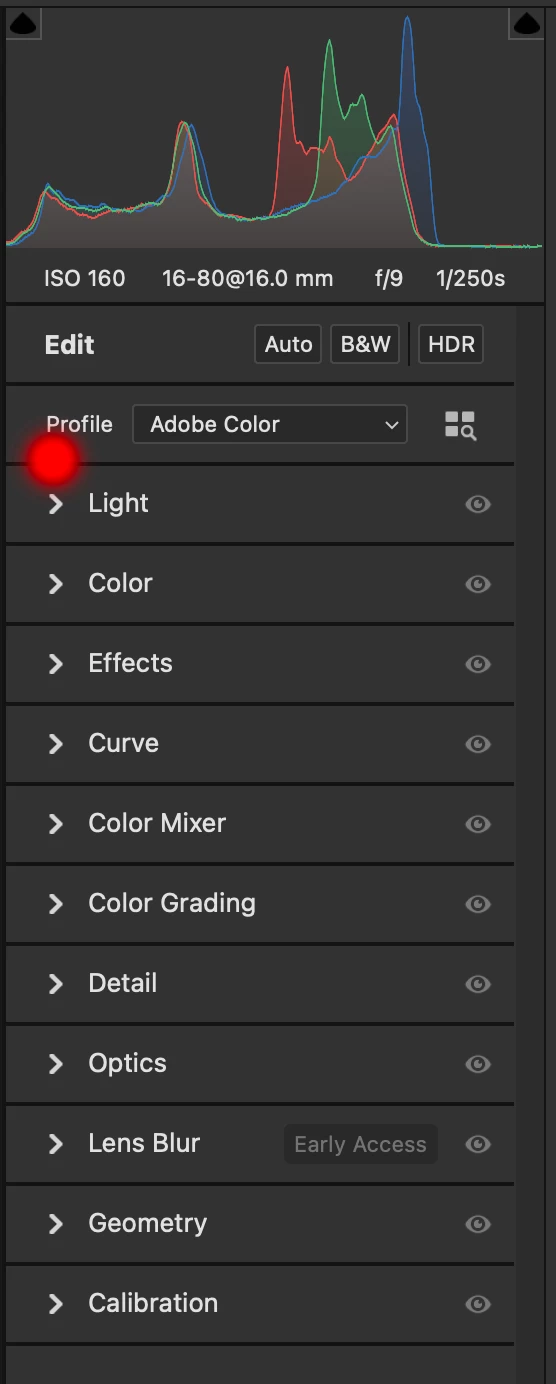
It's the place where pretty much every adjustment I use on pictures is situated, including saturation, vibrance, dehaze highlights etc etc. At the moment, without the basic tab, I have to keep opening different tabe separately, which is making workflow when dealing with multiple pictures a bit of a pain.

Any ideas? Thank you. Mike Kemp

Correct answer Erik Bloodaxe

The functions previously found under "Basic" are now to be found under "Light", "Color" and "Effects" as shown in your screenshot. Three panels rather than one I'm afraid. 

If you use "Multiple Panel Mode" (right click on any panel and select it) you can keep the three panels open at the same time which saves a few clicks.

8 replies

Participant
November 2, 2023

Thank you Erik Bloodaxe.

Participating Frequently
October 25, 2023

I really do not like the new interface/panels in ACR, it slow down my workflow. I work with a lot of HDR/dng files (merged in ACR) and they are not able to open with the 14.5 version, hence I was forced to update to 16.0.


I tried to uninstall Bridge and all ACR related software, then installing 14.5 but I could still not open my old HDR files in dng format.


I really hope the "basic" panel will come back, I had just got into the new interfance since you changed it a few years ago. 


Lightroom still got the "old" interface...

jane-e
Community Expert
Community Expert
October 25, 2023

@Wultimurt 


I've moved your post to Adobe Camera Raw for you.


Jane

Participating Frequently
October 30, 2023

Will there be a roll back in UI?

This in an unacceptable update, you should at least have the option to use a "classic" UI.

Participating Frequently
October 18, 2023

Since Camera Raw 16 now has more panels, you can no longer use CTRL+7 to open the Geometry panel. Since Geometry is the 10th panel, there is no longer a keystroke combination to apply. Is there a workaround or other keyboard combo that can be used to open panels past #9 (for Geometry and Calibration panels)?

jane-e
Community Expert
Community Expert
October 18, 2023

@Nathan REP 


I've moved your post from Photoshop to the Adobe Camera Raw forum for you.


Jane


SK321
Inspiring
October 17, 2023

I don't understand the decision to separate Light, Color, and Effects in the new Camera Raw. 90% of the time I adjust all of these on every photo, so now you've just added a minimum of three extra clicks for me to make adjustments. At the very least, give the option to keep them all open at the same time or revert back to the previous way it was set up. If there's a way to do this, I'm all ears, because it's very annoying to have to click through each one on every photo I adjust.

SK321
Inspiring
October 17, 2023

After looking through the Camera Raw preferences, I found the "Panels" setting, under "General" and set it to "Edit panel behavior: Multiple" The panels now stay open after I click them. I'll leave the post up with the solution in case anyone else is searching for it.

John Waller
Community Expert
Community Expert
October 17, 2023

Great to know how to fix it.


Would be nice to know why they changed it.

Erik Bloodaxe
Erik BloodaxeCorrect answer
Legend
October 17, 2023

The functions previously found under "Basic" are now to be found under "Light", "Color" and "Effects" as shown in your screenshot. Three panels rather than one I'm afraid. 

If you use "Multiple Panel Mode" (right click on any panel and select it) you can keep the three panels open at the same time which saves a few clicks.

mikejlkemp
Known Participant
October 17, 2023

OK, that's all clear, I see now how I can have them all open at once which make a big difference, and so it's as good as it was with the Basic tab. Thank you Erik. Much appreciated. Mike

jane-e
Community Expert
Community Expert
October 17, 2023

@mikejlkemp 


I've moved your post from Using the Community to the Camera Raw forum for you.


Jane

mikejlkemp
Known Participant
October 17, 2023

Thanks Jane, do you have a link where I can find that forum please? I wasn't aware of it. Cheers for the help. Mike

jane-e
Community Expert
Community Expert
October 17, 2023

Sure, @mikejlkemp 


The list of all forums is here:

https://community.adobe.com/

It can be filtered by category, alphabetical, et cetera


The Camera Raw forum is here:

https://community.adobe.com/t5/camera-raw/ct-p/ct-camera-raw


Jane

Inspiring
October 16, 2023

What is the step-by-step procedure to combine/reduce the number of editing panels in Adobe Camera Raw version 16.0? The version 16.0 update resulted in scrambling of the panels and as such more panels really messed up an efficient workflow. It takes longer to have to open more panels to find the exact same function as before.

Erik Bloodaxe
Legend
October 16, 2023

There isn't a step by step procedure. To begin, right click on any panel and study the available options in the menu offerred. Try out the options for yourself to see if that helps you. They are largely self explanatory.

Inspiring
October 17, 2023

My question was not about the functions and what the functions do. My question was about how to unscramble the location of the functions. But thanks for trying.

Participating Frequently
October 10, 2023

I just updated to the new version of ACR 16 and I noticed the Edit panels got separated into 11 panels (for no functionnal reasons). I use the Ctrl+1,2,3... for jumping between panels all the time, but now it's impossible to go beyond the 9th panel with the shortcuts.

Not gonna lie, it's very frustrating. I don't mind the new functions, but it really slows my workflow now that light, color and effects, that were mostly in a single panel before, are in 3 separate panels.

Until it's fixed, I'll need to program custom shortcuts and remove some panels I use less often, so I can do what was once a single shortcut.

Inspiring
October 16, 2023

+1 Splitting up the panels provides significantly worse experience for me. I'd love a way to get back to the previous layout, of course keeping the new Lens Blur panel and the spot color tab in the HSL. Just don't split and rearrange the Basic panel please.

NetPixel
Inspiring
October 29, 2023

The functions previously found under "Basic" are now under "Light", "Color" and "Effects".
This is a bad decision to separate Light, Color, and Effects, since all the time these must be adjusted together. Now a lots of extra extra clicks are needed to make adjustments, just because again, somebody fixed something that wasn't broken...
Another bad side effect is, the number of panels has grown over 10 so Ctrl+1..9 cannot be used anymore - another practiced workflow broken...
Seriously, these changes are made by some newcomers, who don't understand the workflow of power users? These changes don't bring anything new to table, just complicate the things which were working fine.
Please consider reversing these changes, the Basic panel was perfect as it was. Or an option in the settings to bring back the Basic panel.

I am curious, anybody else finds this change problematic? My biggest fear is that this change will be migrated to Lightroom too... 😮