


Participating Frequently
November 17, 2016
Answered

Adding Cookies in Captivate

  • November 17, 2016
  • 3 replies
  • 885 views

Hi,

I downloaded captivate version 9 and I am very much new in using it .

I have some questions,

Question 1:

I would like to know if there is setting in captivate so if user refresh page on particular slide then it needs to start from where it leaves and not from Start. I think thats like saving cookies in captivate? I found one article where it mentioned to try and do  "Project > Table of Contents > Check Show TOC" but its not working for me.

Question 2:

While adding Volume Control widget, source is coming not available and in output after publishing, there is not audio controller loading in the slide. Any Idea?
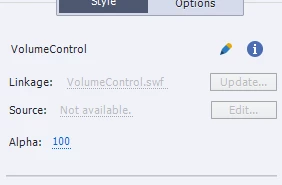
Please let me know on any of both issues.

Thank you

Gulshan

This topic has been closed for replies.
Correct answer TLCMediaDesign

This will get all of the user variables and write them to local storage:

window.onbeforeunload = function( e )
{
var lessonStorage = cp.model.data.project.pN + '.progressData';

if ( typeof( Storage ) !== 'undefined' )
{
  var getVars = cp.ReportingVariables;
   getVars = getVars.split( ',' );
  var myVars = new Object;

  for ( var i = 0; i < getVars.length - 1; i++ )
  {
   myVars[ getVars[ i ] ] = window[ getVars[ i ] ];
  }

  localStorage.setItem( lessonStorage, JSON.stringify( myVars ) );
}
};

Then to read them back in:

window.addEventListener( 'moduleReadyEvent', function ( e )
{
var getResults = localStorage.getItem( lessonStorage );
var getProgress = JSON.parse( getResults );

    if ( typeof getProgress === 'object' )
{
  Object.getOwnPropertyNames( getProgress ).forEach( function( val )
  {  
   console.log( val + ' = ' + getProgress[ val ] );
   window[ val ] = getProgress[ val ]
  });
}
});

3 replies

Inspiring
November 18, 2016

This is wild. I come here today with nearly the exact same question, and find a poster asking it AND Noel is my name. Crazy!

On topic: I have run into a similar situation except that I am only using scenario-based interactive questions. This is not in a SCORM environment. I have a few scenario questions scattered about my lesson where a user must select a right or wrong answer. If they correctly answer a question, I simply assign a value of 1 to that scenario's ID variable.

I need to be able to collect and record these values should the user decide to exit the course before completion, then hopefully call those stored values back into Captivate when that user returns.

There are several variables that I use throughout the course to track what sections a user has completed, so those would need to be tracked as well; but honestly, I can probably troubleshoot that on my own with a decent model to follow. If I can manage to store and call one variable, then I can figure the rest out I think. My search returned this topic and I was excited to see a general sample of JS, so thank you for that!

My question then: is this the right direction to take to store these simple 0/1 values on exit to then call them on reload? If not, could you suggest a better option?

Thank you in advance, and I hope this is not derailing.

- Noel.

TLCMediaDesign
TLCMediaDesignCorrect answer
Inspiring
November 18, 2016

This will get all of the user variables and write them to local storage:

window.onbeforeunload = function( e )
{
var lessonStorage = cp.model.data.project.pN + '.progressData';

if ( typeof( Storage ) !== 'undefined' )
{
  var getVars = cp.ReportingVariables;
   getVars = getVars.split( ',' );
  var myVars = new Object;

  for ( var i = 0; i < getVars.length - 1; i++ )
  {
   myVars[ getVars[ i ] ] = window[ getVars[ i ] ];
  }

  localStorage.setItem( lessonStorage, JSON.stringify( myVars ) );
}
};

Then to read them back in:

window.addEventListener( 'moduleReadyEvent', function ( e )
{
var getResults = localStorage.getItem( lessonStorage );
var getProgress = JSON.parse( getResults );

    if ( typeof getProgress === 'object' )
{
  Object.getOwnPropertyNames( getProgress ).forEach( function( val )
  {  
   console.log( val + ' = ' + getProgress[ val ] );
   window[ val ] = getProgress[ val ]
  });
}
});

Inspiring
November 18, 2016

TLCMediaDesign:

Thank you so much for your reference. I will play with this this afternoon!!

Much appreciated.

- Noel

Participating Frequently
November 18, 2016

Ok, I will check.. thank you very much for your help

TLCMediaDesign
Inspiring
November 17, 2016

You can write cookies and the TOC does write a cookie if you go into the Settings portion of the TOC settings and choose self-paced learning. This will return you to the beginning of the slide.

You will need to set a cookie, better to use localStorage, when the project is closing in the window. You need to add some JavaScript and add an listener to the window for the unload event and set the localStorage to the current Frame.

window.onbeforeunload = function(e) {

var lessonStorage = cp.model.data.project.pN + '.progressData'

if ( typeof( Storage ) !== 'undefined' )

{

  localStorage.setItem( lessonStorage, JSON.stringify( window.cpInfoCurrentFrame ) );

}

};

This code will take the name of the project, you must enter one in the Publish Settings/Project/Information Project Name: field and write the current frame to the localStorage before the window closes.

Then you'd need to add the module ready event and when it fires jump to the frame.

window.addEventListener( 'moduleReadyEvent', function ( e )

{

     var getResults = localStorage.getItem( lessonStorage );


     var getProgress = JSON.parse( getResults );

     window.cpCmndGotoFrameAndResume = parseInt(getProgress);

});

I didn't actually test this but if you put it in the head of the index page it should work, might need some tweaking.

Participating Frequently
November 18, 2016

Hi,

Thanks for replying... javascript works well for me, Thank you very much

but I have some more issues. javascript you given is working but I have slides and then quiz too... when I have 5 question and I already given answers for 2... and if page gets refresh, it comes to correct page but did not save what I have answered for number 1 question. I have to do retest... do you know anything on this?

Participating Frequently
November 18, 2016

That's getting way more complicated and would take way more time than I have to research it for free.

Is this a SCORM course?

What are you quiz settings as far as:

Optional

Required

Pass Required

Answer All

I would try the Pass Required option.


Hi,

Quiz contents some optional, true/false option, multiple choice answer type questions...I can understand it will take time but is there any ready command available?