


muchelleb
Inspiring
October 17, 2018
Answered

Adobe Typekit Fonts not Working when Published

  • October 17, 2018
  • 5 replies
  • 3682 views

Hi There,

I am publishing a piece of responsive eLearning using a Typekit font 'Runda' and 'Nimbus Sans'.

When I upload it, the Typekit fonts disappear and the project reverts back to Times New Roman.

I'm entering the appropriate domains on publish.

What could I be doing wrong here?
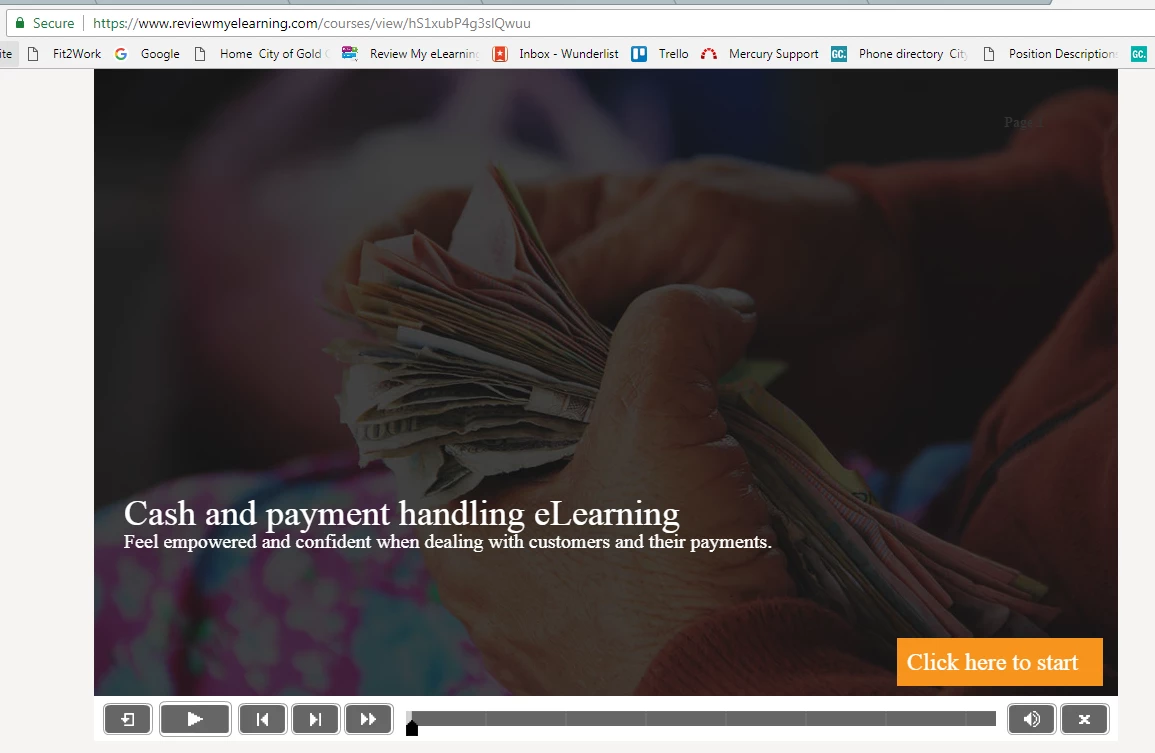
This is my eLearning hosted on reviewmyelearning.com - the font has dropped off and is displaying as Times New Roman.

This is the eLearning within the Adobe Captivate program - I have under 10 type kit fonts with my free plan, which is under the quota.
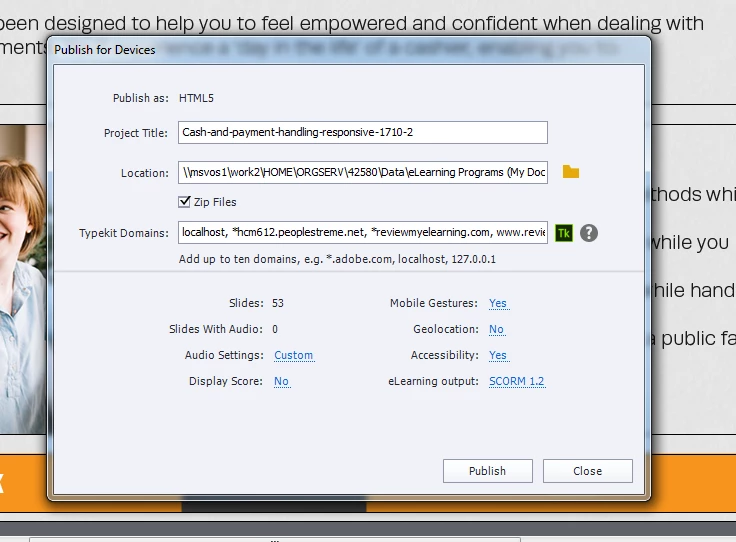
Here is my publish screen. Enter in 'Typekit Domains', I have included : localhost, *reviewmyelearning.com, www.reviewmyelearning.com, reviewmyelearning.com, https://reviewmyelearning.com/

(I just entered all of the variations that I could think of - in case!)

I'm new with using Typekit, any help would be appreciated.

This topic has been closed for replies.
Correct answer HKCROFTS

Thank you for replying so quickly. 


What do you mean by wildcard? 


I only tested after uploading to the LMS. For a bit of background - we have rebranded. I have re-uploaded the old brand version which is showing with the Adobe fonts, it is the most recent version that isn't. The rebranded version is just an updated version of the course that is uploading correctly (saved as new file), so in theory should work completely the same - just has new pictures. As far as I can think, they will both have been published with the same domain. It is a responsive project but we still use breakpoints as a company rather than fluid boxes. 


As the previous version is uploading correctly, it makes me feel like some setting has been lost in the uninstall/reinstall as the course that's uploading correctly was only published a couple of months ago. 


Update - there was a bug with the newest update that means typekit wasnt working with responsive projects. Adobe have fixed this and sent me a new download link which has resolved the problem. 

5 replies

Inspiring
May 7, 2020

Hello. I have the same problem with Adobe Captivate 2019 (v.11.5....) and now it's the adobe fonts domain. I have tried all the possibilities, with my website, with the clients website, but I always see Times New Roman instead of Effra. I just started using the Creative Cloud and I have Adobe for Teams.
As I mentioned it's my first time using Creative Cloud for fonts, so a beginner's mistake may happen too.
I have set *.enaspot.com as "adobe fonts domain" and uploaded it here: elearning.enaspot.com/Test/PWL335%20Advanced%20DVB%20Troubleshooting/index_scorm.html

Not sure what could be the problem. It's the first time I am using Creative Cloud and cannot even start using it.
I have logged into creative cloud, activated the whole font family, the desktop app showed the font as present, I was able to find the font under the Adobe Fonts subcategory in Captivate, entered my domain in the adobe fonts domain.. Im confused if there is something I did wrong...

Lilybiri
Brainiac
May 7, 2020

Fonts are showing up in the CC app? You have to keep that app open while publishing. Which Adobe fonts plan do you have, because that defines how many fonts you can have for free.

Inspiring
May 7, 2020

Yes I keep it open and I use the business - creative cloud for teams. Dont know more details cuz it's from the company I work on. At the end it does not matter, cuz I need basically 2 fonts from the same family (regular and bold). That's all, even one of the family can do the job. The thing is that all my content is converted into Times New Roman.

muchelleb
muchellebAuthor
Inspiring
October 25, 2018

Hi All,

After contacting Adobe their only suggestion was to update Captivate. I work for government, so updating software is a far lengthier process for me and unlikely to happen anytime soon.

I'm currently Adobe 2017. Does anyone with Adobe 2017 have this issue - I'm on 10.0.0.193?

It seems strange that I need to update Captivate to utilise typekit.

Michelle

RodWard
Adobe Expert
October 25, 2018

There's not really anything strange about having to install an update for a software app to resolve an issue.  This happens with all software applications.

You're not currently on the latest build that was available for Captivate 2017.  The Adobe support person would be trained to tell you to update because there's very little point wasting a lot of time trying to resolve an issue that might ONLY be able to be resolved by installing an update.

I understand the fact that updating systems for some organisations is not a quick and easy process.  But there's actually no cost involved in this case to just install the update because it's only a MINOR dot-point update, not a MAJOR new release

All you'd really need is for some IT person with administrator privileges to log into your PC and install the update from the Help > Updates menu.  If your organisation is not willing to even allow that level of support, then you may indeed be stuck.

muchelleb
muchellebAuthor
Inspiring
November 8, 2018

I ended up having IT update Adobe Captivate to the 2018 version on a test computer with the same result on export - Adobe Typekit fonts drop off and don't appear in the published package on either scorm cloud, reviewmyelearning or our lms.

We also tried disabling our anti-virus software and running everything as administrator, with no change.

If there are any other thoughts or ideas feel free to throw them my way, I'd love to hear them.

Michelle

Paul Wilson CTDP
Adobe Expert
October 18, 2018

It may not be related but it's considered best practice to publish to a local drive instead of to a network drive. This is often the cause of file corruption both in your project file and the resulting published ZIP file. I usually publish to my desktop folder.

Paul Wilson, CTDP
muchelleb
muchellebAuthor
Inspiring
October 22, 2018

Gave this a shot (exporting to desktop) and it didn't seem to make a different unfortunately.

I haven't seen anyone that's had this issue before, which makes it really strange.

The Typekit fonts obviously work on my computer, because I can see then on my Typekit website. I must just be doing something strange on my end that's somehow having an impact.

If anyone has any additional expertise or ideas to add to the conversation your input would be much appreciated!

Michelle

Paul Wilson CTDP
Adobe Expert
October 17, 2018

You should also include the dot. For example, if you are uploading it to reviewmyelearning.com, you should enter it as *.reviewmyelearning.com instead of *reviewmyelearning.com. Lieve is correct though. If you have a full Creative Cloud account you would be fine but if you are using the free account you are limited in the number of domains you can send this project to and have your Typekit account work.

One suggestion might be to only include the domain that you are using for review purposes right now. Later when you are ready to produce a final publish, change the domain to the final location of your eLearning when you are ready to publish for your final audience.

Paul Wilson, CTDP
muchelleb
muchellebAuthor
Inspiring
October 18, 2018

Thanks Paul.

I've looked in to this further and I actually do have full access to Adobe Fonts as park of my Creative Cloud 'enterprise' subscription. My mistake.

Regardless, I culled all domains to just *.reviewmyelearning.com - and the font still seems to appear as Times New Roman when I upload it.

I can't seem to find anyone who's experienced similar issues which makes it really strange.

Are there any other steps that I'm missing in the process? I synced the fonts, they're all active, they work fine in captivate, I publish and type in the domain.

Is there another step to it that I've missed?

If you have any thoughts please let me know

Michelle

Paul Wilson CTDP
Adobe Expert
October 18, 2018

I wonder if reviewmyelearning.com has some type of firewall present that is preventing your course from accessing Typekit. Perhaps JamesKingsley might have some thoughts about this.

Paul Wilson, CTDP
Lilybiri
Brainiac
October 17, 2018

Which type of Typekit account do you have? The free account with Captivate allows only one domain, which looks like 'localhost' in your ase.

muchelleb
muchellebAuthor
Inspiring
October 18, 2018

Hi Lily,

For some reason I thought I had a free account, but turns out that typekit comes as part of my enterprise account - it doesn't look like it has any limits either.

I culled all domains to just *.reviewmyelearning.com - and the font still seems to appear as Times New Roman when I upload it.

Any thoughts would be much appreciated