New Participant
July 3, 2023
Question

Advanced Actions in Quiz Slides

  • July 3, 2023
  • 1 reply
  • 556 views

Hello

I am trying to use Advanced Actions in my quiz slides. I am using Captivate 2019 11.8.0

I want my user to view/answer 3 questions. If they get any of them incorrect (after answering all 3) it would play a simulation slide. If they get them all correct, it would jump to the next question slide. I am self taught on Captivate and I cannot figure this out!


Thank you in advance!


This topic has been closed for replies.

1 reply

Lilybiri
Brainiac
July 3, 2023

Not really clear to me, sorry.

Are you using normal quiz slides or custom quiz slides? Which type of question (MCQ, T/F)?

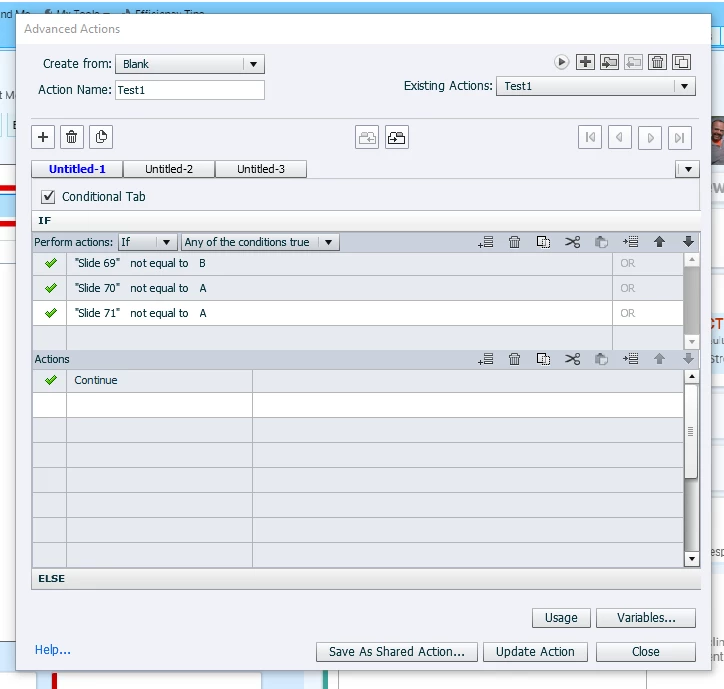
What is 'Slide ...', which is a text? I would expect a user variable if you are using normal quiz slides, and you store the content of the system variable cpQuizInfoAnswerChoice in that user variable using the actions triggered by the Submit button. But a string cannot be a user variable.

When do you trigger this conditional action? Maybe you'd better post a screenshot of the Advanced Interaction anel (F9) to show all the interactions. Make sure to expand the Success and Failure columns so that I can read the titles of the actions.

New Participant
July 4, 2023

Hello!

Thank you for the response, I will try to answer as best I can a I am still pretty new to Captivate.


My quiz slides are created by adding a question slide and then choosing the type of question I want (MC, T/F etc). I have a mix of those throughout the project.


I am attaching a screen shot of the F9 for the questions slides I am trying to work with. So question slides 69,70 and 71, I want them to answer all three of those. If they get any of the three incorrect, they would need to view the software simulation that begins on slide 72. If they get all of the questions correct, they would then Jump to the next question slide, which is slide 104( not pictured in the screenshot)


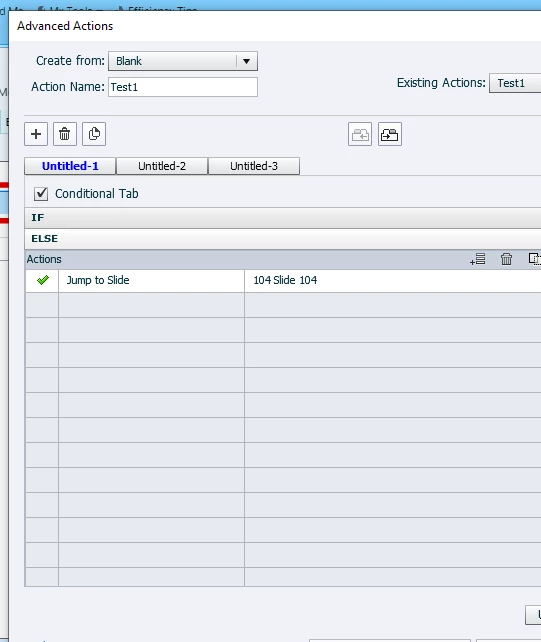
I have the Advanced Action on Slide 72 and it is set to "On Enter"


Hopefully that is helpful? I am not sure I am using the correct terminology, I apologize in advance. Thank you!


Lilybiri
Brainiac
July 4, 2023

Terminology is often a big problem with Captivate, it is one of the reasons I was asking for the Advanced Interaction panel because it gives me a lot of indicators. Since you are pretty new to Captivate, I hope you will not be insulted if I offer some tips about the quiz slides to start with. I have a pretty simple solution for the question you started with, but will probably best write it out in a short blog post to avoid having to post too many links here. 

May I start with inviting you to have a look at my basic course about Quizzes, especially this part:

https://blog.lilybiri.com/quiz-basics-2-submit-process

You can easily find the other parts, they are in sequence in my blog. Reason for pointing to this one especially is your actions On Success and Last Attempt (which is in this case also a Failure action since you have only one attempt). There is no reason whatsoever to specify a Jump action, since the Submit button will automatically get you to the next slide. You can keep the default action 'Continue', playhead will continue the quiz slide in the second step of the Submit process, but end up in the next slide. If you want to shorten the inactive part of the quiz slide, you can move the pausing point towards the end, but not completely to the last frame. I hope you didn't mess up the quizzing master slide for MCQ and T/F (it is the same master slide) or the quiz slides by deleting embedded objects.

As for your question, here are the steps and if you are patient, wait for my blog post:

  1.  Create a user variable v_counter with a start value of 0.
  2.  Change the success action of the three question slides (69,70,71) to 'Increment v_counter by 1'.
  3. Change the Advanced action On Enter 72 to this one:
          IF v_counter is equal to 3
             Jump to slide 104
          ELSE
              Jump to slide 72

Make sure the playbar is hidden during the Quiz (see Quiz Preferences).

You may also have a look at this blog post explaining all features of the Advanced Actions dialog box, because you clearly ignore the existence of the Preview window which is much easier for screenshots of conditional actions and/or multidecision actions:

https://blog.lilybiri.com/advanced-actions-dialog-box-in-captivate-2017