


Participant
July 22, 2020
Answered

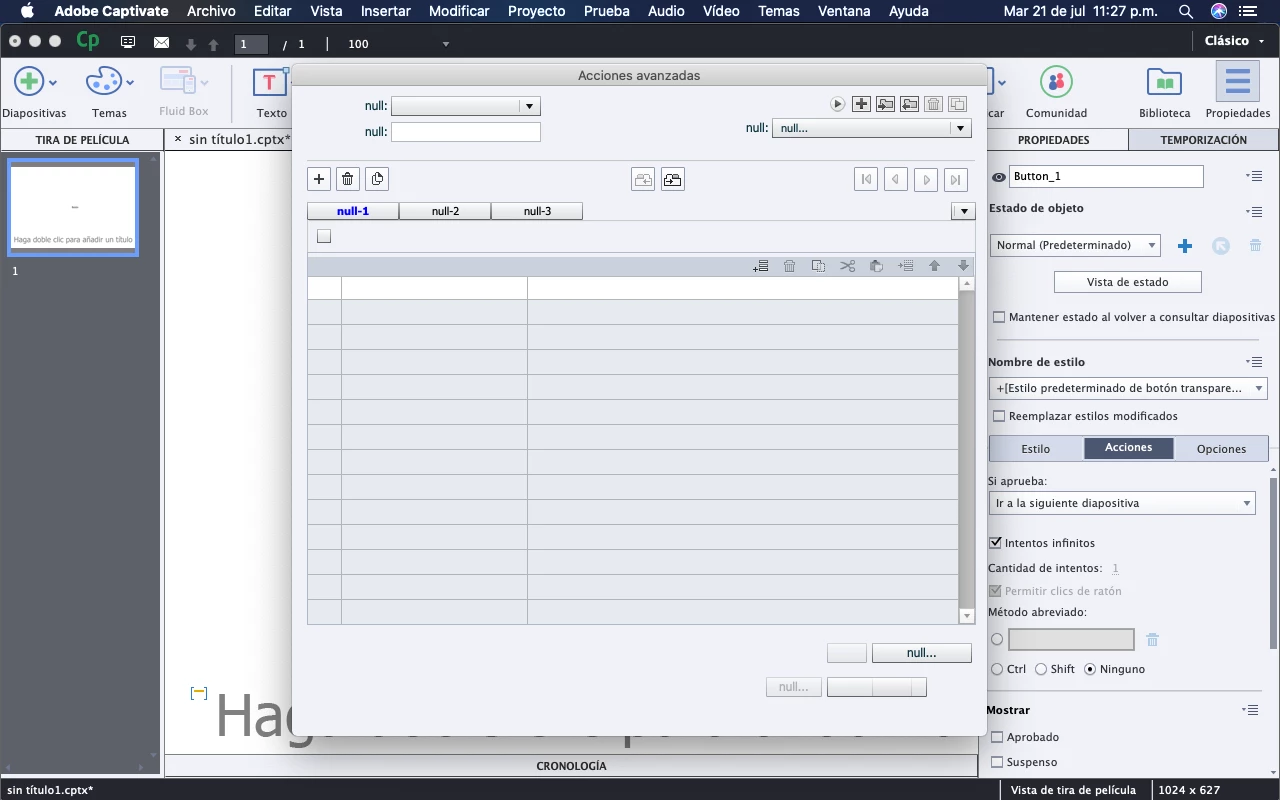
Advanced Actions Null Error
  • July 22, 2020
  • 6 replies
  • 1878 views

I had to erase my Solid  State Drive, when I re-instaled Captivate and planned on programming some buttons with advanced actions the window looked like this, I already deleted the program and downloaded it again and the same thing happens.

    Correct answer Lilybiri

    Thanks for the heads up. I am happy you got solid support from the team!

    6 replies

    Participant
    September 1, 2022

    I am happy to report that a most skilled customer service technician named Pushpendra at Adobe customer service cleaned up my corrupted user account and permissions and got the problem resolved. It was a remarkable fix involving deleting a bunch of files in the macOS Monterey library and reinstalling Adobe Captivate.

    Lilybiri
    LilybiriCorrect answer
    Legend
    January 11, 2024

    Thanks for the heads up. I am happy you got solid support from the team!

    Participant
    May 16, 2022

    No puedo creer que llevemos más de un año con este problema los usuarios de OSX y que aún no lo corriga el equipo de adobe. Pregunta: ¿El equipo desarrollador mira estos foros?

    Lilybiri
    Legend
    May 16, 2022

    There is a new version for Big Sur, there is a new version for Monterey. What do you need?

    Participant
    May 16, 2022

    Actualmente tengo la versión 11.8.0.710 en Big Sur 11.6.5

    miguelp93670367
    Participating Frequently
    April 19, 2022

    hi do you get a solution for this?, im having the same problem and i cant found anyrhing about it

    Lilybiri
    Legend
    April 19, 2022

    This is rather old... are you still on the same version of Captivate? Did you try to clear the cache and clear the Preferences?

    miguelp93670367
    Participating Frequently
    April 19, 2022

    Hi, 


    i came acrross this post because i have a new macbook and i did a fresh install of captivate lastest version 11.8 and i have the same problem and i cant find a solution


    Participant
    August 26, 2021

    I'm currently having the same issue (MacOS Big Sur).

    I have tried and looked everything for a solution to no avail.

    Participant
    September 4, 2020

    Same thing happened to me, did you fixed it?

    Lilybiri
    Legend
    July 22, 2020

    Did you clean the Preferences when reinstalling? 

    Participant
    July 22, 2020

    Yes, I already tried that and cleaning captivates cache and the same happens.

    Participant
    July 22, 2020

    11.5.4 is compatible with your OS.

    Did you clean the Preferences with my instructions?


    Yes, and the same happens:(