


Inspiring
June 26, 2018
Answered

Advanced Actions on Custom TOC

  • June 26, 2018
  • 3 replies
  • 1925 views

All Input is welcome and appreciated.

I need to add a Check Mark image to a custom TOC after specific slides are viewed by the participant.

Unfortunately my Advanced Action / Scripting  skills are not getting me past the hurdle.

I assume I am on the correct path by needing to create variables for each slide that needs to be viewed however finding a way to conditionally connect them to an inbuilt "slide viewed" variable value is escaping me.

Perhaps the images attached can better explain what I need to do.

Note 1: The Circle in the image is a Smart Shape however it is not possible, to my knowledge, to create multi-conditional states within a single "Visible" state for a smart shape.

Note 2: You do see a Custom TOC. The inbuilt Captivate TOC, although it is functionally what I am seeking to do, is not acceptable by the stakeholders.

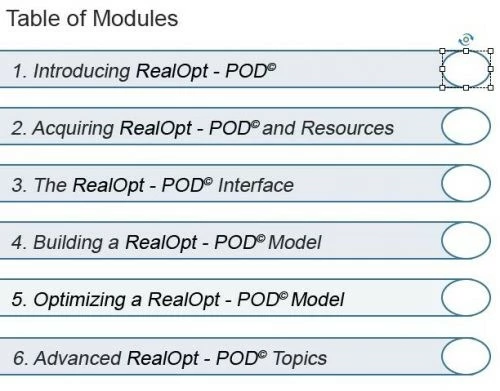
Starting with a Custom built TOC in the first image: This is the bare boned image of Slide 1 of the project
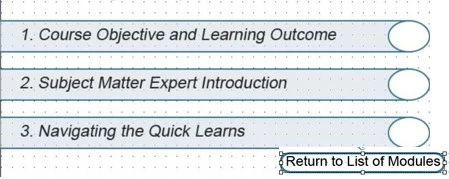
Once a user clicks on Module 1 they will be taken to that particular module's Topic List ( effectively another custom TOC) as seen below. The Return to List of Modules takes the user back the Table of Modules above
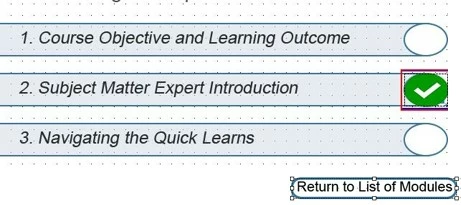
The links in the topic list coincide with 3 separate slides  3,4,5 for example which can be accessed in any order. The visited state upon visit to any of the slides will add a check mark using the inbuilt visited sate to the appropriate circle as seen on the lower  image. The Return to List of Modules button takes the user back to the Table of Modules
                        

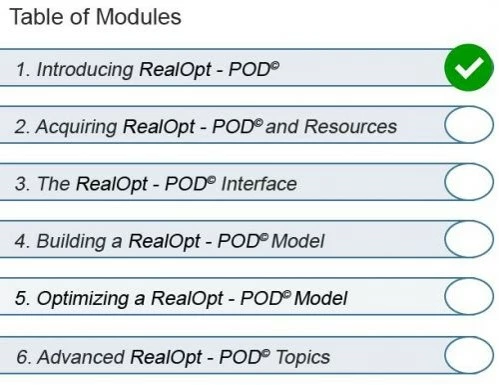
I need to add the conditionally based check mark to the Main Module contents page shown in the image blow .... Conditions for adding the check mark would be the view of Slides 3, 4, and 5 inclusively but not in sequence. Any sequence is possible in order to add the check mark to the Table of Modules.
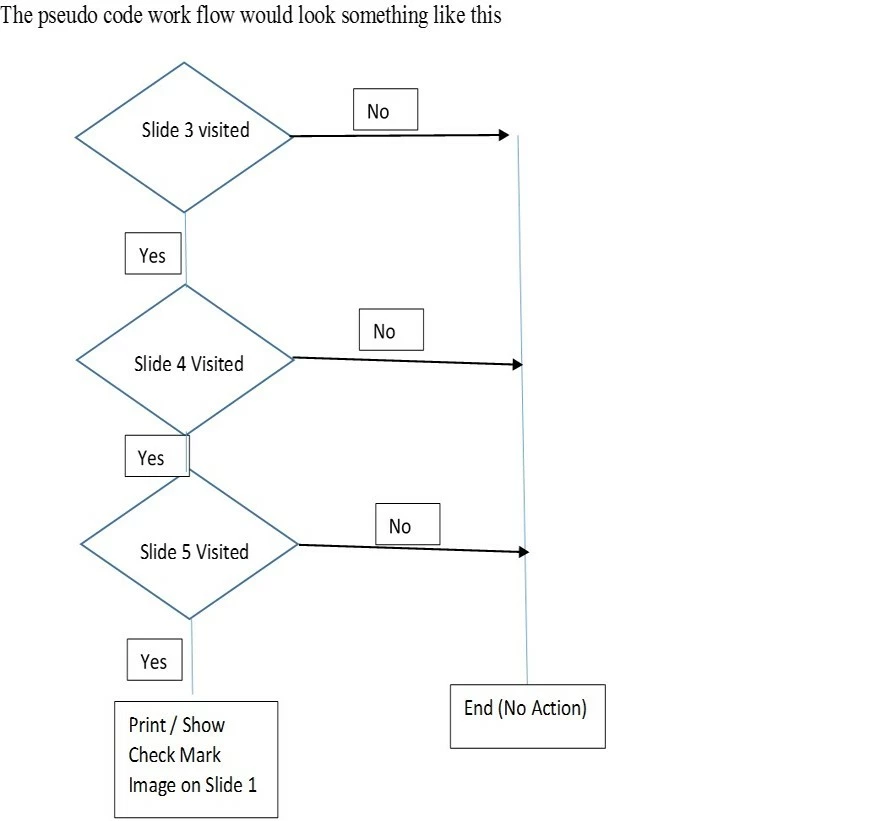
My initial thoughts are that there are some variables that exist that are not apparent within the script writing GUI used to create Advanced Actions . ..... Any thoughts on where / how to identify the variable (s) related to viewed slides would help me create either an Advanced Action or JS script to accomplish the goal.

Again, Open and Welcome to all suggestions... Much appreciated.

    This topic has been closed for replies.
    Correct answer Lilybiri

    Indeed that makes it bit more complicated. 

    Create one user variable for each slide, will label them v_1, v_2... ... They will be Booleans, start with a default value of 0, that will be changed to 1 with the On Enter action of each slide, or you can use the Success action of the buttons in the Lower Level TOC and a shared action:

         Assign v_1 with 1

         Jump to slide1

    The bolded, italic items will be the parameters.

    I will try to define a shared action, supposed that each module has 3 slides. That action will have to be triggered by the 'Return to List of Modules', but will have different parameters depending on the module the slides belong to.

    For the first module, which has the slides slides1, slide2 and slide3  (can be other numbers, just an example):

        IF v_1 is equal to 1  AND

            v_2 is equal to 1  AND

            v_3 is equal to 1

                  Change state of Bt_Module1 to VisitedMod

                 Jump to TOCMod

        ELSE

                   Jump to TOCMod

    Again parameters are bold and italic.  Make sure to check the option 'Retain state on revisit' for both TOC's.

    3 replies

    Inspiring
    June 26, 2018

    Change of state or show for the checkmark doesn't make much difference within each menu slide. I use a unique conditional action for each menu - there is no need to consolidate all decisions for all menus within the course.

    I work backwards from the lowest submenu to the highest - Using the following hierarchy as an example:

    Each menu branches to several other menus or individual slides.

    The easiest way to know if a slide has been viewed is to enter that slide. That is why I place the assign v_slideNumber at the slide level. The menu buttons can then be simple Jump to slide commands.

    Each menu On Enter evaluates which slides at the level immediately below it have been visited and makes checkmarks visible accordingly (either Show or Change State - I've used both and prefer to Change State. I also have another state for "in progress" so that learners know a topic has been started but is not yet complete) .

    If all slides below a menu level have been visited, the On Enter also assigns a v_levelComplete variable to 1. The menu above this level uses this variable to determine if a check should appear for a menu item.

    Another set of variables can be created for each topic - If the bottom set of slides for a topic is complete the topic variable is assigned = 1. The menu above can refer to this value instead of inspecting ALL pages of all lower levels.

    This can go on for many levels.

    Whether you use shared actions or write individual ones for each menu is up to you - since the number of decisions per level may be different (depending on the number of menu items in each menu), I prefer individual actions.

    Lilybiri
    Braniac
    June 26, 2018

    Sorry, you must have missed part of the explanation. There are only two menus. From each slide the user can return to the top level menu, which means since you use the On Enter action for that top level menu, that you have to check all variables, grouped by topic.

    THere is no intermediate level....

    Inspiring
    June 26, 2018

    I do this sort of thing frequently. You are correct that you need a variable for each page that you want to track.

    To use your example, I would

    1. Create variables v_slide3, v_slide4, v_slide5. Set the value of all variables to 0.

    2. On Enter for these slides (or on completion of a required click/exercise), assign the value of that slide's variable to 1.

    3. On Enter of the menu slide(s) will be conditional actions to test for a visited value (i.e. 1) for the variables. I create a condition tab for each menu item. In this example:

    IF v_slide3 ==1 AND v_slide4 == 1 AND v_slide5 == 1

    Show checkmark for menu item 1.

    Lots of menu items means lots of condition tabsin the On Enter advanced action, but that's OK. Using this method users can jump in and out of a course section but the menu item will only show complete (check mark) if all required pages have been viewed.

    Inspiring
    June 26, 2018

    Would you happen to have a screen shot of an Advanced Action conditional that I could use for reference ????? With theh understanding that some modifications to my project will need to be made

    Lilybiri
    Braniac
    June 26, 2018

    OK, now the workflow is understood. Visited state is used for the lower evel TOC. For the upper level of the TOC you need to create a custom state. They can have the same name for each module, will label it VisitedMod.

    One last thing to be clarified:: is the button  'Return to list of Modules' always available? Can the user return to the upper level TOC even when one of the slides in that module has not be visited?

    Maybe not necessary: do you plan to have something happen when all modules on the upper level TOC have the state 'VisitedMod'?

    Inspiring
    June 26, 2018

    Yes Lower level is inbuilt Visited State

    Yes the Return to List of Modules is always available and user can return to upper level TOC even though all slides are not visited..... This is the function that creates a little bit more "heavy" work on the advanced action as I see it.

    Nothing will happen when all upper level TOC have the Visited Mod state on all ..... nothing at all except they will be visible to the user.

    A little history on why this approach was decided on:

    This tutorial will serve as both an end to end training for inexperienced participants and a refresher for experienced participant who may only need to reference a particular topic for refresher purposes.

    Lilybiri
    LilybiriCorrect answer
    Braniac
    June 26, 2018

    Indeed that makes it bit more complicated. 

    Create one user variable for each slide, will label them v_1, v_2... ... They will be Booleans, start with a default value of 0, that will be changed to 1 with the On Enter action of each slide, or you can use the Success action of the buttons in the Lower Level TOC and a shared action:

         Assign v_1 with 1

         Jump to slide1

    The bolded, italic items will be the parameters.

    I will try to define a shared action, supposed that each module has 3 slides. That action will have to be triggered by the 'Return to List of Modules', but will have different parameters depending on the module the slides belong to.

    For the first module, which has the slides slides1, slide2 and slide3  (can be other numbers, just an example):

        IF v_1 is equal to 1  AND

            v_2 is equal to 1  AND

            v_3 is equal to 1

                  Change state of Bt_Module1 to VisitedMod

                 Jump to TOCMod

        ELSE

                   Jump to TOCMod

    Again parameters are bold and italic.  Make sure to check the option 'Retain state on revisit' for both TOC's.