Known Participant
May 12, 2021
Answered

bedingte erweiterte Aktionen mit mehr als 2 Status

  • May 12, 2021
  • 2 replies
  • 5122 views

Hallo,

ich habe ein Objekt mit 3 Status und eine bedingte erweiterte Aktion dazu, die jeden der 3 Status identifizierbar machen soll, weil nur einer der Status als "richtig" akzeptiert werden soll (mit jedem Klick sollen sich Status und Wert der Variable ändern, bei "Senden" soll die Variable überprüft werden und je nach Wert ein "richtig" oder "falsch" eingeblendet werden). Meine bisherigen Versuche sind leider gescheitert. Der aktuelle Stand:


Reiter 1:

IF [var] ist gleich [0]

THEN Status ändern von [Objekt] zu [Status 1] + zuweisen [var] mit [1]


Reiter 2:

IF [var] ist gleich [1]

THEN Status ändern von [Objekt] zu [Status 2] + zuweisen [var] mit [2]


Reiter 3:

IF [var] ist gleich [2]

THEN Status ändern von [Objekt] zu [Status 3] + zuweisen [var] mit [0]


Egal ob ich THEN leer lasse oder "Weiter" eingebe, ändert sich leider der Status und damit auch die Variable nicht.


Hat jemand eine Idee, wie ich das Problem löse?


Vielen Dank im Voraus!
    This topic has been closed for replies.
    Correct answer Stagprime2687219

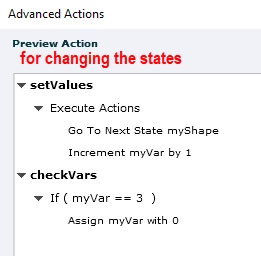
    This is the approach I would take here.


    1. Two variables - one for each object   (for example myVar  and myVar2)

    This action - when you click on your click box will go to the next state and increment your variable.

    The second part - checkVars - will make sure that the variable value cycles around like the object states do

    You will need two advanced actions - one for each object.

    It will be the same setup for both but the name of the shape (myShape or myShape2) will change as will the corresponding variable.


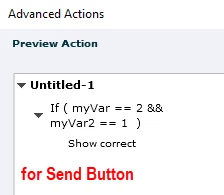
    2. On the send button you will then check your two variables based on the correct answer.


    Hopefully this makes some sense and is helpful.


    2 replies

    Stagprime2687219
    Legend
    May 12, 2021

    Just to be clear...


    Are you wanting the learner to click the object itself and have the state cycle through the three states and adjust a variable at the same time?

    Then the learner clicks a send button when the correct state (and therefore, variable) is displayed?

    Lilybiri
    Legend
    May 12, 2021

    @Stagprime2687219  Greg, I have asked already which event is triggering that action. However it has a similar logical bug as the user yesterday: each new decision is overriding the previous one. 

    You may take over,  I know enough German -  very close to my mother tongue -to try to guess what the OP means exactly with the terminology. No problem, can leave it to you. 

    Stagprime2687219
    Legend
    May 12, 2021

    We were typing at the same time apparently.

    I never expect that someone else back out of a conversation.

    You're welcome to share your thoughts.


    I don't know any German at all - was just going by the built-in translate option.

    I wanted to verify my understanding of those results.

    Lilybiri
    Legend
    May 12, 2021

    I understand German pretty well but I dare not to write in German. You can translate my answer using the Transate feature.


    It would help if you posted a screenshot of the Preview of that Advanced action (erweiterte Aktion). Use the Preview button, which is the first button in the top right control bar of the Advanced Actions dialog box:

    Which event do you use to trigger that action? Is it a button?

    I suspect that 'Reiter' is used here to point to the decisions in one action? In the screenshot above 'Untitled-1' is the name of the first decision. 

    If that is indeed the case, there is a logical bug in your advanced action. This is probably due to the fact that you ignore that all commands in an advanced action will be read and executed, top to bottom and from left to right. Result of your advanced action is that you'll get the start situation, because each later decision overrides the previous one

    You start with var == 0  and state 'Normal' of the multistate object. You action will do this:

    1. Decision 1: condition is correct, so var == 1 and state will be Status 1
    2. Decision 2: now var ==1 , condition is again correct, result: var == 2 and state changes to Status 2
    3. Decision 3: now var == 2, condition is again correct, result: var == 0 (start situation) and state changes to Status 3


    Result should be Status 3 always but I don't yet know which event is triggering this action? Is it the Success event of a button? 

    Explain what you want to do exactly, and I will try to give you a correct advanced action.