


Inspiring
December 15, 2015
Answered

Blank space around HTML Media

  • December 15, 2015
  • 1 reply
  • 2021 views

Captivate 8

When I add HTML 5 media to a project, it comes with a large area around it that is not in the original file (see attached).
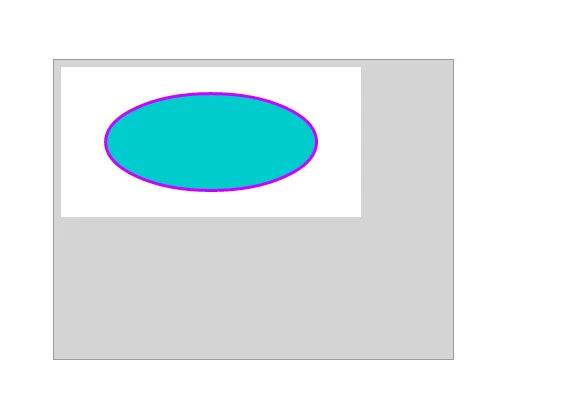
The grey area is added by Captivate.  The blue bit and the white around it is the original image (a button built in Flash, although Edge Animate does the same thing, other images and shapes do the same).

The grey box is 400x300 pixels.

How can I make it go away?  I only want the object, not all the spillover.  How can I trim it off?  It also appears to have a small grey border around the entire animation.  I have not found a setting for this.

Any thoughts?
    This topic has been closed for replies.
    Correct answer Jordster1

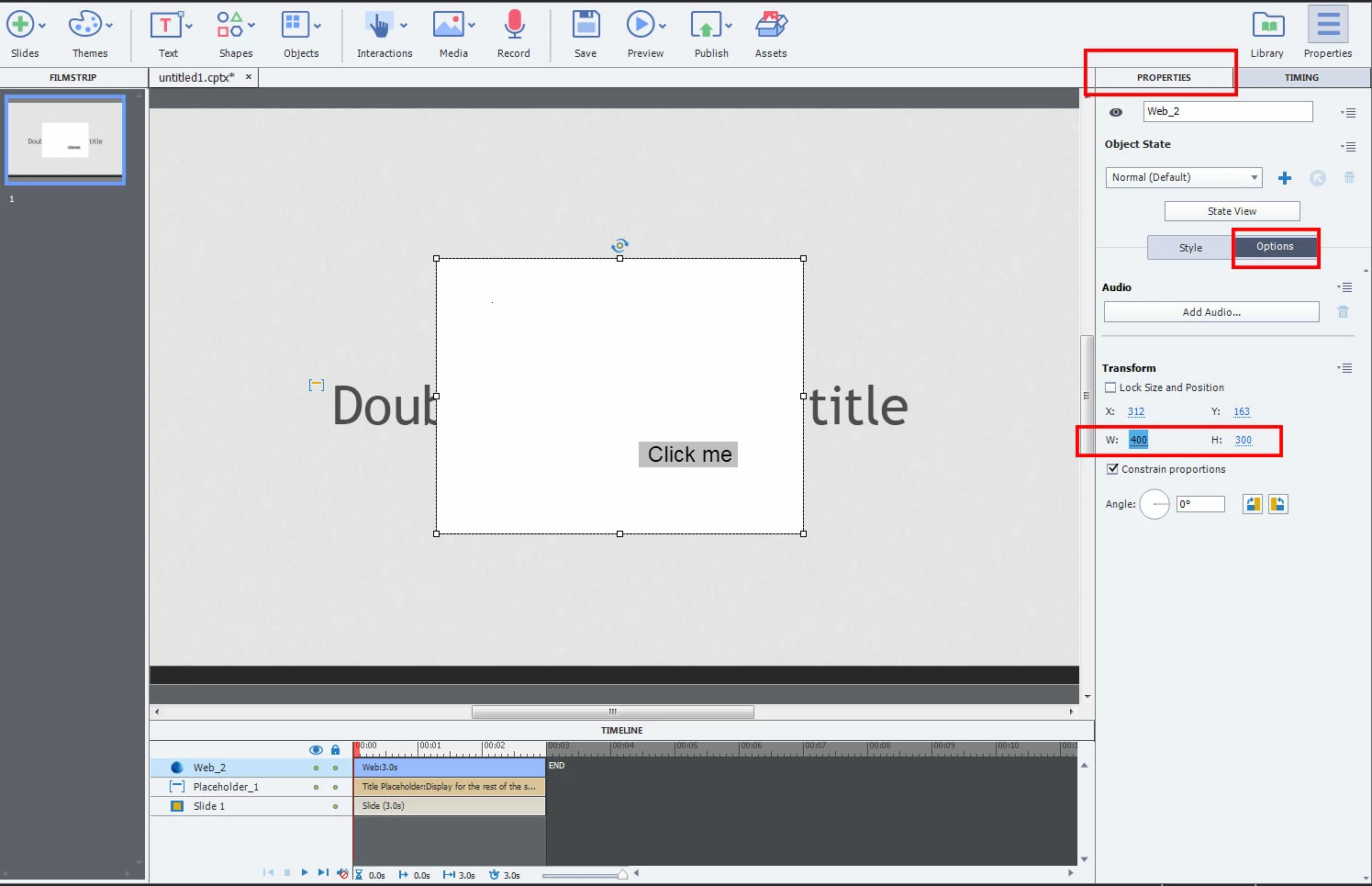
    400x300 is the default size for the imported media. If you select the media item and then click the Options tab in the Properties window, you'll find width and height fields that you can change. Just click inside them and set the width and height to the actual dimensions of your imported media. (Screencap below is from Cap 9 but its similar in Cap 8).

    To get rid of the border, select the Style tab next to Options and uncheck the box next to the Border option.

    -Jord

    1 reply

    Jordster1
    Jordster1Correct answer
    Participating Frequently
    December 15, 2015

    400x300 is the default size for the imported media. If you select the media item and then click the Options tab in the Properties window, you'll find width and height fields that you can change. Just click inside them and set the width and height to the actual dimensions of your imported media. (Screencap below is from Cap 9 but its similar in Cap 8).

    To get rid of the border, select the Style tab next to Options and uncheck the box next to the Border option.

    -Jord

    dcrouse10Author
    Inspiring
    December 15, 2015

    Curious.  It doesn't seem to work, it just scales the entire image.  That is until you mouseover it, whereupon it finally updates itself to the new size.  Yay!  Thank you.

    There is still the issue of the grey border around the image. Is there any way to get rid of that?  Or at least make it white?  Bottom and right side can be trimmed if you are careful, but the top and left side, not so much.

    Jordster1
    Participating Frequently
    December 15, 2015

    Flash produces an HTML file and a JS file.  I added the margin command to both with no effect.


    Sigh (@Captivate). Lookit this:

    Cap embeds the animation file into an iframe, and it's the body tag on that DOM that needs to get the margin 0 treatment. You can see here its been given a default margin of 8px, that's what's causing the grey border effect. To test the theory I did some live browser DOM editing, and...

    Voilà! No more margin.

    Unfortunately, Cap 8 doesn't seem to be using jQuery so getting ahold of the iframe body context in native Javascript is proving to be slippery. Essentially though we should be able to grab that context by executing Javascript in the onEnter of the Master slide and force the margin 0 into the iframe body. I'll keep tinkering with it and see if I can come up with the right script and I'll update the thread.

    Alternatively if there's an easier way to do this, say, somewhere in the settings from within Cap, that would be ideal. Maybe someone else will chime in on this particular windmill tilting we're trying here.

    [Edit 1] So Cap 8 is really being evil about this. I've tried putting the style inline on the html page that Flash writes...Cap strips it out. I tried putting it in the head and at the end after the body and inline on the body tag itself. No dice. My guess is that at the point that the zip gets imported Cap removes anything it considers extraneous? And its gone. Poof. Blowing my mind right now. So that internal iframe user agent style sheet has to be overwritten by Javascript after Cap is done processing the page. Wild.

    [Edit 2] Captivate 9 doesn't strip out the CSS added to the imported HTML page:

    However the iframe is still subject to the user agent stylesheet rules so if I hadn't put in the CSS rule of margin 0 we'd still see the grey margin:

    I'm gonna put this one to bed. If someone really needs me to work out the JS to force Cap 8 to play nice I'll give it another go otherwise my suggestion would be that if you really need that margin to go away, add the CSS rule to the animation HTML as shown and use Cap 9.

    -Jord