


New Participant
March 7, 2016
Question

Can you edit the web object iframe HTML produced by Captivate?

  • March 7, 2016
  • 2 replies
  • 3084 views

Hello Everyone,

Is there a way to edit the HTML code of the web object iframes produced by Captivate? We are using Vimeo video embeds inside our Captivate projects, which has been a great solution to our video needs until recently when Vimeo changed their coding and the FULLSCREEN button became disabled when the embeds were inside an iframe produced by other software (Captivate, in this case). Vimeo provided us with the following advice, as well as a screenshot of one of our published Captivate project's source code, which I've included:
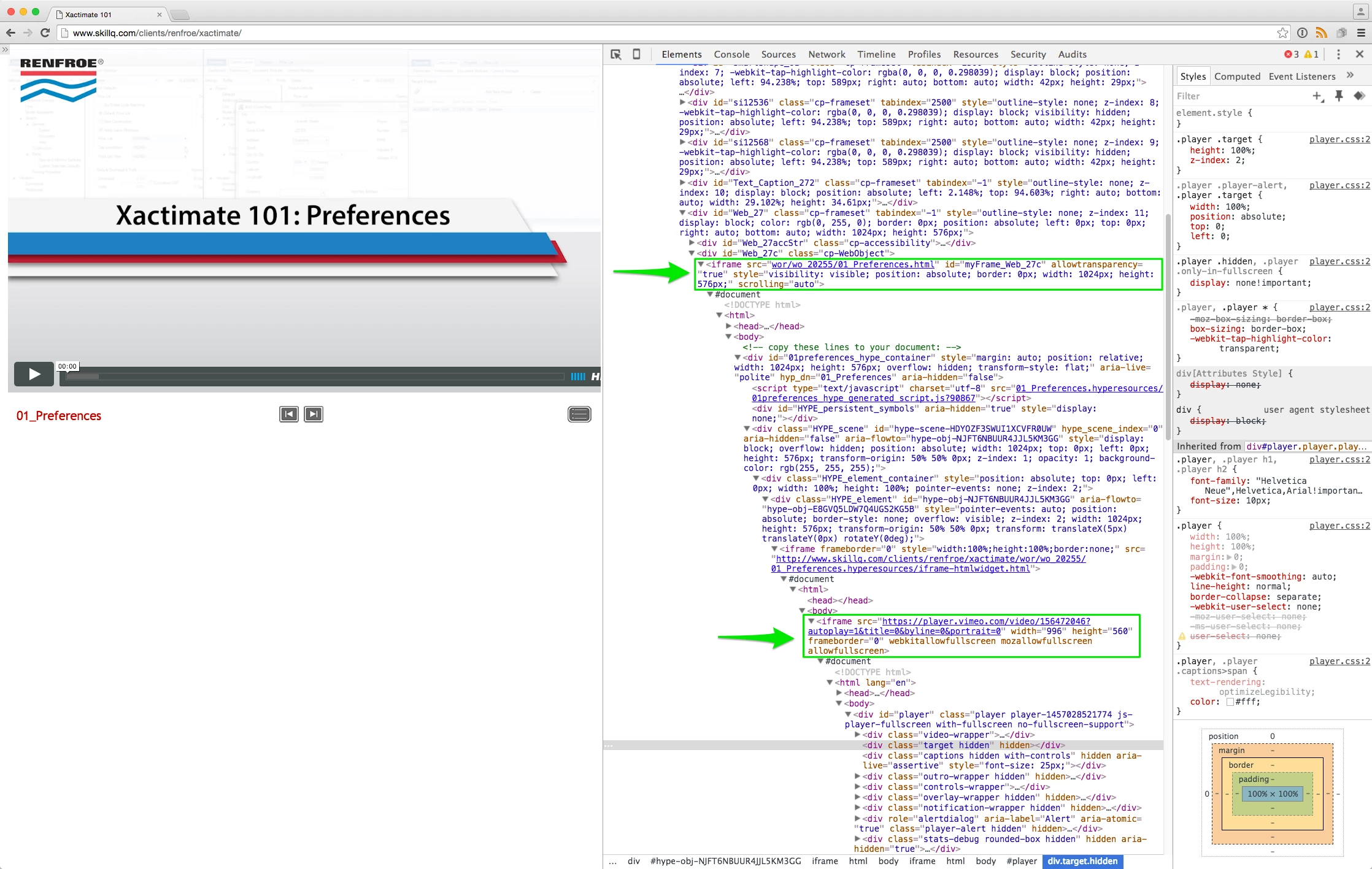
As you can see, the Vimeo player embed (indicated lower in that page’s code) is found within a second containing iframe (indicated higher in the page’s code).

When this is the case, the containing iframe must also include the following fullscreen attributes: “mozallowfullscreen,” “webkitallowfullscreen,” and “allowfullscreen.” Please add these three attributes to the containing iframe, and let me know if you still do not see the fullscreen option.

We use a two-step process that involved placing the Vimeo embed inside a Tumult Hype-produced OAM file for use in Captivate, but we have found a way to get fullscreen to work in the Hype file. We just need a way to add the fullscreen HTML code ("mozallowfullscreen webkitallowfullscreen allowfullscreen") to the iframe produced by Captivate, as pointed out by the top green arrow in the screenshot. Where can this code be found and can we edit it manually to include the fullscreen attributes?

Thank you very much for your time and attention!

SkillQ Team

This topic has been closed for replies.

2 replies

adobetempo
New Participant
June 21, 2016

En efecto como indica el usuario jamesi32884181​ al agregar los valores webkitallowfullscreen:"true",mozallowfullscreen:"true",allowfullscreen:"true", se soluciona el inconveniente.

Para ampliar un poco el tema, esto se debe a que captivate crea los objetos "iframe" en tiempo de ejecucion y a nivel de codigo los maneja con el identificador Myframe_ por lo tanto ubicando ese objeto dentro del archivo CPM.JS y agregandole esos valores que controlan la reproduccion en pantalla completa, cada que dentro del proyecto en su version web, se cree un iframe, este tomara los atributos que se le han asignado.

Indeed indicates the user jamesi32884181 by adding the values webkitallowfullscreen: true, mozallowfullscreen: "true", allowfullscreen: "true", the problem is solved.

To broaden the issue a little, because that captivate creates the "iframe" objects at run time and at the level of code handles them with the Myframe_ identifier so placing that object within the file CPM. JS and adding those values that control the playback on screen full, each of which within the web version of project, will create an iframe, this take the attributes that have been assigned to it.

TLCMediaDesign
Inspiring
March 7, 2016

The iframe is created at runtime within the CPM.js

You can get a reference to the iframe with JavaScript.

var getIframes = document.getElementsByTagName( 'iframe' );

then you an access each within a loop based on the length of getIframes

i.e. getIframes[0] is the first iframe

New Participant
March 7, 2016

Thank you very much for your reply.

The iframe being created at runtime makes more sense. Unfortunately, I have quite little experience with Javascript. Can you provide more set-by-step guidance on how and where I can implement your js code in the CPM.js file and use that to find and edit the iframe HTML I'm looking for? I know this is pretty basic stuff for experienced coders, but the process is a bit of a puzzle for me.

Thanks again!

New Participant
July 18, 2017

This worked for me.

1. Open the CPM.js file in a text editor.

2. Hit Crtl+F and search for this in the file:  allowtransparency:"true",

3. Add the following after the comma:  webkitallowfullscreen:"true",mozallowfullscreen:"true",allowfullscreen:"true",

4. save the file.

Maybe a bit late, but I found this thread looking for a way to modify captivate so I wouldn't have to do this for every project I produce.


Thanks James, this resolved the issue for me.