


Inspiring
March 9, 2021
Answered

Cannot open any CPTX files. Captivate 2019

  • March 9, 2021
  • 7 replies
  • 11001 views

Upon trying to open any CPTX file I was able to open with no issues, I can no longer open any files. Prior to uninstalling and reinstalling the Captivate, I was not able to open a blank project - I can now open a blank project. 


Please see error below that I have already seen as I know it is not helpful given this has been brought up in prior posts and is displayed for many different issues. I have plenty of space on my computer, I save files to my computer that are also loaded and pulled down from a server. I also save files to and from SharePoint. All of what I do has never been an issue prior to today. 


I have cleared my cache folder/files, I was on version 11.5.5 and ran the update. Since this update, I am still having the same issues and unable to open or work with any CPTX files. 


Any help would be appreciated. I have been on hold for an hour on the corporate support line. I will say, I have typically gotten through relatively quickly in the past and the assistance was always successful.   
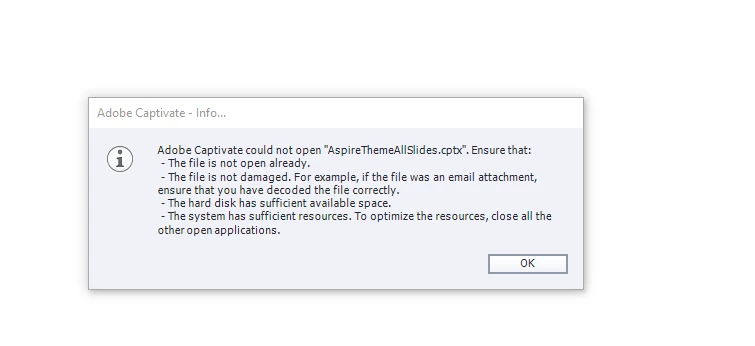
Correct answer defaultyxj9yehtker6

I am trying to open a cptx file with Captivate. I get the same error code as the original poster. I am using version 11.0.1.266.


Check for updates and ensure you are signed into your adobe account to receive updates from Adobe from when this issue originally ocurred. Also, ensure you have closed everything and restarted your computer. 


As a last resort, call Adobe support to ensure there may not be another larger system error. 

7 replies

Known Participant
November 25, 2022

Ok so apparently to get 11.8 ( which is pretty difficult to figure out that you need in the first place - see error message above + no information that this exists from check for updates button in the software ) I have to uninstall Captivate then download the trial ( preferrably in incognito mode ) and reinstall. Pretty topsy turvy if you ask me

Lilybiri
Brainiac
November 25, 2022

Feeling sorry again, although I just tried ot help you. Beware: from several thread on this forum I learned that this version is rather buggy. My decision was to keep with the more stable 11.5.5.553. Hope you are lucky!

Known Participant
November 25, 2022

Thanks for the help Lilybiri, definitely didn't want to make you feel sorry so my apologies for that. It's the Adobe team that I'm venting at if anyone are listening. Not only do we have to deal with this nutso way of getting an update but to not be able to keep the old version at the same time could put users in a precarious situation. Luckily I have been using 11.8 on windows 11 for a while without knowing and have had no issues. That said we're not really using all that many actual Captivate tools in our Captivate productions - it's mostly Javascript based

Known Participant
November 25, 2022

I'm getting this same error on my Windows 10 machine for some files. This has not happened before. Know the files with problems have been saved on a mac. On my Windows 11 machine the very same files open fine. Hope the team will adress this asap.

Known Participant
November 25, 2022

My Captivate version is 11.5.5 - I have plenty of  harddrive space and memory

RodWard
Community Expert
November 25, 2022

Check with the Mac user which specific version of Captivate 2019 they are using.  If you cannot open files they have edited, and you are on 11.5.5, then I would be willing to bet your Mac user is on Captivate 11.8.  The Mac user would be able to open your files, because Captivte is BACKWARD compatible.  But you cannot open their files because Captivate is not FORWARD compatible.

Participating Frequently
April 20, 2021

I'm still experiencing this issue. I've been trying to load a cptx file since Friday, the 16th and I get the same error code. I know I also have plenty of space on my computer. 

Lilybiri
Brainiac
April 20, 2021

Wrong information given by me, my apologies. 

Are you on Windows? The error you get appears for many different kind of issues.  It looks like this file is an edited Aspire Quick Start Project. Can you open the original QSP? 


Participating Frequently
April 20, 2021

This conversation is just over one month old, not 10 years old.

Dr. Pooja Jaisingh
Adobe Employee
Adobe Employee
March 12, 2021

Hi, please follow this post for updates on file operation disruptions experienced on 12th March: https://elearning.adobe.com/2021/03/having-trouble-saving-adobe-captivate-files-on-microsoft-windows/

Dr. Pooja Jaisingh
Adobe Employee
Adobe Employee
March 12, 2021

Hi all,


It has come to our notice that some of the users are seeing the issue appearing again. The team is investigating this on top priority. Meanwhile, please try using Captivate in an offline mode.


Please watch this space for more updates.

Inspiring
March 15, 2021

I can confirm this with some of my peers as early as this past weekend. Still actively having issues yet it is still intermittent and is not affecting all users. 


Dr. Pooja Jaisingh
Adobe Employee
Adobe Employee
March 11, 2021

Hi, I hope the file open and save issues you were facing are fixed now. If not, please let us know. https://elearning.adobe.com/2021/03/attention-adobe-captivate-customers-who-experienced-problems-with-file-open-and-or-save-issues-on-march-9th-2021/

New Participant
March 12, 2021

This issue happened again this morning, for several people on my team. Fatal Exception error when saving while connected to WiFi. No issues while saving off of WiFi.

Participating Frequently
March 9, 2021

I have the exactly same issue, did the same steps, unable to open any project except for a new one. Please help

Inspiring
March 9, 2021
I FINALLY got through to Adobe. The product team is actively working on this as this is an entire system wide issue. Adobe plans to have this issue resolved within 24hours. I asked for some sort of notification, alert or message and that is not something they do.
 
I would highly suggest if Captivate is currently working for you to not close it and save your work right now and often!
Participating Frequently
March 9, 2021

I raised a ticket with Customer support and they told me the same, thank you for the update.