


Participating Frequently
October 30, 2018
Question

Captivate 10 Display Correct Answers When Reviewing

  • October 30, 2018
  • 2 replies
  • 344 views

Good afternoon,

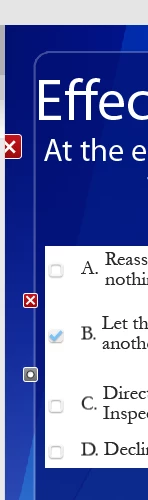
I am have several quiz questions in a Captivate 10 (2017) course. On some of the questions, when I go back and review the correct answer is displayed as shown below. However, it's not consistent throughout the course. Sometimes it shows up and sometimes it doesn't. Anyone know what setting that is ties to? I've turned a few things on and off in Quiz Settings, but haven't been able to pinpoint it and the quiz questions are all set up the same.
This topic has been closed for replies.

2 replies

RodWard
Community Expert
October 30, 2018

the Review Quiz functionality is only for normal quiz question slides.It does not function for other interactive components even thought they may be allocated a score that reports to the quiz.

Is it possible some of your quiz components might NOT actually be quiz question slides?  Are some of your quiz slides actually knowledge check slides?  Are you expecting Drag and Drop slides to be included in the quiz review?

Lilybiri
Brainiac
October 30, 2018

If you allow Review in the Quiz Preferences, that should work. You need ot use the Review button on the score slide. Did you delete any embedded object (has no individual timeline) on the score slide or on the quiz slides?

Participating Frequently
October 30, 2018

I do have the Review button on the score slide. We didn't delete any embedded objects, but the quiz is optional and the completion criteria is based on slide views and not whether or not the quiz is passed. Maybe that has something to do with it? Also, the client wants the score slide hidden. I did "un-hide" it and it didn't seem to have an affect either.

Lilybiri
Brainiac
October 30, 2018

The behavior of the Review is not linked with the Reporting setup.

To Review, it is necessary to visit the score slide and click the Review button. For Retake I could offer a workaround, but hav none for Review.