


New Participant
March 16, 2011
Answered

Captivate 5: Slides Will Not Play Automatically

  • March 16, 2011
  • 1 reply
  • 5876 views

I'm struggling with an issue with Captivate 5 (just starting to use it, actually still a trial version but purchasing full in a couple of weeks) that I'm hoping someone can help me with. I have a 32 slide presentation with audio (imported per slide), and with some animation and highlight boxes on some slides. The animations and highlight boxes are timed with the audio. When I preview it or publish it as a pdf, I notice that it does not automatically play the slides. The audio begins automatically, but you have to push the play button to get the highlight boxes/animation timing to start. So if you push the play button 5 seconds after the audio starts on a slide, then the highlight boxes and animations won't match up (they would be 5 seconds behind). Also, the slides won't auto advance until you push the play button (and the timing on the slide runs to the end).

I figured it was something in terms of not having it autoplay, but I have it set on autoplay. I even played with having the preloader down to 0 up to 100 and pretty much everywhere in between. Also I've played with each slide's settings to see if it was something in terms of the slide action on exit. I've set it to continue, and even set it to no action (where I had to click the next button to advance), but again, nothing is helping.

Also, in case this is relevant, I have a next and back button each screen. On the first screen I have a text entry box (I pull the variable into another screen), and the slide lengths are set based on the audio (a few seconds longer).

What can I do to resolve this? Any help would be GREATLY appreciated!
    This topic has been closed for replies.
    Correct answer Lilybiri

    Hello and welcome to the forum,

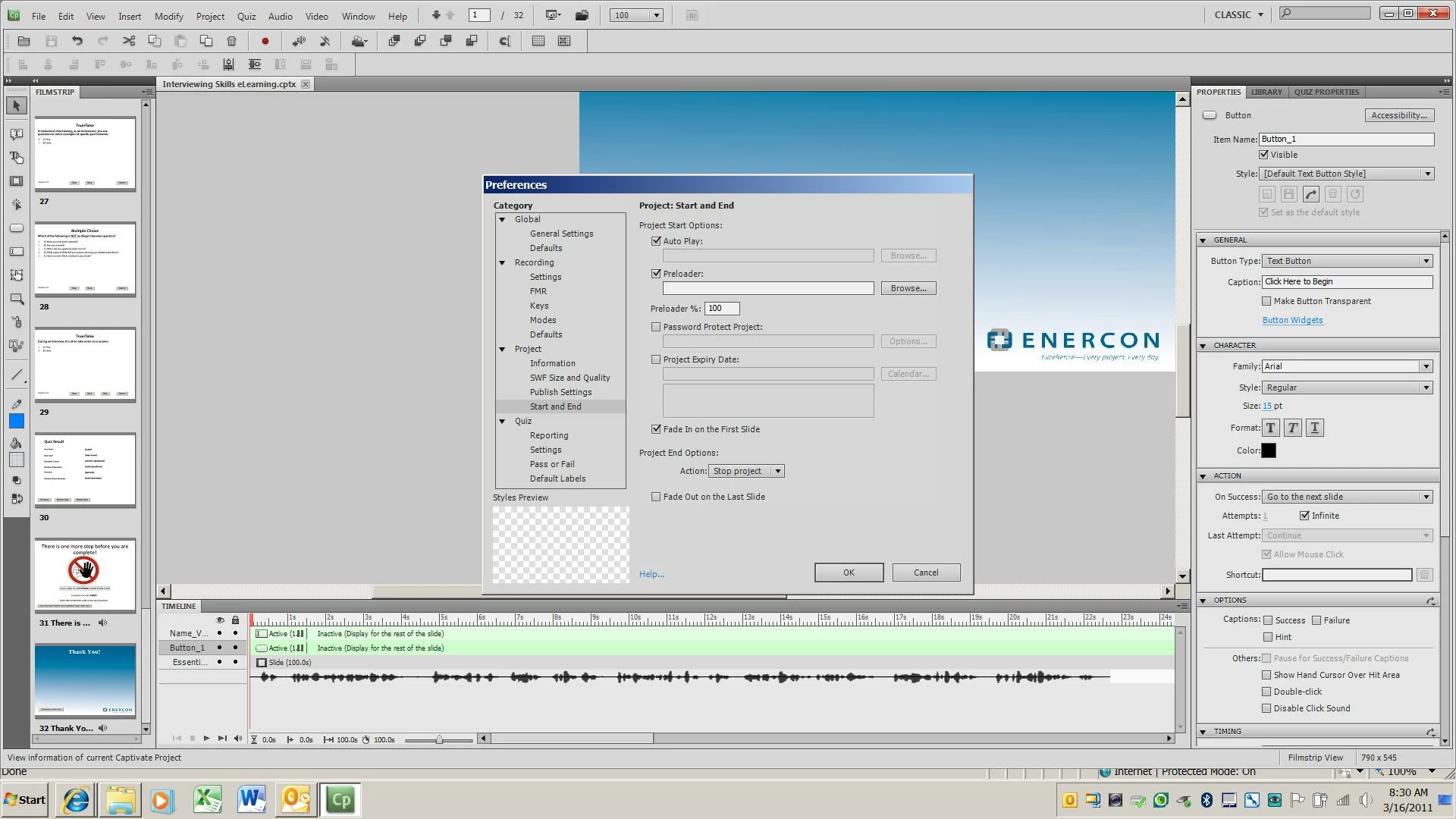
    Is this the Timeline of the first slide? I do not see all the objects, because you talk about a Text Entry Box which is not visible. What I do see is that you have a fade in on the first slide and that the 2 buttons both pause the slide at about 1.5 sec after the start. The slide itself seems to be a lot longer than the audio, contrary to what you told in your question, or did you put an object much later? In that case the issue is with the two buttons that pause before that object. Could you post a screenshot of the complete timeline of the first slide, perhaps what you are seeing is just linked with that?

    Lilybiri

    1 reply

    Lilybiri
    LilybiriCorrect answer
    Brainiac
    March 16, 2011

    Hello and welcome to the forum,

    Is this the Timeline of the first slide? I do not see all the objects, because you talk about a Text Entry Box which is not visible. What I do see is that you have a fade in on the first slide and that the 2 buttons both pause the slide at about 1.5 sec after the start. The slide itself seems to be a lot longer than the audio, contrary to what you told in your question, or did you put an object much later? In that case the issue is with the two buttons that pause before that object. Could you post a screenshot of the complete timeline of the first slide, perhaps what you are seeing is just linked with that?

    Lilybiri

    New Participant
    March 16, 2011

    You are awesome Lilybiri!!! It was the pause on the buttons that was causing the issue. I have been struggling with that for the past couple of days...it was driving me crazy! Thanks a bunch!!!

    Lilybiri
    Brainiac
    March 16, 2011

    You're welcome. Glad it was not difficult to solve.

    Lilybiri