Participant
February 2, 2014
Question

Captivate 6 Help me Lock the Progress Bar in the Playbar

  • February 2, 2014
  • 2 replies
  • 1452 views

I am using Captivate 6.  I need to lock the progress bar in the playbar. I have used the code below.  It works to disable the scrubber, but it puts this green button in the middle of the screen as in the picture shows below.  I would appreicate any help someone can give me.
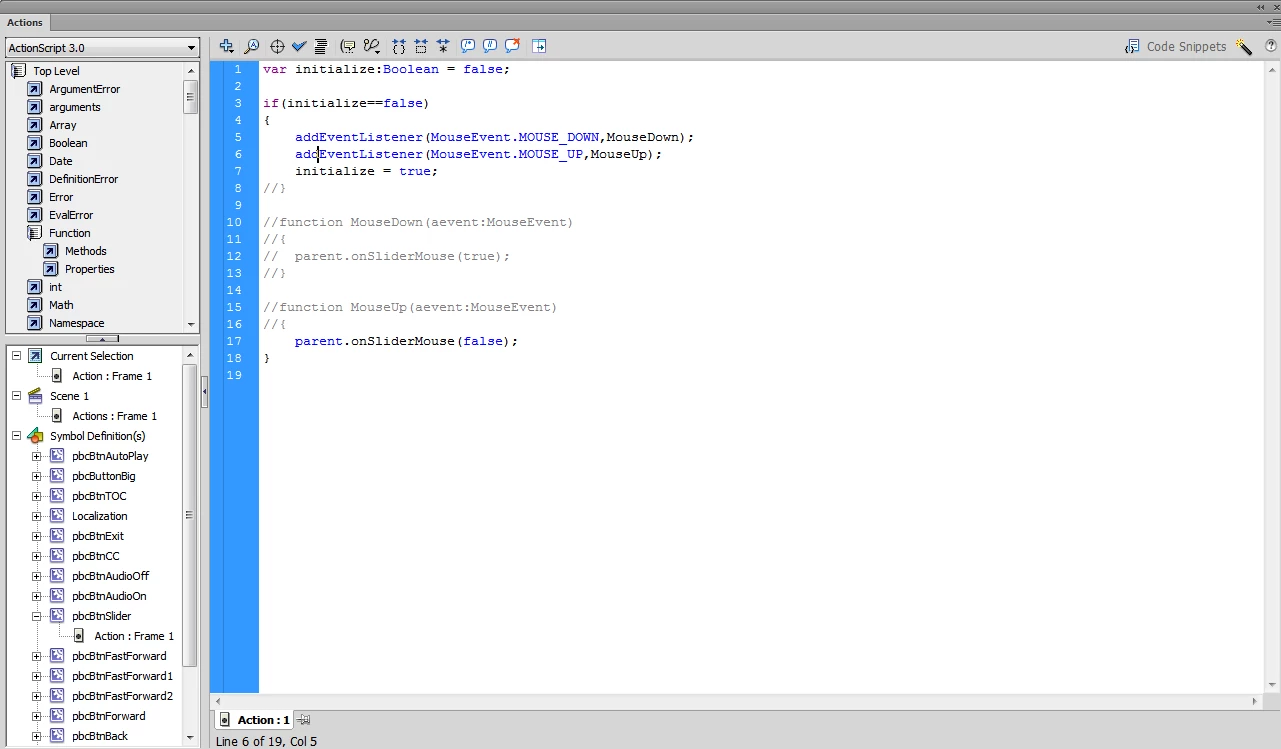
This topic has been closed for replies.

2 replies

sapphiregraphics1
Known Participant
February 6, 2014

Wouldn't it just be easier to remove the progress bar? Project>Skin Editor

You can also hide/show the playbar with Advanced Actions (Assign -> cpCmndShowPlaybar with 0 or 1 to hide/show)

There are also instructions to disable it here: http://forums.adobe.com/thread/872206

TLCMediaDesign
Inspiring
February 6, 2014

This is one of the most common features in eLearning courses. Adobe really should just give us an action to do this. They supply you with all of the controls, but no way to control them. Instructional Designers put it in storyboards all the time to disable navigation. Hiding the whole playbar is not really what most designers want, it's a work-around. Usefull buttons (CC, TOC, Exit, Back) dissapear when you hide the playbar.

Captiv8r
Legend
February 6, 2014

Hi there

Perhaps it's one of the most common features YOU might want to use in eLearning courses. But I would counter that by saying that if that were really the case, someone would have added it a while back. Or, we would have seen more outcry about it. No?

I mean, Captivate today is at version 7. And that really means it's at logical version 12. There is a virtual army of eLearning developers that visit here daily. I cannot say I've ever heard others complain about this missing ability.

Certainly you (and others) may ask for this feature to be added to a future release. You do that by submitting a Wish Form using the link below:

http://www.adobe.com/go/wish

Cheers... Rick

TLCMediaDesign
Inspiring
February 3, 2014

Not really sure how your even able to compile that. You are referencing functions that don't exist in the event listeners. Why don't you just comment out the event listeners. For the AutoPlay button, ou'll need to find the reference to autoPlay_mc and get rid of the code to display it.