hyperlinks in captivate6
Known Participant
May 15, 2017
Answered

Captivate 9 Branching Quiz

  • May 15, 2017
  • 3 replies
  • 1945 views

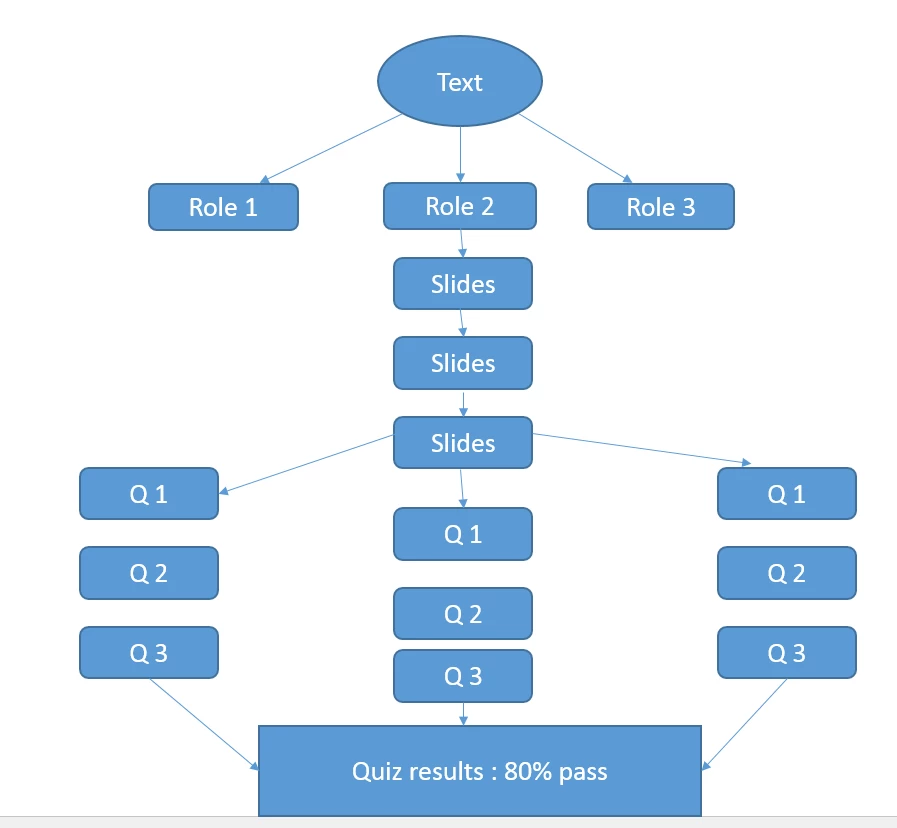
I have branching quiz (below picture). I have three roles, user will pick the role and navigate to his/her quiz and finally gets the result. the course should show the completed status scoring 80%. 1 quiz is enough to complete the course.

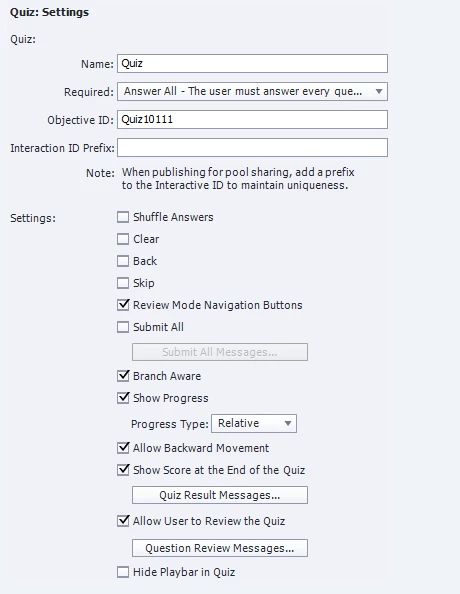
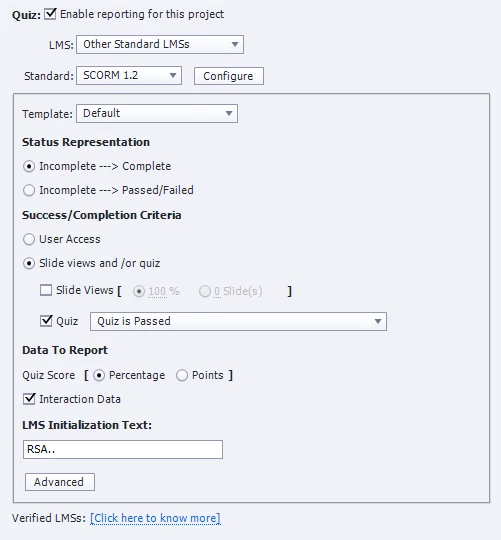
I have to publish the course in HTML5 and without any flash content.  the quiz settings are placed as screenshots(pasted below).

While testing I have observed that If I failed and attempted it again. I am not getting the passed message even I have answered all the questions correctly. Sometimes the first attempt also showing the same result.

Are there any variables to be set  to zero to re-attempt the test?

I have tested the course in SCORM cloud and CSOD also, which results the same.

I am using Captivate 9.0.2.437. please can any one help me?
This topic has been closed for replies.
Correct answer Lilybiri

Sure, that may be the cause. Never copy/paste quiz slides from an older version, that work flow caused already many problems in former versions as well. Could you try to recreate a small project with quiz slides created from scratch in this version?

Copy/paste meant that you were using the old theme. Themes have all master slides, and the quizzing master slides are an essential part of them, because they have inbuilt objects and functionality. Those have been changing a lot in between versions. You could try to reset the master slide on those slides, but not sure it will help.

I just blogged about the new setup of quizzing master slides for responsive projects in CP2017, I would never dare to copy/paste those slides from version 9.

3 replies

hyperlinks in captivate6
Known Participant
May 30, 2017

I didn't delete any quiz objects. I have copied the quiz slides from older version. Is this the cause for the problem.

Lilybiri
LilybiriCorrect answer
Legend
May 30, 2017

Sure, that may be the cause. Never copy/paste quiz slides from an older version, that work flow caused already many problems in former versions as well. Could you try to recreate a small project with quiz slides created from scratch in this version?

Copy/paste meant that you were using the old theme. Themes have all master slides, and the quizzing master slides are an essential part of them, because they have inbuilt objects and functionality. Those have been changing a lot in between versions. You could try to reset the master slide on those slides, but not sure it will help.

I just blogged about the new setup of quizzing master slides for responsive projects in CP2017, I would never dare to copy/paste those slides from version 9.

hyperlinks in captivate6
Known Participant
May 30, 2017

Thank you Lilybiri,

This might be cause. I will recreate the quiz and let you know the result.

hyperlinks in captivate6
Known Participant
May 28, 2017

Yes I'm using captivate 9.0.2.437.

No. I'm not taking the other branch in the same session. Only retakes quiz if I fails the test

Lilybiri
Legend
May 28, 2017

Still confused: same session, but you take another branch on Retake?

Lilybiri
Legend
May 15, 2017

I would not choose the option 'User needs to answer all' as Required. If you don't keep the Skip button (as is the case) and Hide the Playbar in the Quiz (is not the case in your settings), the user has to answer each question. Sometimes those strict requirements cause issues.

You cannot change the quizzing system variables, they are read only:

Using Quizzing System Variables - Captivate blog

They are automatically reset when the user clicks on the Retake button on the score slide, if you provide multiple attempts on Quiz level. Is that the case? Did you keep all the embedded objects on the score slide? I see that you allow Review. In that case it is good practice to drag the Retake button under the Review button on the score slide.

hyperlinks in captivate6
Known Participant
May 16, 2017

Thanks for the reply.

I have enabled 'retake quiz' and and want to jump to navigation slide(if fails). I want reset + jump to navigation.

I have to set the completion criteria as 80%. user is taking only one quiz. how to set that to 80% over total points. I have 8,10,9 questions in each route.

Right now, only first route is working for me in HTML5 output and CSOD LMS. locally it is working fine.

Lilybiri
Legend
May 28, 2017

Thanks for you help so far.

I have recreated the course again(thought the file is corrupted).

Now I have encountered a new problem, in the results slide the score and percentage is showing NaN(not a number) most of the times.

I have tracked the quiz correct answers using cpQuizInfoTotalCorrectAnswers(created a smartshape and insert this variable to print the value) to find the problem. However I didn't find.

I am testing the course locally using IE10(It is not working in LMS as well).


Insert the system variable cpQuizInfoPointsscored and cpQuizInfoLastSlidePointScored in a text container on the first question slide, time that text for the rest of the project, always on top. Does the value of those variables change when you are taking the quiz. Be sure to launch the proper file: index.html